
How to make a digital Christmas card: a template, an e-card service or AI, with your own photo and your exact words
The blubiu team · Published 2026-11-19
To make a digital Christmas card, pick the way that fits how you will send it. A template editor such as Adobe Express or Canva lets you place every element yourself and export the card as a PDF, JPG or PNG; an e-card service such as Paperless Post sends it for you by email, text or link and can schedule it for Christmas Day; an AI card generator designs the whole front for you from one greeting, one sign-off and, if you like, a photo. We tested the AI way on blubiu: every one of 13 cards spelled the greeting and sign-off exactly, including a 91-character greeting, Spanish accents and Chinese, and the two cards we timed took 27 seconds without a photo and 40 seconds with a family photo, which went onto the card unchanged. A card can then be animated into a 5-second clip in 76 to 122 seconds. AI prints only those two lines of text and cannot move elements around afterwards, so for an inside message, a logo or precise layout, use a template editor.
Key takeaways
- Template editors give you full control: Adobe Express is free to start and exports cards as PDF, JPG or PNG.
- E-card services handle the sending: Paperless Post sends by email, text or link and can schedule the card for Christmas Day.
- AI designs the whole front from two lines of text: 13 of 13 test cards spelled them exactly; the timed ones took 27 and 40 seconds.
- A photo stays a photo: the family photo went onto the card without the people being redrawn.
- Animated cards are a second step: a 5-second clip took 76 to 122 seconds, and the lettering held still.
What a digital Christmas card needs
A digital Christmas card needs a front picture, a greeting spelled right and a sign-off, in a shape that fits where it will be seen: a phone screen, an email or a print.
Keep fixed
- The greeting and the names, letter for letter
- Faces in your photo, if you use one
- A shape that fits the screen: vertical for phones, wide for email
Free to change
- The style: classic, watercolor, cartoon, minimal, vintage or funny
- Whether it moves: a still card or a 5-second animated one
3 ways to make a digital Christmas card, compared
Use a template editor for full control, an e-card service when you want it sent for you, and an AI card generator when you want a finished design in under a minute.
| Way | You do | Sending | Weak spot |
|---|---|---|---|
| Template editor: Adobe Express, Canva | Pick a template, edit text, photos and colors | Adobe Express: export as PDF, JPG or PNG; prints in the US, UK, Australia and Canada | Templates look like templates unless you rework them |
| E-card service: Paperless Post | Pick a free or paid card, add your words and photos | Email, text (US numbers) or a shareable link; can schedule for Christmas Day | Its designs, its delivery: the card lives on its service |
| AI card generator: blubiu | Type a greeting and sign-off, pick a style, add a photo if you like | You save the image and share it yourself | Only two lines of text; no layout editing afterwards |
How to make a digital Christmas card with AI, step by step
Type the greeting and the sign-off, pick a style and a shape, and generate: the card comes back as one finished front at 2K.
- Open the AI Christmas card generator. Type the greeting, the big line on the card, and the sign-off, such as "Love, the Parkers".
- Pick a style: classic, watercolor, cartoon, minimal, vintage or funny.
- Pick the shape for where it will be seen: portrait (1536×2048), landscape (2048×1536), square (2048×2048) or phone story (1152×2048).
- Optionally add a photo, or describe the picture in Notes, such as "a corgi in a red scarf sitting in the snow".
- Generate, then read every letter of the result before you send it.
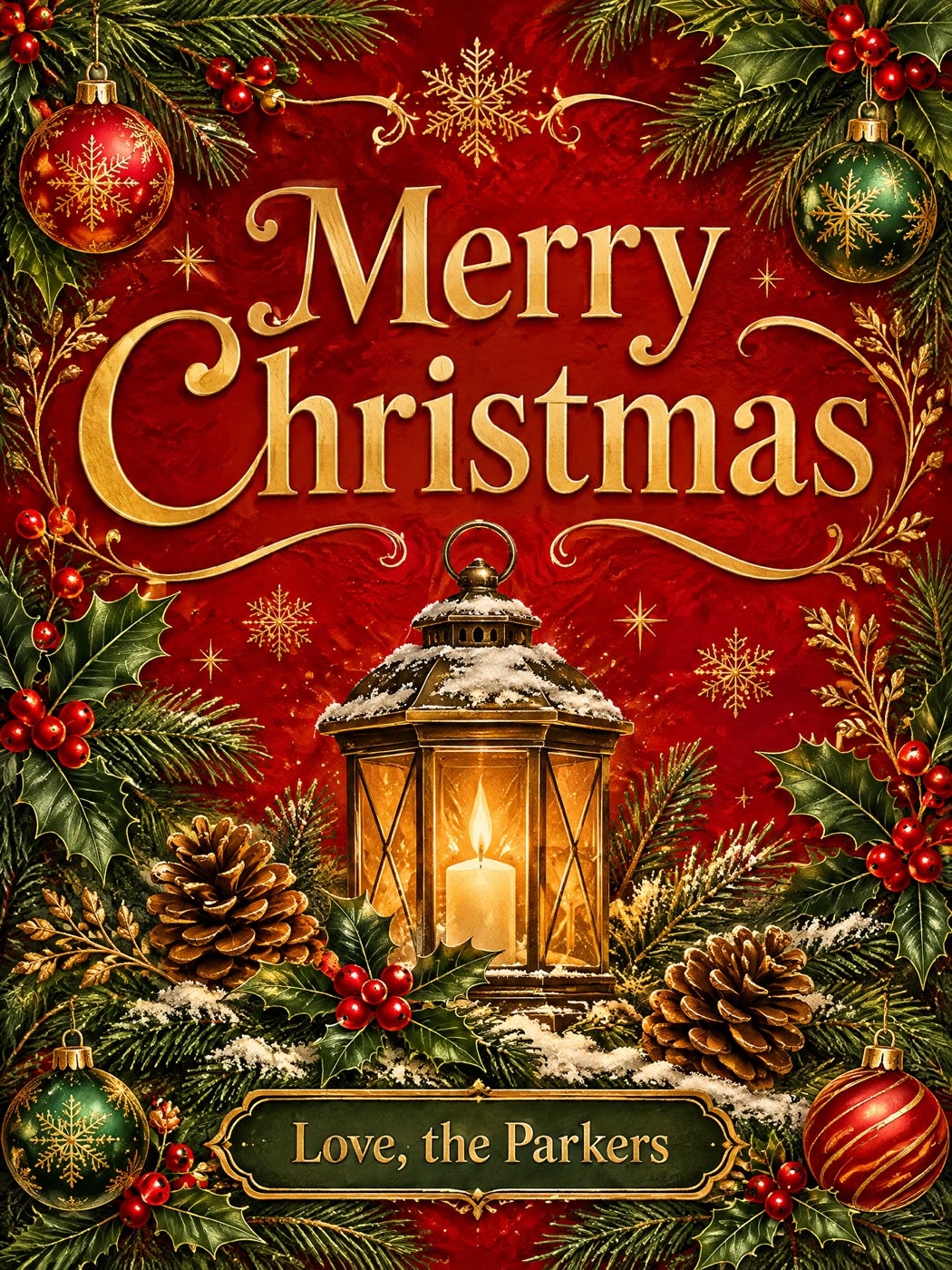
Result: The classic red-and-gold card with "Merry Christmas" and "Love, the Parkers" took 27 seconds; both lines were spelled exactly.
Drift and limits: The AI draws only the front of the card: no inside page, no back, no envelope, and nothing besides the two lines you typed.
How to make a photo Christmas card
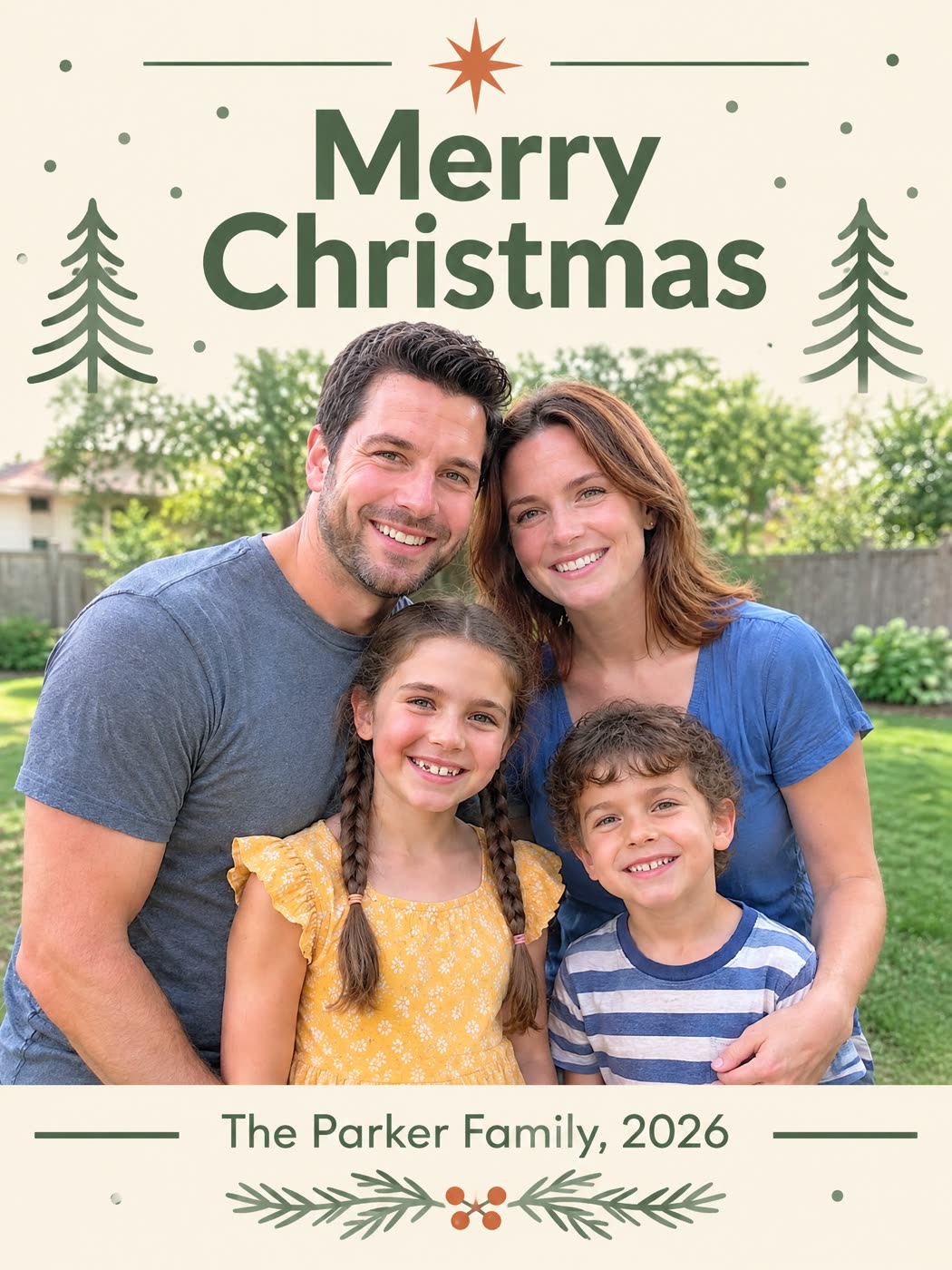
Add your photo in the Photo slot: it becomes the main picture of the card, and the people in it are not redrawn.
Result: Minimal style with a backyard family photo: 40 seconds. The photo sat in the middle unchanged, with "Merry Christmas" above and "The Parker Family, 2026" below, both spelled exactly.
Drift and limits: In our funny-style test with the same photo, the card added antler decorations around the family. If you want your family in Christmas clothes first, make a Christmas photo on the AI Christmas photo generator and use that.
How to make an animated Christmas card
Make the still card first, then press Animate this card: it becomes a 5-second clip with falling snow or flickering lights, and the lettering stays put.
Result: Three animated cards took 76, 85 and 122 seconds at 480P. We checked frames from the start, middle and end of each: the greeting and the sign-off did not warp, and the layout did not move.
Drift and limits: The clip comes with background music chosen by the model; you cannot pick the song.
How to send a digital Christmas card
Save the card and send it the way your family already talks: a text or WhatsApp message, an email attachment or a social media story.
- Phone story shape (1152×2048) for Instagram or WhatsApp stories; portrait for a text message.
- Landscape for an email, where it sits across the screen.
- If you want delivery handled, open-tracking or a scheduled send on Christmas Day, an e-card service like Paperless Post does that; blubiu does not send cards.
Can the card say it in Spanish, or in a long message?
Yes for both, within two lines: a 91-character greeting, Spanish with accents and an inverted exclamation mark, and Chinese all came out spelled exactly.
The 91-character greeting was set in five lines and a 77-character sign-off with five names in three. For a longer letter, write it in the message you send with the card.

How we tested it
We made 13 Christmas cards on blubiu's AI Christmas card generator (GPT Image 2.6 Flare, 2K), read every letter on each, timed two of them, and animated three.
Six styles, three edge cases (a 91-character greeting, Spanish, Chinese) and two extra cards were made on 17 November 2026 without a stopwatch; two more were timed on 19 November. The test family photo is AI-generated. Model fees for the two timed cards were under $0.10.
| Card | Time | Text |
|---|---|---|
| Classic, portrait, no photo (19 Nov) | 27 s | Exact |
| Minimal, portrait, family photo (19 Nov) | 40 s | Exact; photo unchanged |
| Six styles: classic, watercolor, cartoon, minimal with photo, funny, vintage (17 Nov) | Not timed | All exact |
| 91-character greeting, 77-character sign-off | Not timed | Exact, in five and three lines |
| Spanish; Chinese | Not timed | Exact |
| Animated, 5 seconds at 480P (three cards) | 76, 85, 122 s | No warping in the frames we checked |
When an AI card is the wrong choice
- You want a handmade paper card: this is a digital design, though you can print it.
- You need an inside page, a long letter on the card or your company logo: the AI prints only a greeting and a sign-off, and no logos.
- You want to move one element by a few pixels: AI cards cannot be edited afterwards; a template editor can.
- You want the card delivered for you with open-tracking: use an e-card service.
Make your card
AI Christmas Card Generator →
Type your greeting, pick a style and get the card in under a minute; free to try.
AI Christmas Photo Generator →
Turn a family photo into a Christmas photo first, then put it on the card.
Animate Photo with AI →
Animate the finished card into a 5-second clip.
How to Add Santa to a Photo: 4 Ways, Tested →
Read the companion guide: how to add Santa to a photo.
FAQ
How can I make a digital Christmas card for free?
Adobe Express has a free plan with free templates and PDF, JPG or PNG export, and Paperless Post lists free cards. On blubiu, the Free plan's monthly credits cover five 2K AI Christmas cards.
Can I create my own Christmas cards online?
Yes. With a template editor you design it yourself from a template; with an AI card generator you type the greeting and sign-off and get a finished design. Our AI cards took 27 to 40 seconds.
What is the easiest way to make a Christmas card?
Type two lines and let AI design the front: on the AI Christmas card generator, a greeting, a sign-off and a style are all it needs.
What is the cheapest way to make Christmas cards?
Send them digitally: no printing or postage. Free plans cover a few cards; on blubiu that is five 2K cards a month, and each Generate button shows the cost before you confirm.
Will my photo be changed if I put it on an AI card?
No. In our tests the photo went onto the card as it was, and the people in it were not redrawn. The card's decoration and lettering go around it.
Sources and dates
- Questions: Google's People also ask and related searches for "how to make a digital christmas card" and "how to make a christmas card" (US, 19 November 2026).
- Other ways, as their own pages describe them (read 19 November 2026): Adobe Express's Christmas card page and Paperless Post's Christmas cards page. Canva's page could not be read, so we state nothing about it beyond its name.
- Test results: our own runs on blubiu on 17 and 19 November 2026; the test family photo is AI-generated.