
How to put yourself in a giant wave video: from one photo, alone or with friends, soaked and laughing
The blubiu team · Published 2026-11-21
To put yourself in a giant wave video, you give an AI video tool a photo of you and it films the trend: you pose by the sea, a giant wave rises behind you, foam whites out the frame, and you walk out soaked. SuperMaker AI's Tidal Wave AI takes one clear adult photo and needs no prompt; its FAQ says you get a fourteen-second 9:16 MP4. Media.io's how-to starts from a waterfront group photo and a prompt you write. Magic Hour's template takes a start frame and an end frame and makes 5 seconds at 1080p. On blubiu you upload one to three photos, one person each, and pick one of three places; the photo only tells the model who you are, so it does not have to be taken by the sea. All 4 of our 12-second, 480P test clips followed the four beats, with faces, glasses and clothes matching the photos, and each took 186 to 259 seconds. The catches: hair came out dripping but clothes often looked barely wet, one friend walked away at the end of our two-person clip, and the shortest clip costs more than the Free plan's monthly credits.
Key takeaways
- The trend has four beats: a pose by the sea, a giant wave rising behind, foam whiting out the frame, then walking out soaked.
- Your photo does not have to be taken by the sea on blubiu: ours were taken in a living room, a dance studio, on a terrace and against a brick wall.
- All 4 of our 12-second test clips followed the four beats, and each took 186 to 259 seconds from submitting to the finished file.
- Expect dripping hair more than soaked clothes: on the sunny pier and at the lighthouse, the shirt and the hoodie looked barely wet.
- Up to three people, one photo each: in our two-friend clip both got soaked, but one walked away at the end instead of toward the camera.
- It is not free on blubiu: the shortest clip, 10 seconds, costs more than the Free plan's monthly credits.
What the giant wave trend is
The giant wave trend is a short vertical clip in which someone poses by the sea, a giant wave rises behind them, foam whites out the frame, and they walk out soaked, as SuperMaker AI's and Media.io's pages describe it.
Keep fixed
- Your face, hair and glasses, as in your photo
- Your clothes, as in your photo
Free to change
- The place: a seafront, a pier or a harbor wall made from scratch, not the place in your photo
- You get soaked: in our tests the hair always came out dripping, the clothes less so
- The shape: a vertical 9:16 clip of 10, 12 or 15 seconds
4 ways to put yourself in a giant wave video, compared
Use SuperMaker AI for the set template from one photo with no prompt, Media.io to start from your own waterfront photo with a prompt you write, Magic Hour for a 5-second wave transition between two pictures, and blubiu to bring up to two friends and pick the place.
On cost, their pages say: Media.io gives "Free credits on signup" and keeps creations "only 7 days" unless you upgrade; Magic Hour lists "Free daily credits" and "No signup required". On blubiu you pay credits by the second of video.
| Way | What you give it | What you get | Weak spot |
|---|---|---|---|
| SuperMaker AI Tidal Wave AI | One clear adult photo, which takes the opening left-side role; no prompt | A set template: a night waterfront with a railing, wet pavement, dark water and a distant illuminated tower; a calm pose, a wave that "rises beyond the rail", a whiteout of foam, then the person "returns into view and moves closer". A fourteen-second 9:16 MP4 (its FAQ); 480p, 720p, 1080p or 4K; a Generate Audio toggle and a Number of Videos selector | One photo only: no second personalized person, no full-group version, no pet version; the page does not name the model |
| Media.io (Image to Video) | A clear waterfront group photo you have permission to animate, and a prompt you write; if the photo was taken elsewhere, first make a waterfront starting image | Your photo animated: a giant wave rising behind, foam briefly filling the frame, friends "surprised, soaked, and laughing"; vertical 9:16 in its sample prompt | You write the prompt; creations are kept "only 7 days" unless you upgrade |
| Magic Hour "Get hit by a massive wave" | Two images: a start frame and an end frame | A wave hits the first image and covers its subject, water fills the screen, then the second image appears with its subject "standing dry and confident". Kling 3.0, 5 seconds at 1080p, "Any aspect ratio" | The subject ends up dry, not soaked; 5 seconds |
| blubiu AI tidal wave video | 1 to 3 photos, one person each; one of three places; optional Notes | Seedance 2.0 films the four beats in a new place: pose, wave rises, foam fills the frame, soaked and laughing, walking toward the camera. Vertical 9:16, 10, 12 or 15 seconds, 480P or 720P, with wave sound or silent | The shortest clip costs more than the Free plan's monthly credits; 720P at most; clothes often look barely wet |
How to put yourself in a giant wave video on blubiu
Upload a photo of yourself to the AI tidal wave video page, pick where the wave hits and generate: our 12-second clips came back in 186 to 259 seconds, vertical, 496×864, with an audio track.
- Pick a photo with one person in it, face clear and toward the camera. The page suggests a full-body photo and says a selfie works too.
- Open the AI tidal wave video page and upload it as Your photo. To bring friends, add up to two more photos as Friend 1 and Friend 2, using photos the people in them agreed to.
- Under Where, keep Seafront at night for the trend's own look, or pick Sunny pier or Lighthouse at sunset.
- Optionally write a note; the page's own examples are "she is holding an iced coffee" and "a peace sign at the end". We tested with Sound on Wave and screams, Length 12 s and Resolution 480P.
- Generate. The button shows the cost before you confirm, and a failed generation is refunded automatically.
Result: The clip at the top of this page, Seafront at night with one woman: 256 seconds. The wave rose around 2 seconds in and foam filled the frame around 4 seconds; then she came out soaked, hair stuck to her face, wiped her face, laughed and walked toward the camera. Her glasses stayed on throughout.
Drift and limits: The page asks for a tall illuminated tower far along the shore; in this clip it came out as a lighthouse.

Which photo works: it only has to show who you are
Any clear photo of one person facing the camera works, because blubiu only uses it to know who you are: the sea is filmed fresh, so the photo does not have to be taken by the sea.
Seedance 2.0 gets your photo as a reference, not as the first frame. The recipe tells the model the clip starts already at the sea and your photo never appears as a shot of its own.
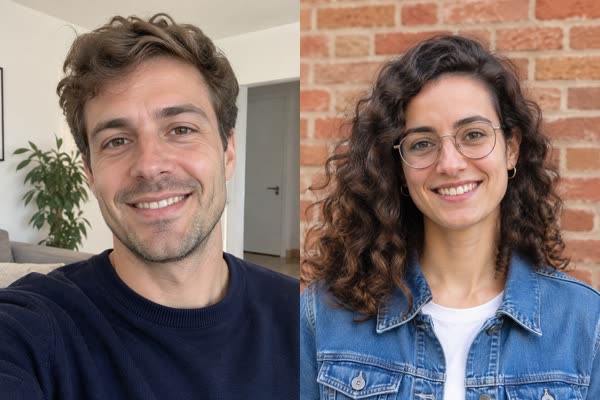
- A woman with glasses and curly hair: a half-body photo against a brick wall.
- A man in a floral shirt: a full-body photo on a terrace.
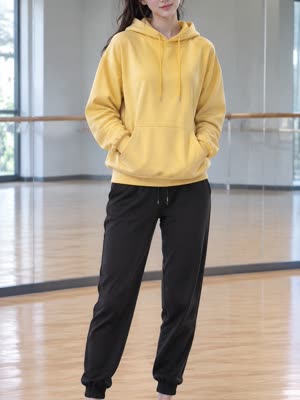
- A woman in a yellow hoodie: a full-body photo in a dance studio.
- A man in a navy sweater: a selfie in a living room.
Result: All four came out by the sea with their faces, hair, glasses and clothes matching their photos.
Drift and limits: Because the place is made up, the place in your own photo is not kept. If that is what you want, see the last section.

Pick the place: seafront at night, sunny pier or lighthouse at sunset
Seafront at night is the trend's own setting, Sunny pier gives a bright blue sea and a white wooden railing, and Lighthouse at sunset a stone harbor wall in golden light; all three followed the same four beats in our tests.
Each description below is what the page asks the model to film, followed by what our test clip showed.
- Seafront at night: a metal railing, wet paving stones shining under warm street lamps, the dark sea and a tall illuminated tower far along the shore. Our clip took 256 seconds; the tower came out as a lighthouse.
- Sunny pier: a wooden pier over a bright blue sea on a sunny afternoon, with a white wooden railing and a clear sky. Our clip took 259 seconds; the man grabbed his wet hair and laughed walking to the camera.
- Lighthouse at sunset: a stone harbor wall with a low stone parapet and a red-and-white lighthouse behind, in warm golden light. Our clip took 186 seconds; with wet hair, she covered her face laughing and walked toward the camera.
Drift and limits: On the pier the shirt looked barely wet, and at the lighthouse the hoodie looked hardly wet; the lighthouse also shifted position a little between moments.
What it sounds like
With Sound on Wave and screams, the two clips we listened to had the crash of the wave, a man off camera shouting a warning and the person laughing, and no music.
- Seafront at night: an off-camera male voice shouts "Whoa, look out!"; the crash, splashing, wet footsteps and her laughter.
- Lighthouse at sunset: a male voice shouts "Woah, look out!"; the ocean, the crash, the splash and her laughter.
Result: Both were transcribed by a model that listens to audio. Every one of our 4 clips had an audio track.
Drift and limits: The two-friend clip had no music either: an off-camera "Woah, watch out!", a laughing "Holy cow!", the crash, gasps and wet footsteps. The listening model returned nothing for the pier clip, so we have not checked it, and we have not tried Silent.
Put your friends in the wave too
Add one photo per friend, up to three people in all: in our two-friend test both posed arm in arm at the night railing, both got soaked and both came out laughing.
This is where the ways differ most: SuperMaker AI's page takes one photo, with no second personalized person; Media.io starts from a group photo you already have; on blubiu each friend can come from a different photo taken anywhere.
Result: Seafront at night with a man from a living-room selfie and the woman with glasses from the brick-wall photo: 257 seconds.
Drift and limits: At the end the man walked away behind her instead of toward the camera, and a small red logo appeared on his plain navy sweater. We have not tested three people.
Making it look wetter
Expect dripping hair more than soaked clothes: the hair came out dripping in all 4 of our clips, but on the sunny pier and at the lighthouse the shirt and the hoodie looked barely wet.
The page already asks the model for hair dripping and clothes stuck to the people. If you want the clothes dark and clinging with water, you can say so in Notes. We have not tested such a note, so we cannot tell you how much it helps.
Keep it a comic soaking, and label it as AI
Make it a joke, not disaster footage: the page tells the model that nobody falls, gets swept away or gets hurt, and in all 4 of our tests nobody did; blubiu adds no watermark, so say it is AI-made when you share it.
- Media.io's page makes the same point: the clip is AI-generated and not evidence of a real wave or disaster.
- The page does not make disaster scenes, real places hit by real waves, or anything meant to pass as news.
- Use your own photo, or photos your friends agreed to.
How we tested it
On 21 November 2026 we made 4 clips with the AI tidal wave video page's own recipe on Seedance 2.0, at 9:16, 480P, 12 seconds and sound on, and checked each one frame by frame at one frame per second.
Every output was 496×864 and 12.05 seconds long, with an audio track. Times run from submitting to the finished file. The test photos are AI-made fictional people, not real people.
All 4 followed the four beats, and faces, hair, glasses and clothes matched the photos in all 4. Not tested: three people, 10 or 15 seconds, 720P and Silent.
| Test | Time | What happened | Drift | Sound |
|---|---|---|---|---|
| Seafront at night · 1 person: woman with glasses and curly hair, half-body photo against a brick wall | 256 s | Wave rose around 2 s, foam filled the frame around 4 s; soaked, hair stuck to her face, wiped her face, laughed, walked toward the camera; glasses on throughout | The distant illuminated tower came out as a lighthouse | No music; off-camera male voice shouts "Whoa, look out!"; crash, splashing, wet footsteps, her laughter |
| Sunny pier · 1 person: man in a floral shirt, full-body photo on a terrace | 259 s | Same four beats; grabbed his wet hair and laughed walking to the camera | Shirt looked barely wet | No music; "Woah, watch out!", a laughing "Holy cow!", the crash, gasps, wet footsteps |
| Lighthouse at sunset · 1 person: woman in a yellow hoodie, full-body photo in a dance studio | 186 s | Same four beats; wet hair, covered her face laughing, walked toward the camera | Hoodie looked hardly wet; the lighthouse shifted position a little between moments | No music; a male voice shouts "Woah, look out!"; ocean, crash, splash, her laughter |
| Seafront at night · 2 friends: man from a living-room selfie + the woman with glasses | 257 s | Posed arm in arm; both soaked, both laughing | At the end he walked away behind her instead of toward the camera; a small red logo appeared on his plain navy sweater | Not checked yet |
When this way is the wrong choice
- You want real footage of a real wave, or anything that could pass as news: this is a made-up comic clip.
- You want the wave to hit the place in your own photo: here the place is filmed fresh. Media.io's how-to starts from your own waterfront photo instead; to keep your photo and only make it move a little, use animate photo.
- You want it free: on blubiu the shortest clip costs more than the Free plan's monthly credits, so you need a paid plan or a credit pack. Magic Hour lists free daily credits and Media.io free credits on signup.
- You want 1080p or 4K straight away: here it is 480P or 720P. SuperMaker AI lists 1080p and 4K, or you can upscale the finished clip with video upscale.
Put yourself in a giant wave
AI Tidal Wave Video →
Upload your photo, add up to two friends, pick the place and get soaked.
AI Group Dance Generator →
Another trend to do with friends: a group dance.
Boxing Dog Video Generator →
The pet version of a viral clip: your dog punching the air.
AI Video Upscaler →
Upscale the finished clip to 1080P or 4K before you post it.
FAQ
What is the AI tidal wave video?
It is the trend in which someone poses by the sea, a giant wave rises behind them, foam whites out the frame and they walk out soaked. On the AI tidal wave video page it is made from one photo of you, or one per friend; our 12-second clips took 186 to 259 seconds each.
Which wave AI video generator should I use?
It depends on what you have. SuperMaker AI takes one adult photo and needs no prompt; Media.io animates a waterfront photo you already have, with a prompt you write; Magic Hour turns two images into a 5-second wave transition; blubiu takes one to three photos taken anywhere and lets you pick one of three places.
Can AI put me in a giant wave from any photo?
On blubiu, yes, as long as the photo shows one person clearly, facing the camera: it is only used to know who you are. Our test photos were taken in a living room, a dance studio, on a terrace and against a brick wall, and all four people came out by the sea looking like their photos.
Can I make an AI tsunami wave video of myself?
Only the comic kind: a big wave soaks you and you walk out laughing. The page tells the model that nobody falls, gets swept away or gets hurt, and it does not make disaster scenes or anything meant to look like real news.
Sources and dates
- Questions and search terms: Google autocomplete for "ai wave video", "ai tidal wave", "tidal wave ai", "giant wave ai" and "tsunami ai video" (21 November 2026). We did not check search volumes.
- The trend and the other ways, as their own pages describe them, read on 21 November 2026: SuperMaker AI's Tidal Wave AI page, Media.io's tidal wave AI video how-to and Magic Hour's "Get hit by a massive wave" template. These names are trademarks of their owners; blubiu is not affiliated with them.
- Test results: our own runs on blubiu on 21 November 2026; the photos are AI-generated fictional people.