
How to upscale anime images: from waifu2x to a 4K wallpaper, with 8 test upscales
The blubiu team · Published 2026-11-19
To upscale an anime image, run it through an upscaler made for drawn art rather than a plain resize: these models keep outlines crisp instead of blurry. waifu2x.net is the one many people know, with 1.6×, 2× and 4× and five noise-reduction levels, for images up to 1500×1500 pixels. Web tools such as Pixelbin and VanceAI aim at 4K output; Pixelbin gives three free upscales a month without an account. Open-source projects like Anime4K run on your own machine. On blubiu's anime upscaler, which uses Real-ESRGAN, you upload one picture and pick 2× or 4×: our 8 tests took 13 to 36 seconds each and came back at exactly that size, from 200×200 to 3840×2160. Outlines got crisper and JPEG blocks disappeared, but fine texture went the other way: hair strands, film grain and manga screentone came back smoother. To reach 4K, start from at least 960×540 and use 4×.
Key takeaways
- waifu2x.net: 1.6×, 2× or 4×, five noise levels, images up to 1500×1500 for upscaling, PNG or WebP out.
- Web upscalers (Pixelbin, VanceAI, Nero AI): aimed at 4K; Pixelbin gives three free a month without an account.
- blubiu's anime upscaler: 2× or 4×, exact sizes, 13 to 36 seconds in our 8 tests.
- Every upscaler cleans and sharpens; none brings back detail the small picture never had.
What upscaling an anime image actually does
Upscaling an anime image means making it two or four times wider and taller while a model fills in the new pixels so that lines stay sharp, instead of stretching the old pixels into blur.
Keep fixed
- The drawing: characters, poses, composition and colors stay as they were
- Bold outlines and flat color areas, which come out cleaner than before
Free to change
- JPEG blocks and blur are cleaned away
- Fine texture such as hair strands, film grain and screentone is smoothed
4 ways to upscale anime images, compared
Use waifu2x when you want noise control for free and your image is under 1500×1500, a web upscaler or blubiu for 4× in the browser, and an open-source project if you want it running on your own machine.
| Way | Scale and size | Cost | Weak spot |
|---|---|---|---|
| waifu2x.net | 1.6×, 2×, 4× (4× on a separate site); upscaling up to 1500×1500, files up to 5MB | No price stated; supported through Patreon and Fantia | Input size cap; 4× is on another site |
| Web upscalers (Pixelbin, VanceAI, Nero AI) | Aimed at 4K; Pixelbin up to 16MP and 10MB; Nero does bulk uploads | Pixelbin: three free a month without an account; others link to pricing pages | Scale options are not always stated on the page |
| Run it yourself (e.g. Anime4K on GitHub) | Whatever the project supports; Anime4K describes itself as real-time anime upscaling and denoising | Free and open source | You set it up yourself |
| blubiu anime upscaler | 2× or 4×, exact output size; tested up to 960×540 → 3840×2160 | Credits per image; the Free plan covers about 37 a month | No noise setting; the result is a JPEG, so no transparency |
Upscale a blurry anime screenshot
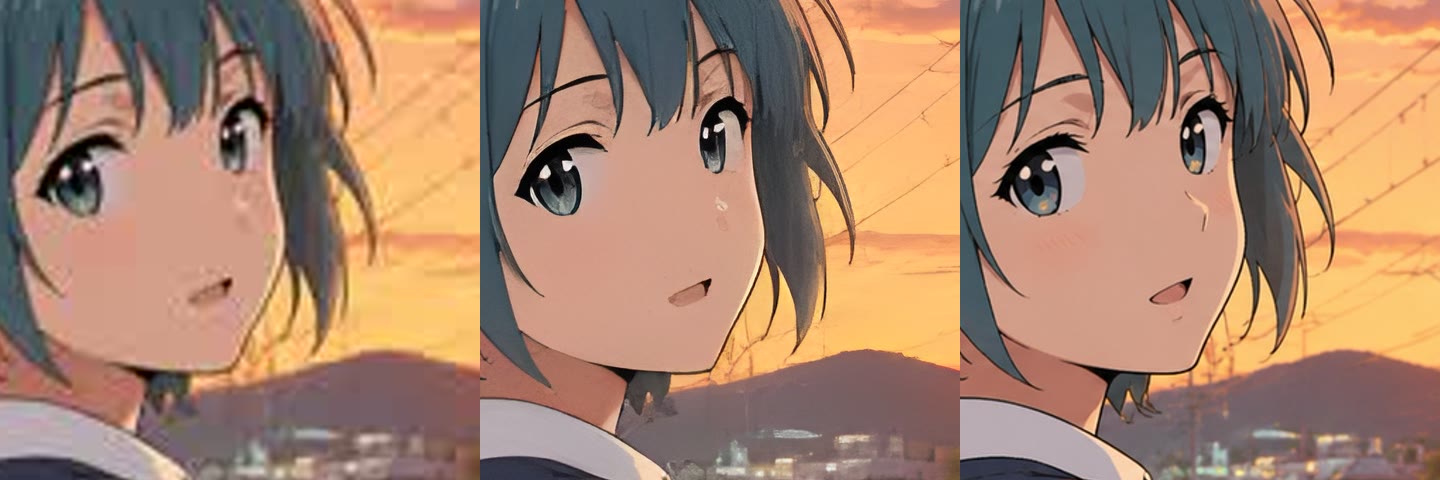
Upload the screenshot to an anime upscaler, pick 4× and compare it with the original: the outlines and eyes come back sharp and the JPEG blocks in flat areas disappear.
- Use the largest copy you have; every repost adds compression.
- Open the anime upscaler, upload it and keep 4× selected.
- Open the result at full size and check thin lines before you save it.
Result: 19 seconds: a 480×270 frame came back at 1920×1080 with the character's outlines and eyes sharp and the sunset sky clean.
Drift and limits: Thin power lines that the blur had broken came back broken, and a small nose line turned into a dot.
Upscale anime to 4K
To get a 4K anime wallpaper, start from a picture at least 960×540 and upscale it 4×: that gives exactly 3840×2160.
4× multiplies both width and height by four, so the source size decides where you land. A 480×270 screenshot at 4× reaches 1920×1080, which suits a phone or a 1080p screen but not a 4K one.
Result: 36 seconds: a 960×540 seaside wallpaper came back at 3840×2160 with the lighthouse, roofs and cloud edges crisp.
Drift and limits: Small houses in the distance turned into soft blocks of color: detail that was never in the small picture does not appear.
Anime upscaler →Upscale manga panels and pages
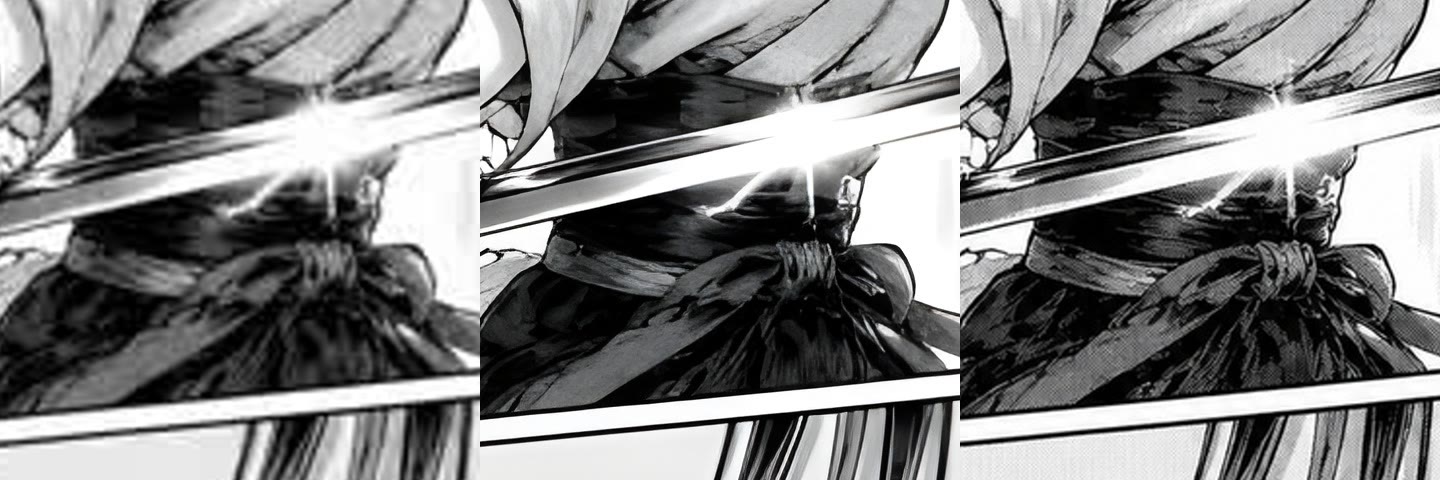
Manga pages upscale well for reading and printing, with bold ink lines and speed lines coming back clean, but the screentone dot pattern gets smoothed into flat grey.
Result: 13 seconds: a 420×560 black-and-white page came back at 1680×2240 with the sword, the speed lines and the eyes in the close-up panel sharp.
Drift and limits: The screentone shading became smooth grey, so the page looks painted rather than printed. Keep the original if the dots matter.
Upscale old anime frames
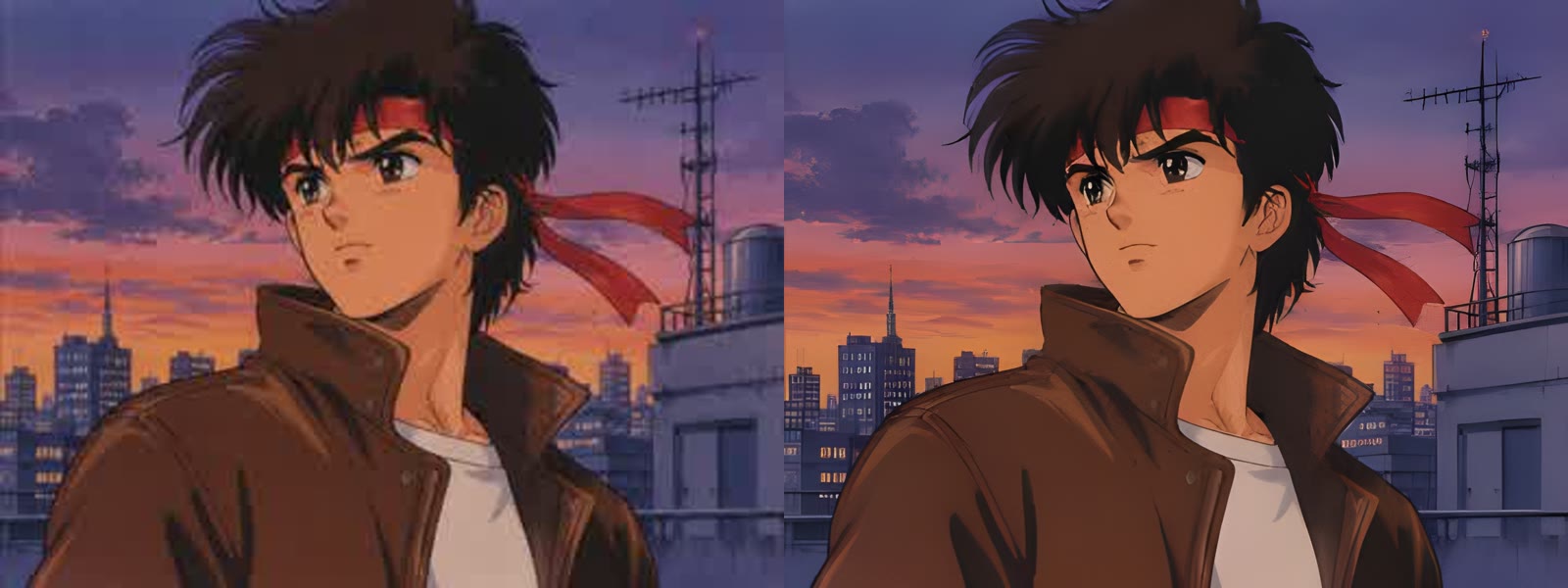
Frames from old anime come out sharper and cleaner, but the film grain and the faded look are cleaned away too, so the result looks like a remaster.
Result: 14 seconds: a 360×270 frame came back at 1440×1080 with the ink outlines and the city skyline crisp, as in the picture at the top of this page.
Drift and limits: The grain and the slightly washed-out colors of the original were gone.
Upscale anime clips and episodes
Anime video needs a video upscaler rather than an image one: on blubiu that is the [video upscaler](/video-upscale), which enlarges a clip to 1080P, 2K or 4K.
The image upscaler takes one still at a time. The video upscaler uses a different model and is charged by the second of the source video.
Video upscale →How we tested: 8 upscales, all of them
We drew seven original anime-style pictures with an AI image model, shrank them and saved them as low-quality JPEGs to imitate blurry copies, then upscaled each with Real-ESRGAN on blubiu and compared crops against a plain resize and the full-size original.
All 8 runs succeeded and came back at exactly 2× or 4×. Times are from pressing upscale to the finished file, with up to five sent at once. The pictures are original AI-made test images, not frames from any series. One first-draft illustration was not usable and was replaced before testing.
| Picture | In → out | Time | What held / what drifted |
|---|---|---|---|
| Screenshot, 4× | 480×270 → 1920×1080 | 19 s | Outlines and eyes sharp / broken power lines stayed broken, nose line became a dot |
| Screenshot, 2× | 480×270 → 960×540 | 24 s | Same look at half the size |
| 4K wallpaper, 4× | 960×540 → 3840×2160 | 36 s | Lighthouse, roofs, clouds crisp / distant houses became color blocks |
| Manga page, 4× | 420×560 → 1680×2240 | 13 s | Ink lines clean / screentone smoothed into grey |
| Illustration, 4× | 384×512 → 1536×2048 | 25 s | Outlines, eyes, lantern glow clean / hair strands smoothed |
| Avatar, 4× | 256×256 → 1024×1024 | 13 s | Eyes, lashes, hair edges sharp / finest strands simplified |
| Chibi sticker, 4× | 200×200 → 800×800 | 19 s | Bold outlines and flat colors clean: the biggest improvement |
| Old anime frame, 4× | 360×270 → 1440×1080 | 14 s | Outlines and skyline crisp / film grain and faded look removed |
When an anime upscaler is the wrong tool
- Real photos: Real-ESRGAN only enlarges them and does not repair blur, noise or damage.
- You want more detail, a new style or a fixed face: an upscaler keeps the picture; to change it, use an image generator.
- You need screentone or film grain kept exactly: both were smoothed in our tests.
- You need a transparent background kept: blubiu's result is a JPEG.
Next steps
FAQ
How do I upscale anime to 4K?
Start from a picture at least 960×540 and upscale it 4× with an anime upscaler; on blubiu that gave exactly 3840×2160 in 36 seconds. A smaller picture at 4× stays below 4K.
Can you upscale anime without losing quality?
Partly. Outlines and flat colors come out cleaner than a plain resize, and JPEG blocks disappear. Fine texture does not: hair strands, film grain and screentone were smoothed in our tests, and broken thin lines stayed broken.
What does it mean to upscale anime?
It means making an anime picture or video larger, such as twice or four times the width and height, with a model that fills in the new pixels so lines stay sharp instead of turning blurry.
How do I upscale anime video or episodes?
Use a video upscaler, not an image one. On blubiu the video upscaler enlarges a clip to 1080P, 2K or 4K and is charged by the second of the source video.
Sources and dates
- Questions come from Google autocomplete and Google Ads Keyword Planner searches for anime upscaling, checked on November 19, 2026.
- Facts about waifu2x.net, VanceAI, Nero AI and Pixelbin are from their own pages, read on November 19, 2026; Anime4K's description is from its GitHub listing in Google results the same day.
- All 8 test upscales were run on blubiu on November 19, 2026, with original AI-made test pictures.