A photo or a drawing on paper. You can also drag it here

Or just draw here: a house, a cat, how a room is laid out. Label parts with the text tool, like “red velvet sofa”.

The result appears right here on the canvas.

Sketch to Photo AI

Sketch to photo AI turns a rough sketch, labeled diagram or paper drawing into a real photo with the same layout, in 20–30 s. Free to try.

Sketch to photo AI examples

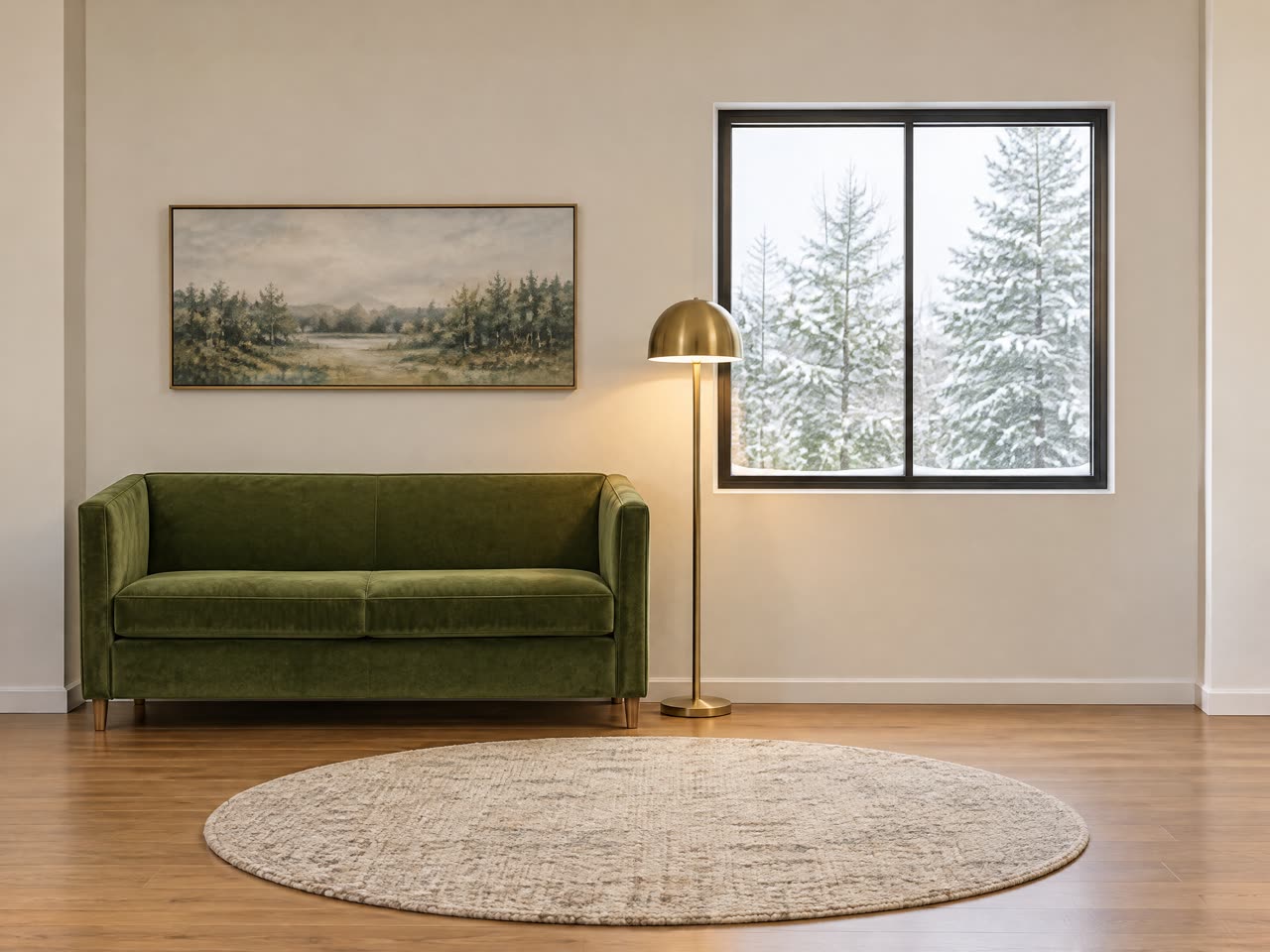
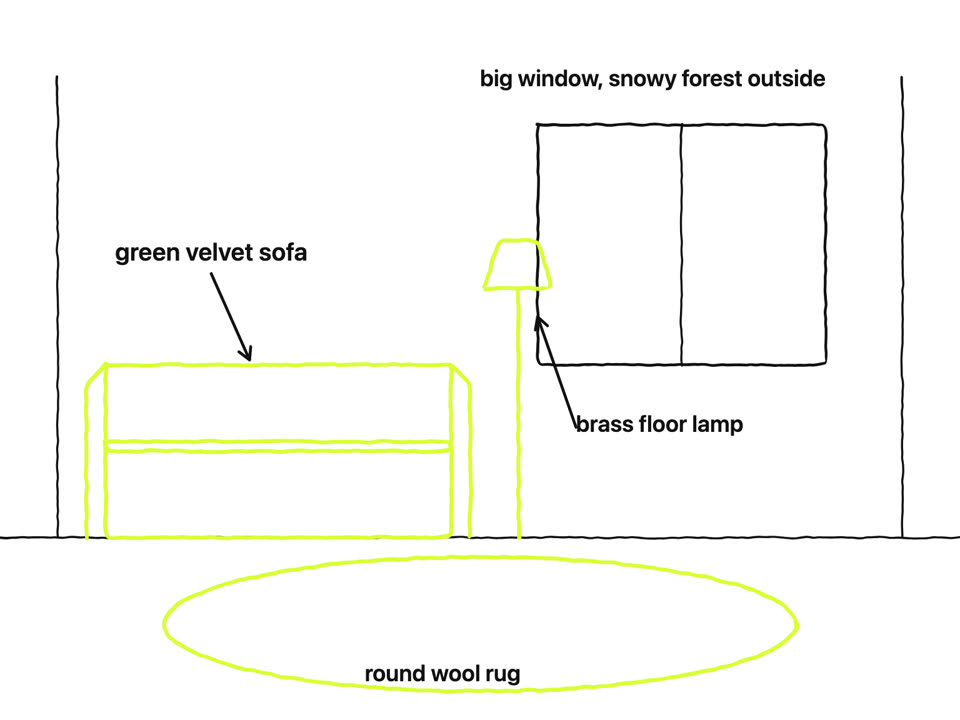
A living-room diagram with labels for a green velvet sofa, brass floor lamp, round wool rug and a window, and the photo made from it (sketch)A living-room diagram with labels for a green velvet sofa, brass floor lamp, round wool rug and a window, and the photo made from it
Labeled room diagram → photoSketch as sent to the model → GPT Image 2.6, Photo, 2368×1776, 24 s. No label text in the photo; the painting on the wall was added by the model.
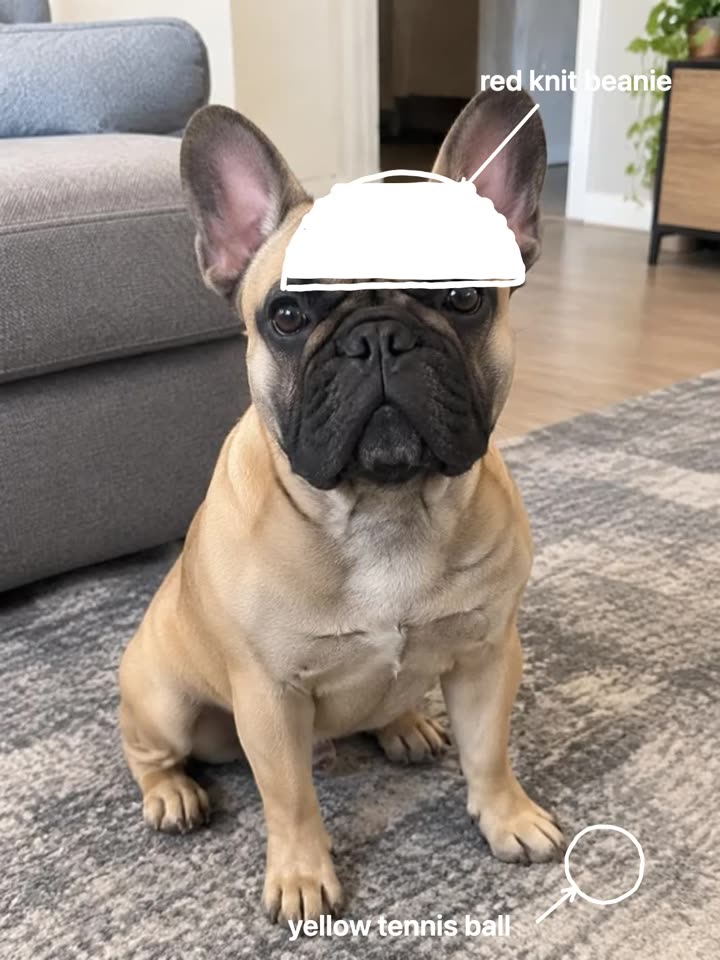
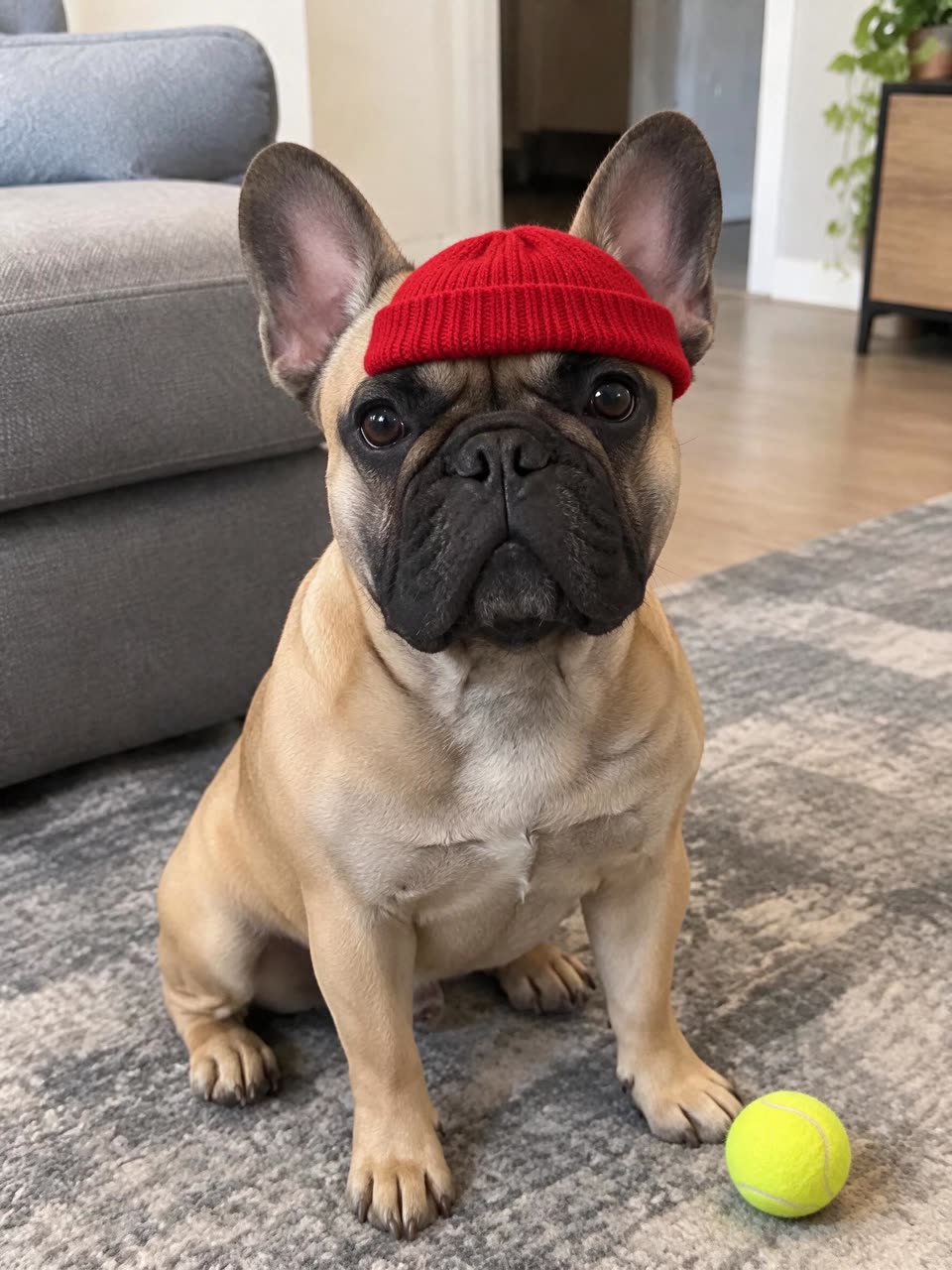
A French bulldog photo with a hat and a ball outlined with the white pen and labeled, and the edited photo with a red knit beanie and a tennis ball (sketch)A French bulldog photo with a hat and a ball outlined with the white pen and labeled, and the edited photo with a red knit beanie and a tennis ball
Marked-up photo → edited photoUploaded photo, recognized as a photo → Seedream 5.5, Auto, 1776×2368, 33 s. The dog is an AI-made test photo, not a real pet.

What you can make with sketch to photo AI

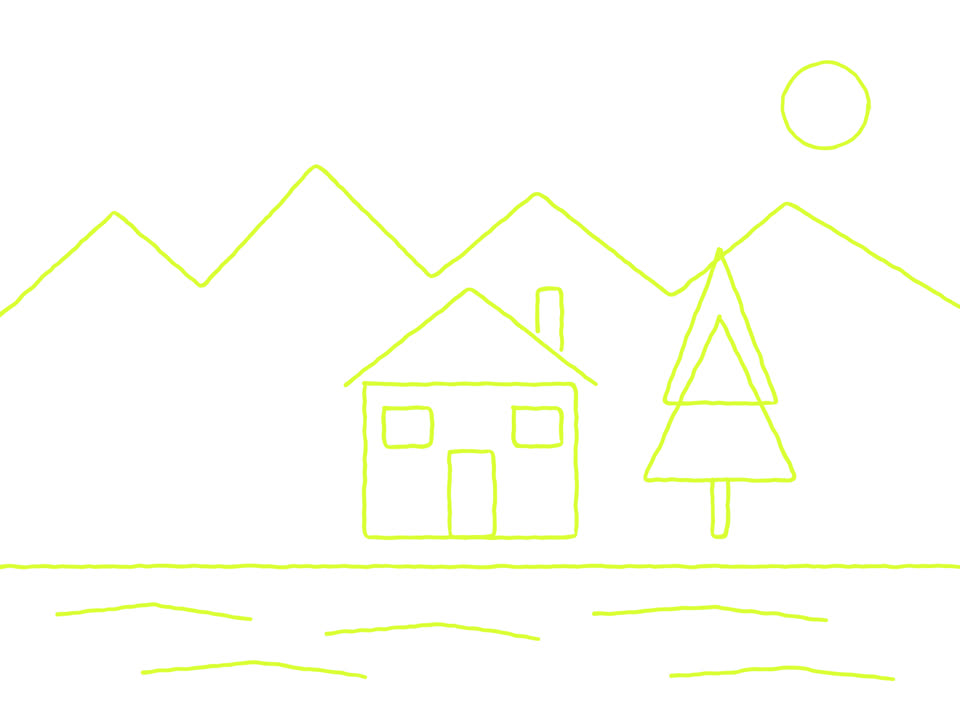
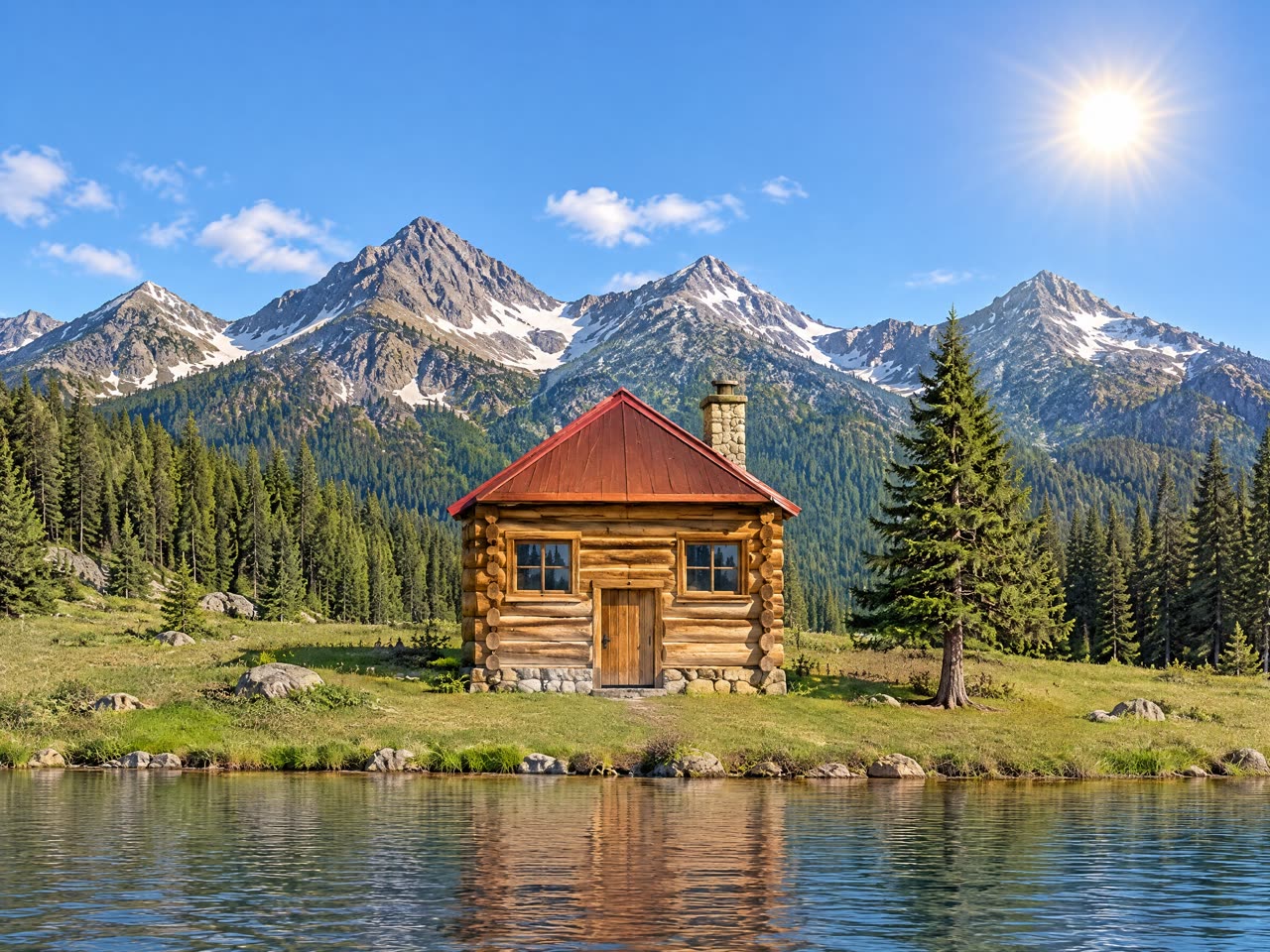
A cabin sketch in lime lines with mountains, a pine tree and a lake, and the realistic photo made from it (sketch)A cabin sketch in lime lines with mountains, a pine tree and a lake, and the realistic photo made from it
Lime-pen sketch as sent to the model, plus one line of description → GPT Image 2.6, Photo, 2368×1776, 28 s.

Turn a sketch into a realistic photo

Draw the scene and say in one line what it is. Our cabin sketch, 17 strokes in the lime pen plus “a wooden log cabin with a red roof by a mountain lake on a sunny day”, came back as a photo with the roof, chimney, pine tree, mountains and lake where we drew them, in 28 s.

Pen colors don't carry over: the pens are only white, lime or red, so write the colors you want in a label or the description. The red roof in our photo came from the description.

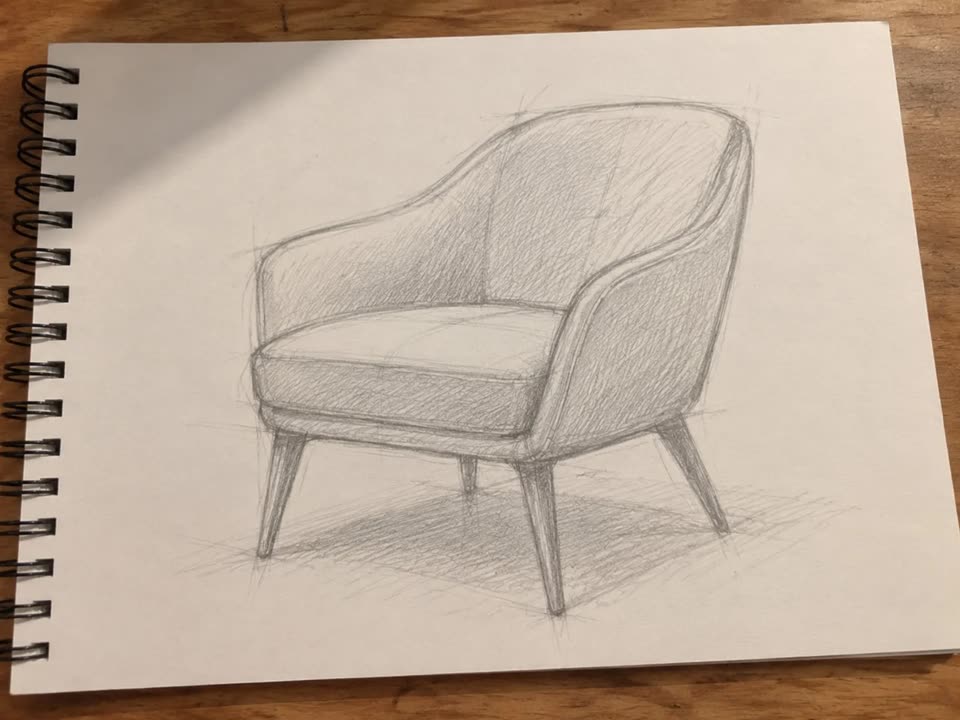
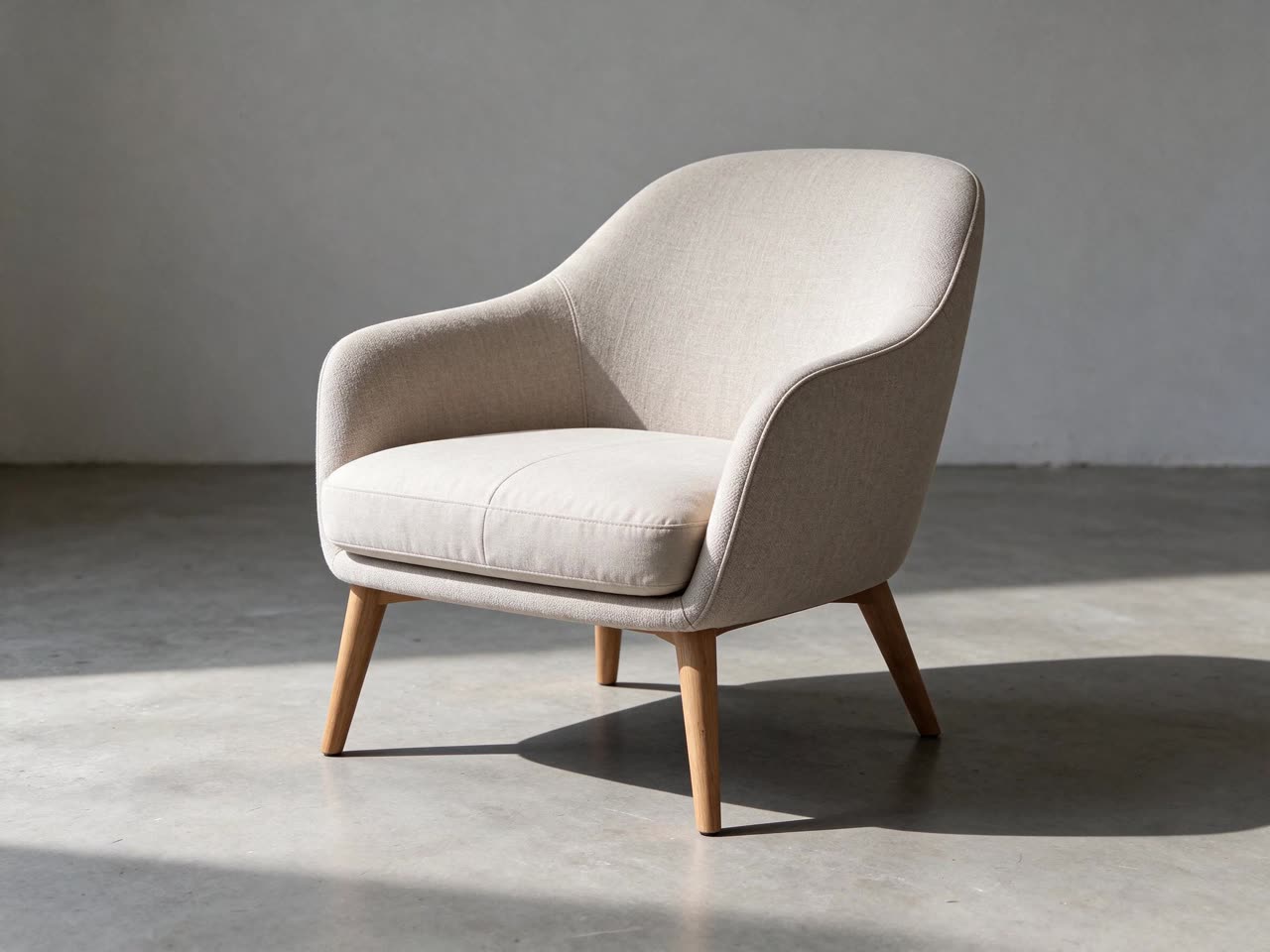
A pencil concept sketch of a lounge armchair in a sketchbook, and the product photo made from it (sketch)A pencil concept sketch of a lounge armchair in a sketchbook, and the product photo made from it
Uploaded photo of a paper sketch, recognized as a drawing → Seedream 5.5, Auto, 2368×1776, 30 s. AI-made test sketch.

Product or design sketch to render

Upload a phone photo of a pencil sketch: the page works out that it's a drawing, drops the paper, spiral binding and shadows, and renders it. Our armchair concept sketch came back as a product photo with the same curved shell back, seat cushion and four tapered wooden legs in 30 s.

Anything the pencil lines don't show is guessed: ours got pale fabric and light wood legs. Write the materials in the description if you need specific ones. It is a picture, not a 3D model or a CAD file. The sketchbook photo is an AI-made test image.

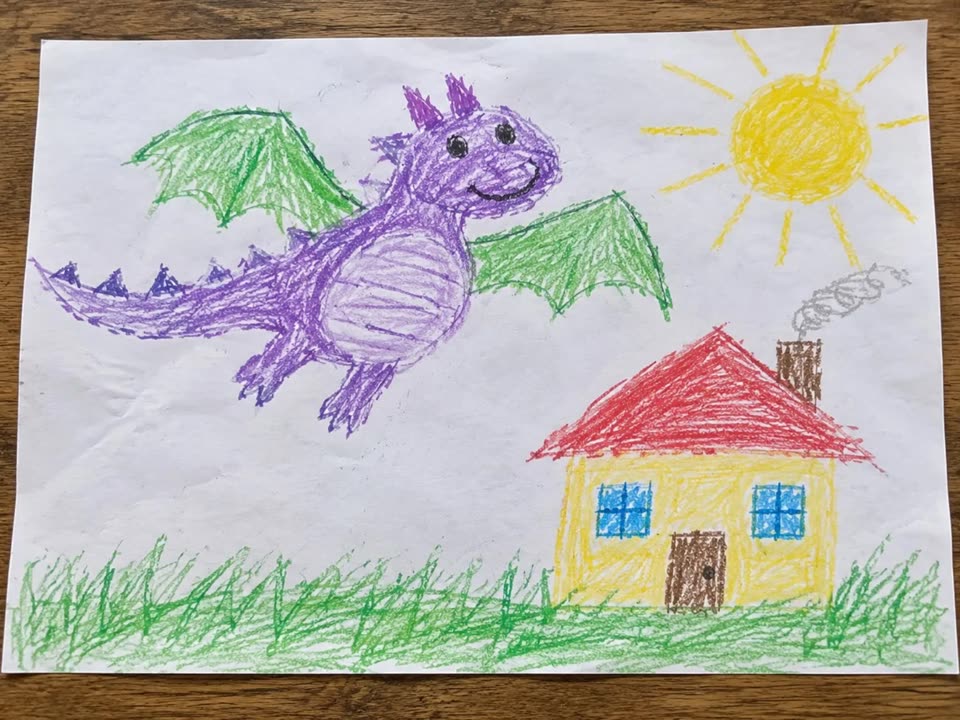
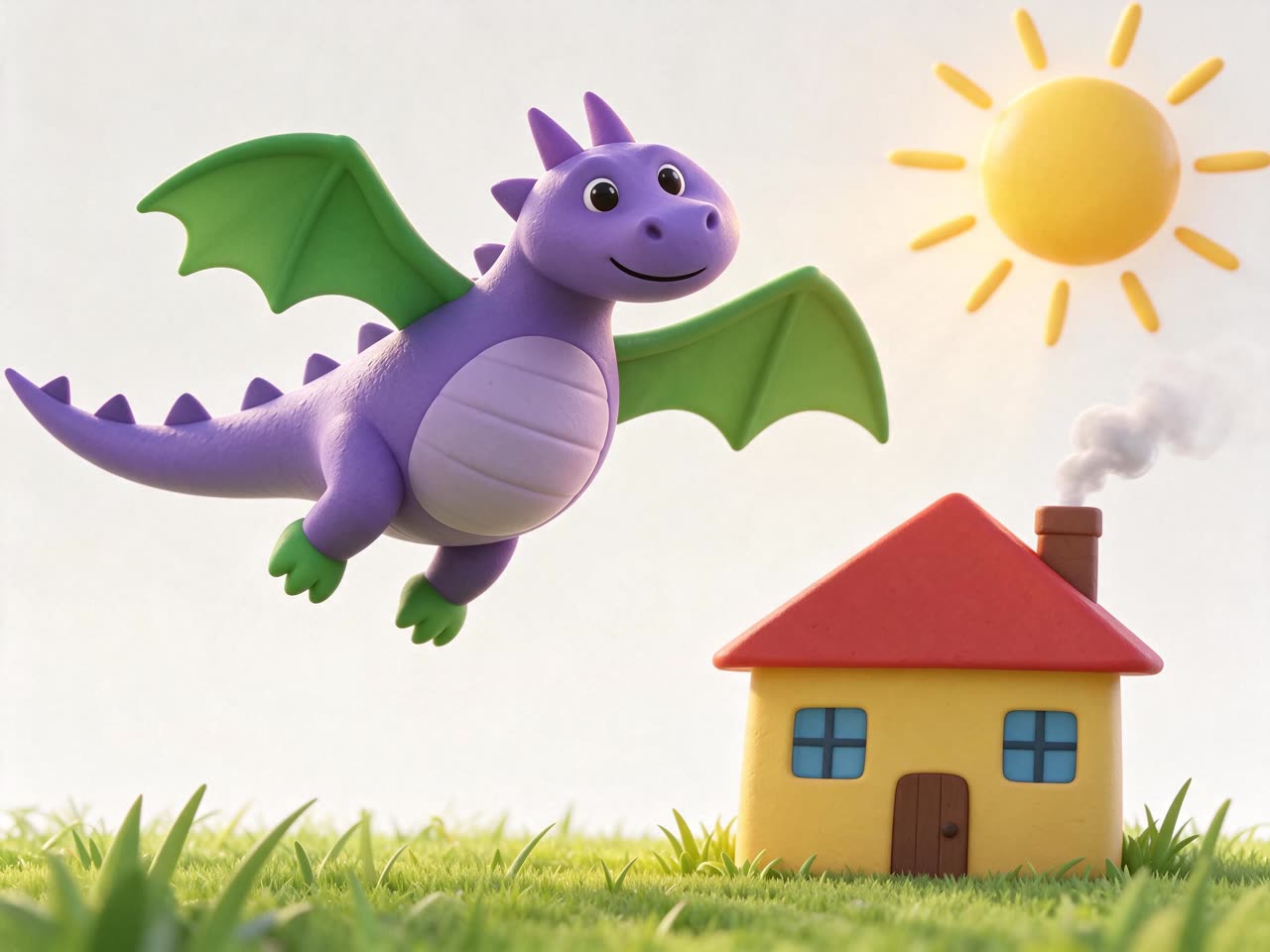
A child's crayon drawing of a purple dragon over a house, and the 3D picture made from it (sketch)A child's crayon drawing of a purple dragon over a house, and the 3D picture made from it
Uploaded photo of a crayon drawing → Seedream 5.5, 3D render, 2368×1776, 35 s. AI-made test drawing.

Turn a kid's drawing into a 3D picture

An uploaded crayon drawing is recognized as a drawing and keeps its characters, layout and its own colors. In our test the purple dragon with green wings, the yellow house with a red roof and the sun stayed where they were, rendered as a 3D animated-film picture in 35 s.

The model tidies shapes (our dragon got a clear face and a belly), so it is a new picture based on the drawing. To make the drawing itself move, use animate drawing. The crayon drawing is an AI-made test image.

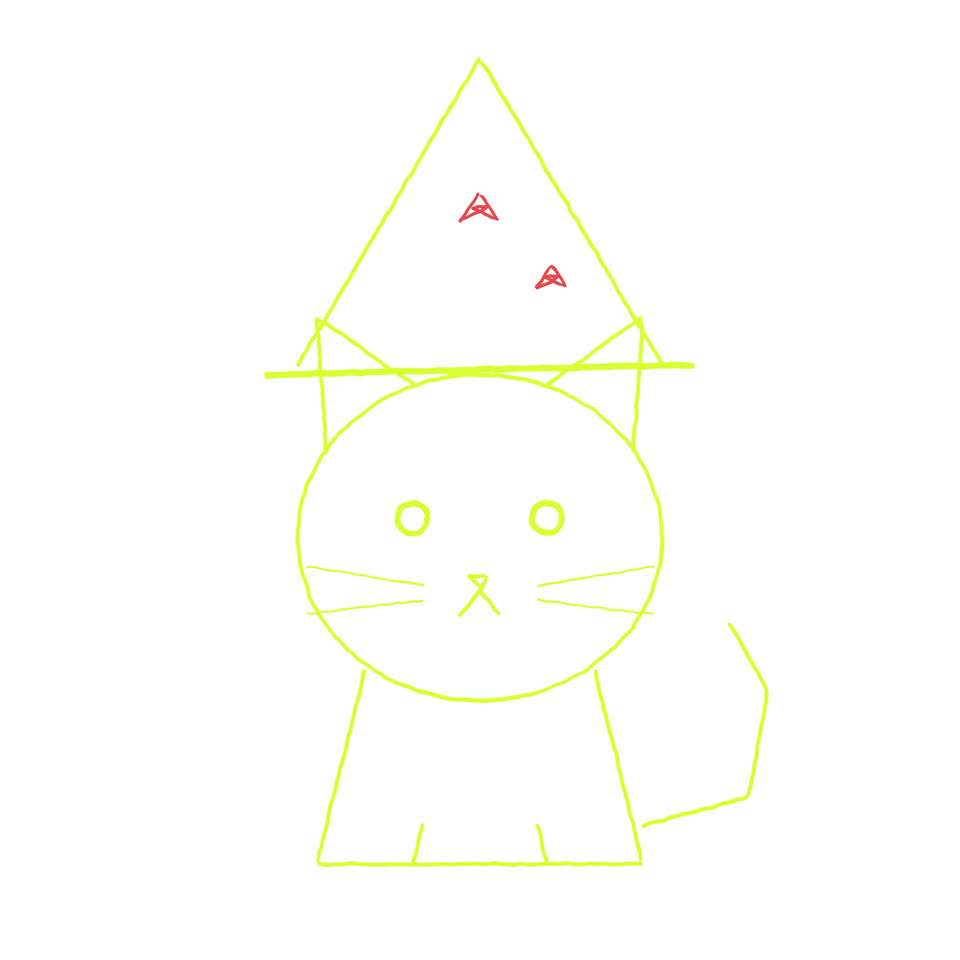
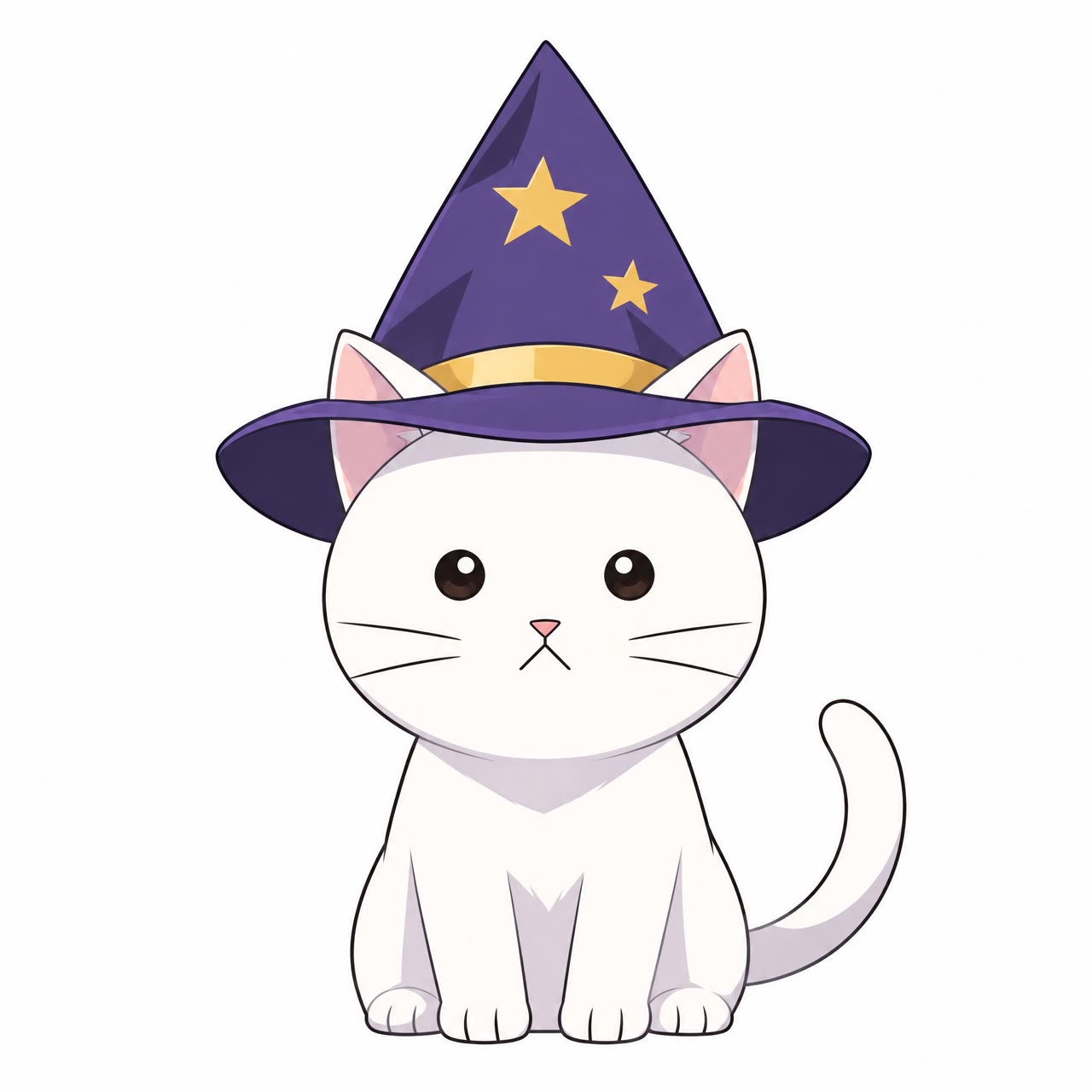
A lime-pen doodle of a cat in a wizard hat, and the anime picture made from it (sketch)A lime-pen doodle of a cat in a wizard hat, and the anime picture made from it
Sketch as sent to the model → GPT Image 2.6, Anime, 2048×2048, 20 s.

Doodle to anime or cartoon

Pick Anime and a doodle becomes clean line art with flat shading. Our cat in a wizard hat kept its round head, eyes, whiskers, hat and curled tail, and the two red stars we scribbled on the hat became gold stars, because the description said “purple wizard hat with gold stars”.

GPT Image 2.6 left the background plain white; Seedream 5.5 gave the same doodle a lavender one. Write the setting in the description if you want a background.

Labeled diagram or room layout to photo

Draw boxes where things go and write what each one is. Our living-room diagram (the first example above) had four labels and two arrows: green velvet sofa, brass floor lamp, round wool rug and a big window with a snowy forest outside. With GPT Image 2.6 each item came out where it was drawn, and none of the label text appeared in the photo.

Use GPT Image 2.6 for labeled sketches: Seedream 5.5 drew our labels and arrows into the photo. GPT also added a framed painting we hadn't drawn, and sizes and perspective aren't measured, so this is not a floor-plan tool.

Edit a photo by drawing on it

Upload a photo, outline the change and label it: the page works out that it's a photograph and changes only the marked parts. On our French bulldog photo (the second example above) Seedream 5.5 added the red knit beanie and the tennis ball we outlined with the white pen, in 33 s, and the rest of the photo stayed the same. The result replaces the photo on the canvas, so you can mark the next change right away.

With the same marks GPT Image 2.6 returned the photo unchanged, which is why uploads and edits default to Seedream 5.5. We tested one photo; edits on photos of real people's faces are untested.

What is sketch to photo AI?

blubiu's sketch to photo AI turns a rough sketch into a finished picture with the same layout. You draw on the built-in canvas with a brush, arrows, shapes and text labels, or upload a photo of a paper drawing, and an image model renders it in one of 59 styles, from a real photo to anime or watercolor. Labels like “green velvet sofa” are followed and left out of the image. You can also put a photo on the canvas, mark what should change and get it edited.

Who it's for

  • Designers and makers who sketch a product, a room or a building and want a realistic picture to show someone before anything is made.
  • People who think in pictures but can't paint: draw boxes and arrows, label them, and get a photo of what you meant.
  • Parents and teachers who want to turn a child's drawing into a 3D or storybook picture.

When not to use it

  • You need a precise technical render with real measurements and exact materials: the model interprets your lines and sizes are approximate. Use CAD or 3D software for that.
  • You want the reverse, a photo turned into a pencil sketch or line drawing. Photo to Line Art →
  • You want your drawing to move, not to become a new picture. Animate Drawing with AI →

How to turn a sketch into a photo

  1. 1

    Draw, or upload a drawing

    Sketch on the full-screen dark canvas with the brush, lines, arrows, rectangles and ellipses from the toolbar on the right, or press the lime Upload button at the top (or drag a file onto the canvas, or pick one from Assets) to add a photo or a drawing on paper (JPG, PNG or WebP). Images you add once the canvas has something on it are pasted on top, up to 4: drag them into place and pull a corner to resize. Your drawing is saved in this browser.

  2. 2

    Label what matters

    Use the text tool to write what something is (“brass floor lamp”) and point at it with an arrow. The pen has three colors, lime (the default), white and red; they only mark things, so write colors in a label or the description.

  3. 3

    Describe and pick a style

    The description box follows what you just drew. Write one line (the time of day, the materials), then pick one of 59 styles, each shown with its own sample picture (photo, 3D, anime, watercolor, ukiyo-e, stained glass and more), and whether to follow the sketch closely or loosely.

  4. 4

    Generate, then keep editing

    Press Generate. The result replaces what's on the canvas, so you can mark the next change and generate again. Undo brings your sketch back, earlier results stay in the strip on the left, and the bar at the top can download the result or save it to your Assets.

Tips for better sketch to image results

Label instead of drawing details

A box labeled “green velvet sofa” works better than trying to draw velvet. In our room diagram GPT Image 2.6 put the sofa, lamp, rug and window where they were labeled and drew none of the label text.

Write colors, don't draw them

The white, lime and red pens are only for marking. Our lime cabin sketch came out with natural wood and a red roof because the description said “red roof”, and a hat outlined in lime on a photo became the red beanie its label asked for.

Use the right model for the job

GPT Image 2.6 is the default for sketches: it followed our layouts and labels most closely in 20–28 s. Seedream 5.5 is the default for uploaded images and edits: it told our photo from our two drawings and handled each one, and it made both marked changes on our test photo, where GPT changed nothing.

Paste the real thing instead of drawing it

To get a specific dog, person or product into the picture, upload its photo onto your sketch or photo and put it where it should go. We tried three: our French bulldog pasted in front of a fireplace, a husky on a sketched park, and a woman and her bulldog on a sketched street. Both models put each one where it was pasted, kept its look (coat, cardigan, pleated skirt, bag) and left no pasted edges; GPT Image 2.6 drew the husky and the woman larger than pasted, Seedream 5.5 kept the sizes closer.

Close or Loose

Close keeps positions, sizes and proportions from your sketch. Loose keeps only the rough layout and lets the model improve shapes and add background, which suits very rough doodles.

Sketch to image tools compared

ProductWhat it offersWhere it's strongerWhen to pick blubiu
Adobe Firefly (sketch to image)Upload a hand-drawn sketch (JPG, PNG or WEBP up to 100 MB) and get photos, paintings or designs, guided by prompts and variations. Partner models such as Gemini 3, GPT Image and FLUX sit in the model menu. A free Adobe account gets monthly generative credits.Bigger uploads, more models to choose from, and results go straight into Photoshop, Illustrator and After Effects. Adobe says Firefly's own models are trained on licensed and public-domain content for commercial use.You want to draw the sketch on the page itself, write labels the model follows, or mark up a photo to edit it.
Canva (Sketch to Life)Sketch to Life is a free third-party app inside Canva: sketch or draw your idea, describe it in a few words, and get a realistic AI photo. It is on Canva's website and mobile app.The photo lands inside a Canva design (decks, mockups, social posts), and it runs in Canva's mobile app.You want labels and arrows read as instructions, styles beyond photos, or to edit an existing photo by drawing on it.
Fotor (sketch to image)Upload a sketch (JPG, PNG, WEBP and more), pick a style such as watercolor, oil painting, Pop Art, styles inspired by Monet, Van Gogh or Picasso, realistic, anime, cartoon, pixel art or 3D, and save it without a watermark. Credits come from signing up, daily check-ins and community sharing.Styles inspired by named painters (Monet, Van Gogh, Picasso), and apps for iOS, Android, Windows and Mac.You would rather draw than upload, or need a labeled diagram followed item by item.

Facts about other products come from their own pages, checked on 2026-11-20.

Sketch to photo AI limits and pricing

Input
Draw on the canvas in 16:9 (the default), 9:16, 3:2, 2:3, 1:1, 4:3 or 3:4, or upload a JPG, PNG or WebP (button or drag and drop). Uploads are scaled to 2048 px on the long side; the canvas is sent to the model at 1536 px.
Pasted images
Up to 4 images pasted on top of the canvas (the first upload on an empty canvas becomes the background instead). Each one is sent to the model as its own picture, so Seedream 5.5 costs 4 more credits per pasted image at 1K; GPT Image 2.6 costs the same. In our tests with pasted images a picture took 32–112 s.
Models
GPT Image 2.6 (default for sketches) and Seedream 5.5 (default for uploaded images and edits). You can switch in the description box.
Styles
59 styles in 9 groups (photo, 3D, anime, illustration, painting, print, craft, toy, game), each with its own sample picture. On sketches we tested Photo, 3D render and Anime; the sample pictures show what the other styles look like but were made from text, not from sketches.
Pen colors
Lime (default), white and red on a dark canvas. They mark the sketch; colors in the result come from labels, the description or the model. A sketch without a photo is sent to the model as dark lines on white paper.
Output size
1K by default; 2K is one click away. Our tests ran at 2K: 2368×1776 for 4:3 (both models), 2048×2048 for 1:1 (GPT Image 2.6) and 1776×2368 for 3:4 (Seedream 5.5). One image per click, and it replaces what's on the canvas.
Time
GPT Image 2.6: 20–28 s for sketches (5 tests). Seedream 5.5: 23–35 s (8 tests). It is not real-time.
Text in the sketch
With GPT Image 2.6 none of our labels appeared as text in the result. Seedream 5.5 drew the four labels of our room diagram into the photo, though the two labels on our photo edit didn't show up.
Account and watermark
Drawing needs no account and is saved in your browser. Generating needs you to sign in; the Free plan includes monthly credits to try it. blubiu does not add a watermark.
Cost
Paid in credits; the Generate button shows the cost for the model and size you picked. Failed generations are refunded automatically. Plans are on the pricing page.
Sketch to photo AI FAQ

How can I turn my sketch into a photo?

Draw it on the canvas above, or upload a photo of it, keep the style on Photo and press Generate; with GPT Image 2.6 the photo is ready in 20–28 s, keeps your layout and appears right on the canvas. Label anything the lines don't make clear, like “brass floor lamp”: GPT Image 2.6 follows labels and leaves them out of the photo.

Is there a free AI sketch to image generator available?

Yes, you can try this one with the Free plan's monthly credits. Drawing works without an account and is saved in your browser; generating needs you to sign in so the credits have an account to come from. There is no watermark, and failed generations are refunded.

Is this real-time sketch to image AI?

No. Each picture is generated after you press Generate: 20–28 s with GPT Image 2.6 and 23–35 s with Seedream 5.5 in our tests. You can keep drawing while it runs; the result then replaces the canvas, and every result stays in the strip on the left.

How do I turn a sketch on paper into a digital image?

Take a photo of the page and upload it with the upload button or drag it onto the canvas; the page works out that it's a drawing. The paper, its shadows and the lighting are dropped, and the drawing's own colors are kept; our pencil chair sketch and a crayon drawing came back as clean pictures in 30 and 35 s.

How do I get a realistic photo instead of a painting?

Keep the style on Photo and describe the light and materials in one line. Both models turned our lime cabin sketch into a real-looking photo (GPT Image 2.6 in 28 s, Seedream 5.5 in 31 s).

Can it turn a sketch into a 3D model?

No. The 3D render style makes a picture that looks like a frame from an animated film, not a model file you can rotate or print. For a 3D model you need a 3D modeling tool.

Which AI tool is good for converting sketches into images?

It depends on where you start and where the picture goes. Adobe Firefly suits people who will keep working in Photoshop or Illustrator; Canva's Sketch to Life puts the photo straight into a Canva design; Fotor has the most painting styles. blubiu lets you draw on a full-screen canvas, follows text labels, and edits photos you draw on, with the result landing back on the canvas.

Last checked 2026-11-20