
How to make AI cartoon videos: from a photo to a cartoon that moves and sings, with our test results
The blubiu team · Published 2026-11-20
To make an AI cartoon video, fix the cartoon character as one picture first, then animate that picture, and only then build longer scenes from it. All-in-one tools do it in one go: HeyGen's AI Cartoon Video Maker turns a script into an animated video with lip-sync in 175+ languages, and Renderforest turns an idea into a full cartoon with voiceover, with a free tier of about 20 seconds at 480p with a watermark. OpenArt's tutorial builds it by hand: a three-panel character sheet, a scene image, then clips of about 13 seconds chained together. On blubiu it is three steps we tested: photo to cartoon took 30 seconds and returned a 2048×2048 3D cartoon of a selfie; Animate photo made it wave in a 5-second clip in 87 seconds; AI singing video made a 3D cartoon girl sing an 8.5-second birthday song in about 6 minutes. The face and the style held in every step. The limit: singing and talking move the face, not the body, and each step is a separate clip.
Key takeaways
- Fix the character as one picture first; every later clip starts from it.
- All-in-one tools (HeyGen, Renderforest) go from a script or idea to a full cartoon; you choose less.
- On blubiu: photo to cartoon 30 s, a 5-second wave in 87 s, an 8.5-second song in about 6 minutes.
- Singing and talking move the face only; for full-body motion, animate the picture instead.
What an AI cartoon video is made of
An AI cartoon video is a cartoon character picture turned into short clips: a video model animates the picture, a lip-sync model makes it talk or sing, and longer stories join many clips that all start from the same character.
Keep fixed
- The character's face, hair, outfit and cartoon style, when every clip starts from the same picture
- The framing of that picture: a close-up stays a close-up
Free to change
- Movement, expression and the mouth, which the video or lip-sync model adds
- Small details between separate clips, unless you keep reusing the same reference picture
3 ways to make AI cartoon videos, compared
Use an all-in-one cartoon video tool when you want a finished multi-scene cartoon from a script, a hand-built workflow when you want control over every shot, and blubiu's step-by-step pages when you want to start from your own photo and see each step before paying for the next.
| Way | You give | You get | Cost and limits on its page |
|---|---|---|---|
| All-in-one: HeyGen AI Cartoon Video Maker | A script or short prompt; optionally a photo or drawing to animate | A finished animated video with voices and lip-sync in 175+ languages, MP4 up to 4K | A free plan for testing; Creator plans from $24 a month; length limits not stated |
| All-in-one: Renderforest AI Cartoon Generator | An idea, optional reference images, or a photo of yourself, your kids or your pet | A full cartoon video with characters and voiceover; storybook, 2D, 3D and anime styles | Free: about 20 seconds at 480p with a watermark; paid plans up to 1080p |
| By hand: OpenArt's cartoon tutorial | A three-panel character sheet per character, a scene image per scene, a timed prompt per clip | Clips of about 13 seconds, chained by using the last frame of one as the first of the next | No pricing in the post; no separate lip-sync step |
| Step by step on blubiu | Your photo, then a style, a motion or a song | A cartoon picture, then clips of it moving, talking or singing; multi-shot stories through the Agent | Credits per step, shown before each one; singing and talking clips up to 60 seconds and face-only |
Step 1: turn a photo of yourself into a cartoon character
Upload a clear photo to a photo to cartoon tool and pick one style; the result is the character picture every later clip will start from.
- Pick a photo where the face is clear and the framing is what you want in the video; the cartoon keeps the framing.
- Open photo to cartoon, upload it and choose 3D animated, flat 2D, comic book or storybook.
- Save the result; use the same picture for every clip of this character.
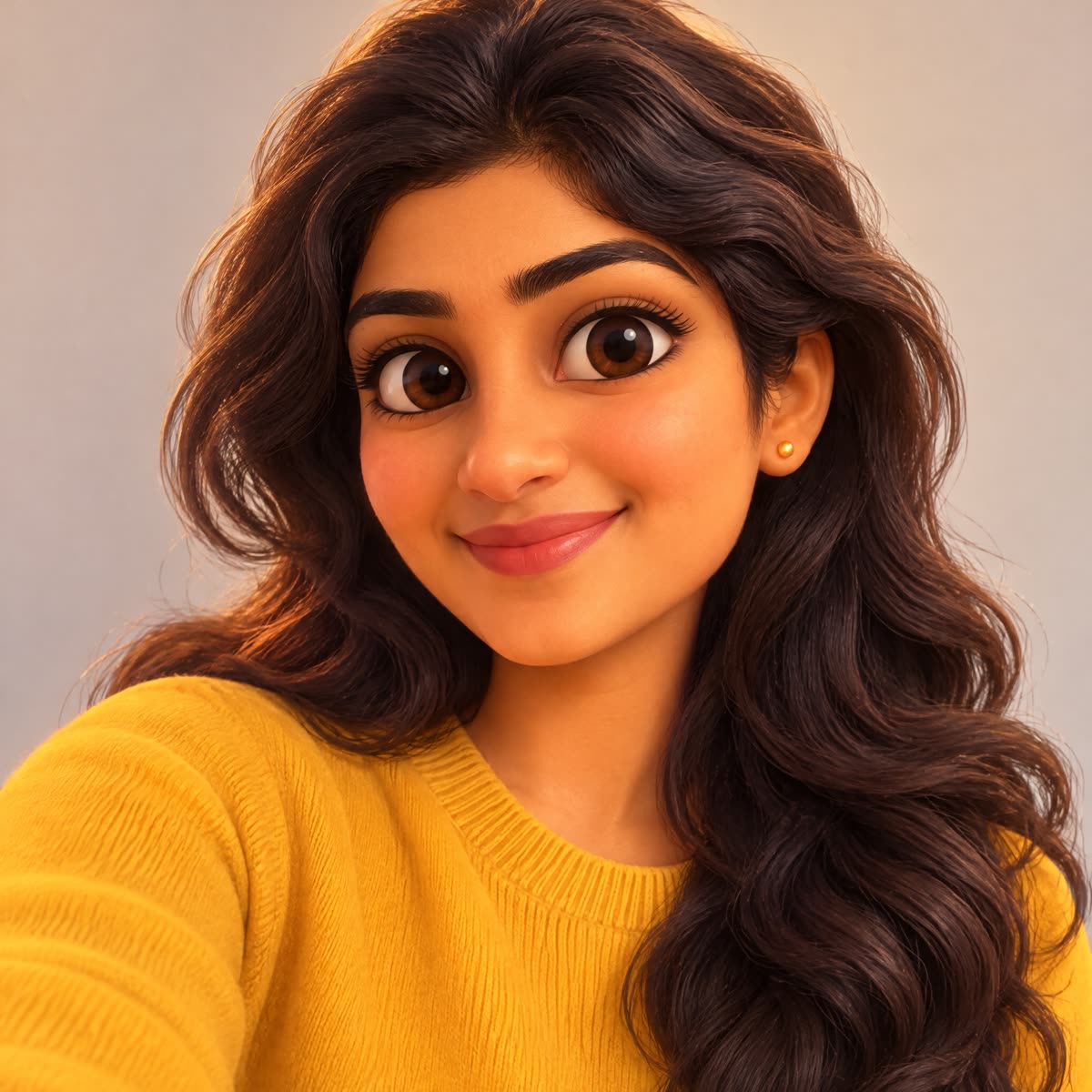
Result: 30 seconds: a square selfie came back as a 2048×2048 3D cartoon with the same long wavy hair, mustard sweater and gold stud earrings.
Drift and limits: The 3D style enlarged the eyes and rounded the features, which is the point of the style. Comic book and flat 2D stayed closer to the photo's proportions.
Step 2: make the cartoon move
To animate a cartoon character, use the cartoon picture as the first frame of a short video and pick one simple motion, such as a wave or a smile.
- Open Animate photo and upload the cartoon.
- Pick a motion; we used Wave. Keep the default 5 seconds at 480P for a first try.
- For flat 2D or comic-style cartoons, Animate drawing is the page made for drawn art: its prompt tells the model to keep the lines and style unchanged.
Result: 87 seconds: a 5-second, 640×640 clip in which the cartoon raises a hand, waves, smiles and lowers the hand, with the same face and 3D look throughout.
Drift and limits: The arm that held the phone in the selfie became the waving arm. The clip is 640×640 at 480P; 720P is the other option on that page.
Animate photo →Step 3: make the cartoon talk or sing
A cartoon talks or sings through lip-sync: give the cartoon picture plus a voice recording or a song, and the model moves the mouth, eyes and head to the audio.
- To sing: open AI singing video, upload the cartoon and pick one of our short songs, or upload a song up to 60 seconds.
- To talk: open talking photo AI, upload the cartoon and type a line with a voice, or upload a recording.
Result: About 6 minutes (356 seconds): a 3D cartoon girl in a party hat sang our 8.5-second birthday song in an 8.68-second, 768×1024 clip; her mouth changed shape with the singing and her head tilted slightly. On the talking photo page, a 3D clay cat mascot blinked, smiled and gestured while it talked.
Drift and limits: Only the face moves when singing: her hands stayed on her chin and the kitchen behind her stayed still. Flat 2D and line-art characters have not been tested for talking.
Step 4: build a cartoon story or episode
A cartoon story is many short clips that all start from the same character pictures, so make the character sheet once and reuse it for every shot.
OpenArt's tutorial chains clips by using the last frame of one clip as the first frame of the next, and writes the same voice description into every prompt so the voice stays the same. On blubiu, the Agent does the planning: it writes the script, designs the characters, draws a storyboard, generates each clip and cuts the film with narration and music, stopping for your approval at each step.
Our one-minute, three-character test film and what stayed consistent is in the guide on how to make an AI movie; a kids' story made the same way is in how to make AI story videos for kids.
How we tested: every step, with times and sizes
We ran each step on blubiu's own pages with their default settings, starting from AI-made test photos, timed it from pressing the button to the finished file, and checked the results frame by frame.
The people in the photos are AI-made, not real. Before settling on four cartoon styles we also tried caricature and clay twice each; neither looked right (normal proportions; felt rather than clay), so they are not offered. A first version of the 3D style looked too realistic on an adult face and was rewritten before these tests.
| Step | Page and settings | Time | Result |
|---|---|---|---|
| Selfie → 3D cartoon | [Photo to cartoon](/photo-to-cartoon), 3D animated | 30 s | 2048×2048; face, hair, sweater, earrings kept; eyes enlarged |
| 3D cartoon → wave | [Animate photo](/animate-photo), Wave, 5 s, 480P | 87 s | 5.04 s, 640×640; same face and style; the selfie arm became the waving arm |
| Photo → 3D cartoon girl | [Photo to cartoon](/photo-to-cartoon), 3D animated | 24 s | 1776×2368; curls, party hat, yellow dress kept |
| 3D cartoon girl → sings | [AI singing video](/ai-singing-video), our 8.5 s birthday song | 356 s | 8.68 s, 768×1024; mouth and head move; hands and background still |
When this way is the wrong one
- You want a finished multi-scene cartoon from one script without choosing anything along the way: an all-in-one tool such as HeyGen or Renderforest is built for that.
- You need the whole body to move while the character sings: singing here moves the face only; for full-body motion use Animate photo without lip-sync.
- You need two characters talking to each other in one shot: we have not tested two faces in one lip-sync clip.
- You want a cartoon made without AI: autocomplete shows people looking for that too, and traditional animation software is the answer there, not this.
Next steps
Photo to Cartoon →
Turn your photo into a cartoon in one of four styles.
Animate Photo with AI →
Make the cartoon wave, smile or turn its head.
AI Singing Video Generator →
Make the cartoon sing one of our short songs or your own.
How to Make AI Story Videos for Kids (Tested) →
Turn a character into a kids' story video.
FAQ
How can I make AI cartoon videos for free?
Within a free allowance. On blubiu the Free plan's 75 monthly credits cover the cartoon picture (15) plus either one 5-second animation (34) or one of our short songs (27), with no watermark. Renderforest's free tier gives about 20 seconds at 480p with a watermark.
How do I make a cartoon of myself and turn it into a video?
Turn a clear photo of yourself into a cartoon with photo to cartoon, then use that picture as the starting frame in Animate photo or as the face in AI singing video. Our selfie took 30 seconds to cartoon and 87 seconds to animate.
How do I animate a cartoon character with AI?
Use the character picture as the first frame of an image-to-video clip and describe one simple motion. Our 3D cartoon waved in a 5-second clip with the face and style unchanged. For drawn styles, Animate drawing keeps the lines and flat colors.
How do I make AI cartoon videos for kids?
Start from a simple story with one character, make that character once and reuse it for every shot. The guide on AI story videos for kids walks through a 30-second story made by the blubiu Agent.
Sources and dates
- Questions come from Google autocomplete for cartoon video searches, checked on November 20, 2026.
- Facts about HeyGen's AI Cartoon Video Maker, Renderforest's AI Cartoon Generator and OpenArt's two cartoon posts are from their own pages, read on November 20, 2026.
- All tests were run on blubiu on November 20, 2026, with AI-made test photos; the talking clay cat is from the talking photo page's test on November 17, 2026.