
How to make an AI movie: a 1-minute film with three consistent characters, step by step, with every slip we found
The blubiu team · Published 2026-11-20
To make an AI movie, plan first and generate second: write a short brief, turn it into a shot list, design every character, prop and place once, draw a storyboard frame for each shot, animate each frame into a clip, then add narration and music and check the cut. Consistent characters come from that design step, because every frame is drawn from the same design images. In our test on 16 November 2026, the blubiu Agent turned a one-paragraph brief with three characters and a twist into a 59.5-second film of 10 shots. The clockmaker, the girl Mia and the black cat stayed recognizable in every shot, and the Agent's own review caught and redid 2 broken clips. It missed smaller slips: a music box open in one shot and closed in the next, and a hair bun the design did not have. The media cost 365 credits (22 images, 12 clips, music, 7 narration lines, 2 cuts), with the chat billed by usage on top. Tools with a timeline, such as OpenArt, LTX Studio and Invideo, give more hands-on editing; HeyGen adds lip-synced dialogue.
Key takeaways
- Plan before you generate: a shot list of 10 six-second shots kept a 60-second brief at 59.5 seconds.
- Consistency comes from design images made once: 3 characters, 2 props and 2 places, each place from 2 angles.
- The Agent's own review caught 2 broken clips; a music box that opened and closed between shots still needed human eyes.
- Check the narration timeline before the final cut: in another test run, every line landed on the wrong shot.
- Cost: 365 credits of media for 59.5 seconds, with the chat billed by usage on top.
What making an AI movie involves
Making an AI movie means planning, generating and editing: you decide the story and the shot list, AI makes the images, clips, voices and music, and you check the pieces and cut them into one film.
Keep fixed
- The story, the shot order and the look you approve
- Characters, props and places, when each is designed once and reused
Free to change
- Each clip is generated on its own, so props, hair and positions can slip between shots
- Motion: the video model may cut a planned single shot into several angles
Ways to make an AI movie, compared
Work shot by shot in a video model when you want full control, use a movie maker with a timeline (OpenArt, LTX Studio, Invideo, HeyGen) when you want to edit the cut yourself, and use the blubiu Agent when you want to describe the film in a chat and approve each step.
| Way | What you get | Cost, as its page states | Compared with blubiu |
|---|---|---|---|
| By hand with a video model (OpenArt's filmmaking method) | Three reference images per character, one per place and prop, a shot list, 480p tests, then the cut in any video editor | Credits per generation; a 480p test costs far fewer credits than 1080p | Better: full control of every shot, including filming yourself and having the model copy your performance |
| OpenArt AI Movie Maker | Text, script or prompt with saved characters; a storyboard in a Scenes tab and the full cut in a Timeline view; export up to 4K; Director mode videos up to 5 minutes | No prices on the page; it says you can start free | Better: a storyboard and timeline you edit yourself, 4K export |
| LTX Studio | Script or prompt to a storyboard; Elements keep the cast, styling and voices consistent; Retake one shot; export MP4, a pitch deck or XML | A free tier with full access to its filmmaking features; paid plans add compute time | Better: retakes on one moment, real-time collaboration, XML for a pro editor |
| Invideo | Script to movie with an AI agent and an editable timeline; voiceovers, voice cloning and several music models | Prices did not load on the page; its FAQ calls it a free movie maker | Better: a timeline next to the agent and a choice of music models. Its FAQ says character continuity can vary between shots |
| HeyGen AI Movie Maker | Screenplay or one-line idea; a scene-by-scene plan you review before rendering; sequences up to three minutes; per-character voices with lip sync | From $24 a month; a free plan with 2 free clips a day | Better: lip-synced dialogue, translation into 175+ languages, 4K and up to 120 fps |
| blubiu Agent | A brief in a chat; it stops after the plan, the style, the designs, the storyboard and the clips for your OK; 59.5 s with 3 characters in our test | 365 credits of media in our test, with an estimate before each paid step; chat billed by usage | Weak spot: no timeline editor; dialogue and films over 1 minute untested |
Step 1: Write a brief and approve the shot list
Write the brief as a paragraph (the characters, what goes wrong, the twist, the length, the frame, narration or not) and let the Agent turn it into scenes and shots that you approve before any image is made.
Our brief: a rainy night in an old clock shop; an old clockmaker, a girl named Mia who comes to collect a pocket watch, and a black cat that steals parts. A gear is missing from the watch, they blame the cat and chase it to the attic, and find it has been using the saved parts to fix the clockmaker's silent old music box. 60 seconds, with narration.
OpenArt's filmmaking guide makes the case for this step: without a shot list, "a one-minute idea grows into three minutes."
- Open the blubiu Agent and paste the brief.
- Read the plan: scenes, shots, how each shot joins the last, narration lines and the list of designs.
- Send back anything that does not fit, such as a line too long for its shot.
Result: 3 scenes and 10 shots of 6 seconds: the shop floor (4 shots), the chase up the stairs (1) and the attic (5). The Agent added a cause so the twist holds: the cat had heard the clockmaker sigh over his silent music box, the watch gear was taken by mistake, and at the end the cat pushes it back to Mia. Each shot noted the eye line, which side characters leave and enter, and where they stand.
Drift and limits: We sent back two things: one narration line was too long for its 6-second shot, and Mia had a spoken line although the brief asked for narration only.
Step 2: Design every character, prop and place once
Before any storyboard frame, make one design image for each character, each key prop and each place, and draw every later frame from them: this is what keeps characters consistent across a film.
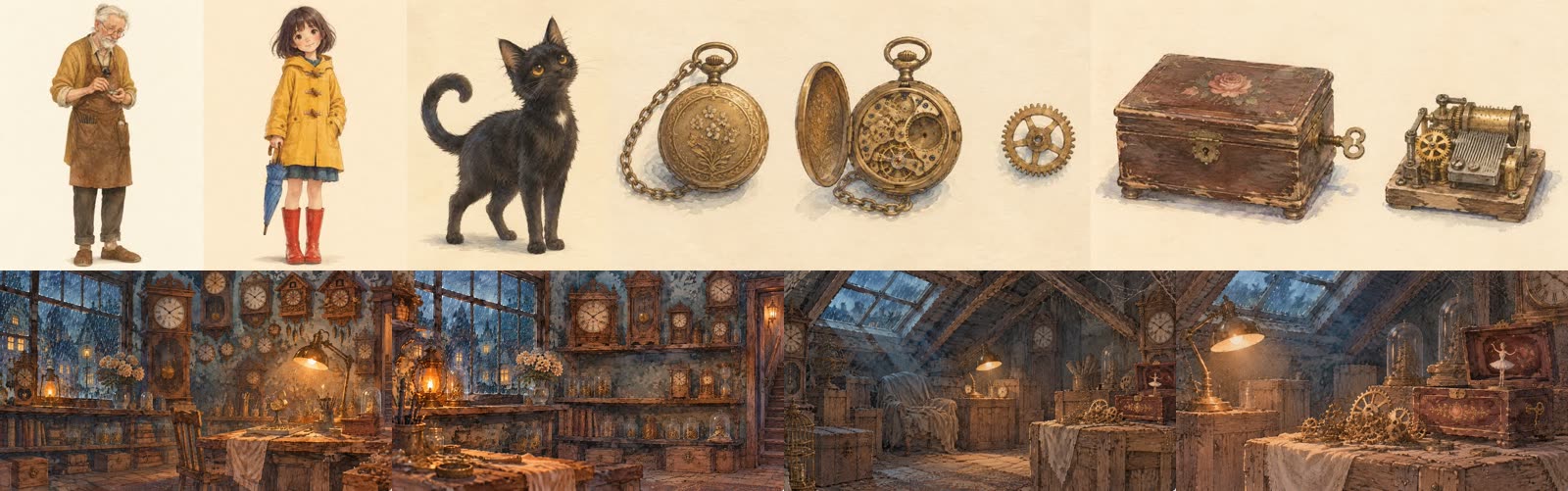
The Agent first made 3 style samples, then 9 designs: the clockmaker, Mia and the cat; the pocket watch in three states (closed, open with the gap, the single gear) and the music box with its mechanism; the shop and the attic from two angles each. The stairs appear in one shot only, so they got no design. The two reverse angles were drawn after the main shop and attic images, using them as references.
Result: The designs held in the storyboard: the clockmaker kept his white hair and beard, round glasses, mustard cardigan and brown leather apron in 8 shots; Mia her chin-length bob, yellow raincoat and red rain boots in 7; the cat its amber eyes and the white tuft on its chest in 7.
Drift and limits: The design has the clockmaker's hair combed back; a few shots gave him a small bun.
Step 3: Draw a storyboard frame for every shot
Draw one storyboard frame per shot from the designs and check them before paying for video: each frame becomes the first frame of its clip, so a mistake here carries into the motion.
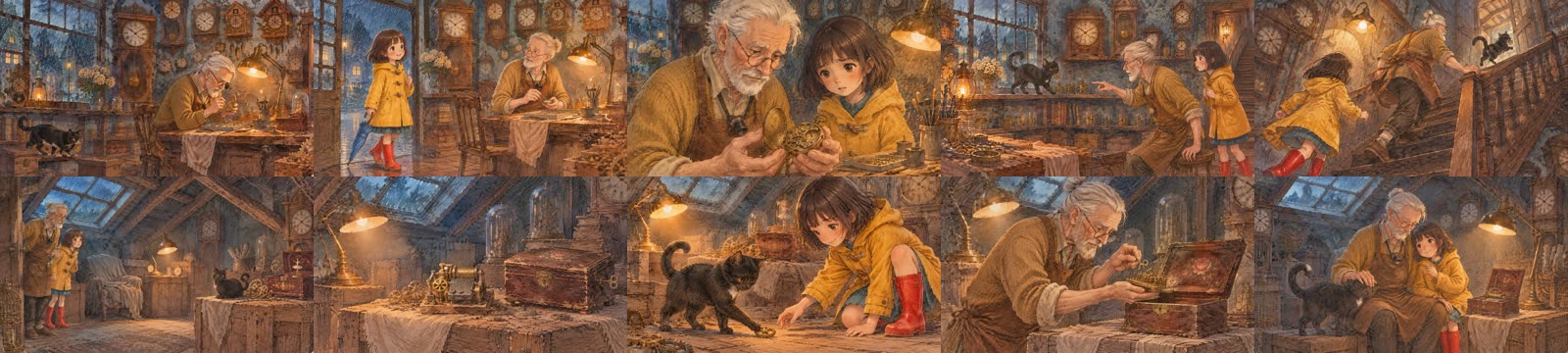
The Agent caught one prop problem at this step: the attic design showed the music box open, though the story only opens it in shot 9. Instead of redrawing the design, it wrote that the lid is closed into the following frames, and shot 7 came out closed. One frame was blocked by the image model's content filter by mistake; the credits came back automatically and a reworded retry worked.
Result: 10 frames. In the shots with all three characters (4, 5, 6 and 10) no one was mixed up and no extra person appeared, and the shop and the attic stayed the same places.
Drift and limits: The Agent checked the frames on one overview sheet rather than one by one. That is how shot 9 slipped through: its frame already shows the box open and a key in the clockmaker's hand, while its clip prompt asked him to put the mechanism in first.
Step 4: Turn each frame into a clip with a timed prompt
Use each storyboard frame as the first frame of its clip and write the prompt as the camera, then the action second by second, then what stays still: in our test most planned actions happened, but one shot planned as a single move came out as several angles.
Shots with several characters gave each one its own seconds instead of having all three act at once, and the empty shot 7 asked only for the light, the dust and the camera to move. Clips were made with MiniMax H3 Lite at 480p, 6 seconds each.
The Agent's prompt for shot 8, the cat returning the gear
Watercolor storybook animation, low static camera near the floorboards. 0-2s: the black cat bows its head and gently pushes the single brass gear across the boards with one paw until it rests against Mia's red rain boot, then looks up at her. 2-4s: Mia crouches lower and picks the gear up with her small fingers. 4-6s: she closes her fist around it and her expression softens into a tender smile; the cat's tail curls, ears relaxing. Warm lamp pool steady, background unchanged. Characters do not speak.
Every prompt ended with the same style sentence, left out here. "Characters do not speak" is there because the film is narrated.
Result: Shots 2, 3 and 8 did everything their prompts asked: Mia folds her umbrella and looks up while the clockmaker waves; he opens the watch and points at the gap as her face turns worried; the cat pushes the gear, Mia picks it up and closes her hand around it.
Drift and limits: Shot 5, the chase up the stairs, was cut by the video model into several angles instead of one continuous shot. In the redone shot 4 the cat jumped down but landed at the bottom of the frame instead of running right toward the stairs.
MiniMax H3 →Step 5: Add narration and music, then check the timeline
Place each narration line on its clip rather than at a guessed second, and read the timeline the cut step returns before the final cut: it shows which line lands on which shot, and when.
In our film the 7 narration lines ran 2.4 to 3.7 seconds each, and every one finished inside its 6-second shot. The voice results came back numbered out of order, and the Agent matched each line to its shot correctly.
In another test run of the same brief, every line landed on the wrong shot. Two things stacked up: the voice results were numbered out of the order they were sent in, and the clips ran 6.58 seconds instead of 6, so lines timed every 6 seconds drifted further ahead with each shot. Since then, blubiu places narration per clip and measures each clip's real length, and the cut step returns a timeline of every line, its clip and its seconds, with warnings for lines that overlap or get cut off at the end. The timeline also comes back with a price quote, so you can check it before paying for the cut.
Drift and limits: Narration placement was checked against the timeline, line by line; how the voice and music sound is for you to judge.
AI audio models →Step 6: Review the cut and redo only the broken shots
Watch the first cut, list what is broken, redo only those clips and re-cut with the same narration and music: the Agent's own review flagged 2 of the 10 shots, and fixing them took 2 new clips and 1 more cut.
blubiu's review step uses a model that watches the video. It flagged the cat bending out of shape mid-jump in shot 4 and the clockmaker's fingers merging with the key in shot 9. OpenArt's filmmaking guide says the same about generation in general: nobody gets a perfect scene on the first try.
Result: The final film: 59.5 seconds, 10 shots, all three characters recognizable from start to end, and the story told in order: the missing gear, the blame, the chase, the music box, the gear returned, the box wound up, all three together.
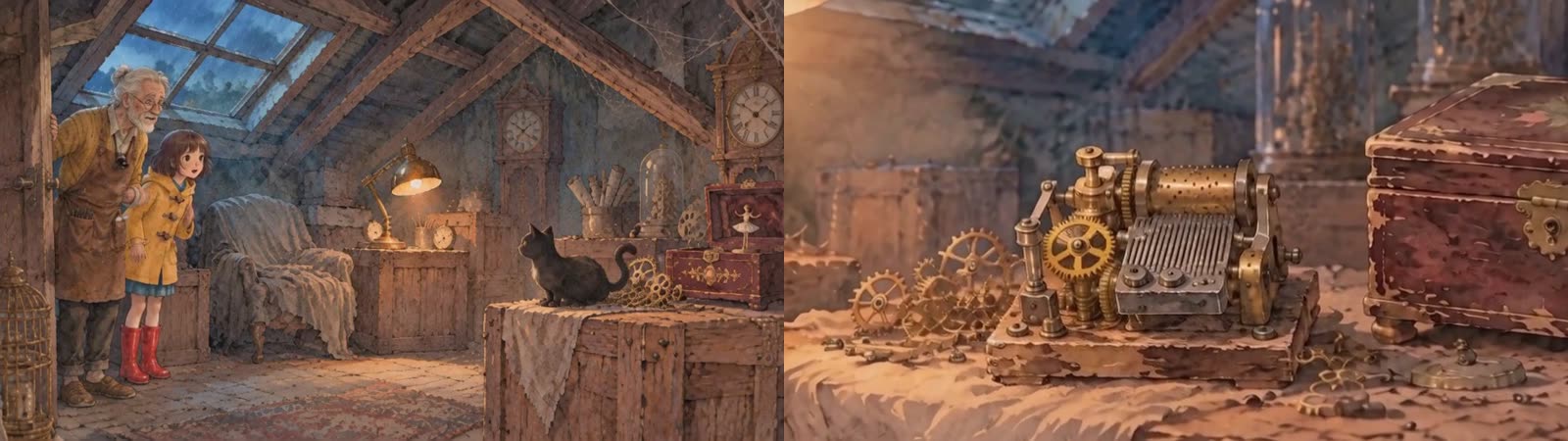
Drift and limits: What the review missed: in shot 6's wide view the music box is open, in shot 7 it is closed (picture below); the redone shot 9 lets the music box slide out of frame in its second half, leaving only the hands and the key; and the clockmaker's bun stayed.
How to keep characters consistent across a 1-minute AI film
Design each character once, draw every storyboard frame from those designs and start every clip from its frame; then check props and hair yourself, because that is where our film slipped.
Other tools reach the same goal in other ways. OpenArt's filmmaking guide adds three reference images of each character to every generation: a full-body sheet, a close view of the face and a skin and hair detail sheet. Its long-video guide uses a saved character for the face and a full-body picture for the outfit and hair, then gives each new clip the clip before it as a video reference, and notes that "fewer, longer clips mean fewer places where a character can change." Runway's guide suggests starting each generation from the last frame of the one before.
To make the designs yourself first, a character reference sheet puts a turnaround, expressions and color notes on one board, and a consistent character sheet gives three face angles plus front, side and back views.
| Character or thing | Held | Slipped |
|---|---|---|
| Clockmaker | White hair and beard, round glasses, mustard cardigan, brown apron | A small bun in a few shots that the design did not have |
| Mia | Chin-length bob, yellow raincoat, red rain boots | Nothing we found |
| Black cat | Amber eyes, white tuft on the chest | Bent out of shape mid-jump in one clip (redone) |
| Music box | The same box, closed in shot 7 as the story needs | Open in shot 6, closed in shot 7; slides out of frame in the redone shot 9 |
| Shop and attic | The same places from shot to shot | Nothing we found |
| All three together (shots 4, 5, 6, 10) | No one mixed up, no extra person | Shot 5 split into several angles |
How we tested: one brief, every step, every credit
We gave the blubiu Agent a 60-second brief on 16 November 2026, answered it as a user would, let images and clips through only after looking at them, and checked the finished film shot by shot from extracted frames.
The model behind the Agent can change, so a new run of the same brief will differ. Clips were made with MiniMax H3 Lite at 480p to keep costs down; the finished file is 1920×1080 with one audio track. Narration placement was checked against the timeline. All three characters are original and AI-made. Credits are what the test account was charged that day; the chat was billed by usage on top and is not in the table. The narration lesson in step 5 comes from a second run of the same brief.
| Step | What came back | Credits |
|---|---|---|
| Plan | 3 scenes, 10 shots of 6 s, narration lines; we asked for 2 changes | Chat usage only |
| Style, designs, storyboard | 3 style samples, 9 designs, 10 frames: 22 images; 1 more blocked by mistake and refunded | 176 |
| Clips | 10 clips of 6 s at 480p, plus 2 redone after review | 108 |
| Music | 1 track | 57 |
| Narration | 7 lines, 2.4 to 3.7 s each | 14 |
| Cuts | First cut, then the final cut with 2 shots replaced: 59.5 s | 10 |
| Total media | One 59.5-second film | 365 |
When this way is the wrong choice
- Films longer than a few minutes: our test was 59.5 seconds; OpenArt's Director mode goes up to 5 minutes and HeyGen up to three-minute sequences.
- Dialogue with lip sync: we used narration only; HeyGen and OpenArt's movie maker list lip-synced voices.
- Frame-accurate editing on a timeline: the Agent has no timeline editor; LTX Studio, Invideo and OpenArt do, and LTX exports XML for a pro editor.
- Acting the scene yourself: OpenArt's method copies a performance you film onto your character; our test worked from text and images only.
- Continuity you do not plan to check: the review caught broken motion but missed a music box that opened and closed between shots.
Next steps
Consistent Character Sheet Generator →
Design a character once, three face angles plus full body, to reuse in every shot.
MiniMax H3 (Hailuo) AI Video Generator →
See the video model behind our clips and what it handles well.
How to Make AI Story Videos for Kids (Tested) →
A shorter story for kids: one sentence to a 30.5-second film.
How to Make an AI Music Video: 3 Ways Compared →
Cut a film to a song instead of narration.
FAQ
How much does it cost to make an AI short film?
Our 59.5-second film used 365 credits of media on blubiu (22 images, 12 clips, a music track, 7 narration lines and 2 cuts), with the chat billed by usage on top. Invideo's guide puts its documented productions at $315 to $750 per finished minute and 2 to 5 days of work.
Can I make an AI movie for free?
Not a whole film on blubiu: you sign in first, and a one-minute film costs far more than the Free plan's monthly credits. LTX Studio says its free tier has full access to its filmmaking features, HeyGen's generator shows 2 free clips a day, and OpenArt says you can start making movies free.
How do I make an AI movie from a script?
Paste the script into the blubiu Agent with the length, the frame and whether you want narration, then read the shot list it makes before any image is drawn. We tested from a one-paragraph brief rather than a finished script: the Agent wrote the shots and the narration, and we asked for two changes before any image was made.
How do I keep characters consistent in an AI video?
Design each character once, draw every storyboard frame from that design and start every clip from its frame. That kept a clockmaker, a girl and a cat recognizable across all 10 shots of our film; what slipped was smaller: a hair bun, and a music box that opened and closed between shots.
How do I make a long AI video?
Join many short clips that share the same designs: our 59.5-second film is 10 clips of about 6 seconds. Fewer, longer clips leave fewer places for a character to change; OpenArt's guide says Seedance 2.5 makes single clips up to 30 seconds there, and its Director mode builds videos up to 5 minutes.
Sources and dates
- Questions come from Google autocomplete (English) for AI movie, AI short film, long AI video and consistent character searches, checked on 20 November 2026.
- Other ways, as their own pages describe them (read 20 November 2026): OpenArt's "AI Filmmaking: How to Make an AI Movie Step by Step" and "How to Make Long AI Videos with Consistent Characters" (openart.ai/blog, both published 19 November 2026) and its AI Movie Maker page; LTX Studio's AI movie maker page; Invideo's online movie maker page and its guide to making an AI short film (15 July 2026); HeyGen's AI movie maker page; Runway's article on character references (19 December 2025).
- Test results: our own test runs of the blubiu Agent on 16 November 2026; the characters are original and AI-made. The model behind the Agent can change, so a new run will differ.