
How to make AI story videos for kids: one sentence, six steps, a 30.5-second film, and what YouTube asks of you
The blubiu team · Published 2026-11-20
To make an AI story video for kids, write a three-part story (a problem, a turning point, an ending the character earns), design the character once, make one short clip per scene from those designs and join them with music or narration. Story video tools such as OpenArt's Director mode, Fliki, LongStories and Atlabs turn a story or script into a video several minutes long. On blubiu you can describe the story to the Agent: in our test on 16 November 2026, one sentence about a little fox seeing snow for the first time became a 30.5-second film in six steps we approved one by one. The same felt-wool fox appears in all six shots; the one flaw is about half a second where two foxes blend into a double image between two shots. The media cost just under 200 credits, with the chat billed by usage on top. For a narrated story without designing anything, the stickman animation maker writes, draws and narrates up to 60 seconds from one idea. Before posting to YouTube, set the video as made for kids and give every episode its own story.
Key takeaways
- Story first: YouTube's quality principles for kids content praise a complete narrative and a clear lesson; hard-to-follow, jumbled stories count as low quality.
- blubiu Agent: one sentence became a 30.5-second, six-shot film with the same fox in every shot; just under 200 credits of media, chat billed by usage.
- Music cost more than all six clips together: 57 credits against 48.
- Story video tools go longer: OpenArt's Director mode up to 5 minutes, Fliki up to 40 minutes on its top plan.
- On YouTube, you set "made for kids" yourself; those videos get no personalized ads and no comments.
What an AI story video for kids is made of
An AI story video for kids is a short animated story in which AI writes or follows the script, draws the characters and places, animates each scene into a clip and adds music or narration, while you decide the story and check each step.
Keep fixed
- Your story, its lesson and the character you choose
- One look from the first shot to the last, when the character and place are designed first
Free to change
- Each scene is its own generated clip of about 5 to 6 seconds in our tests, so a minute takes 10 or more clips
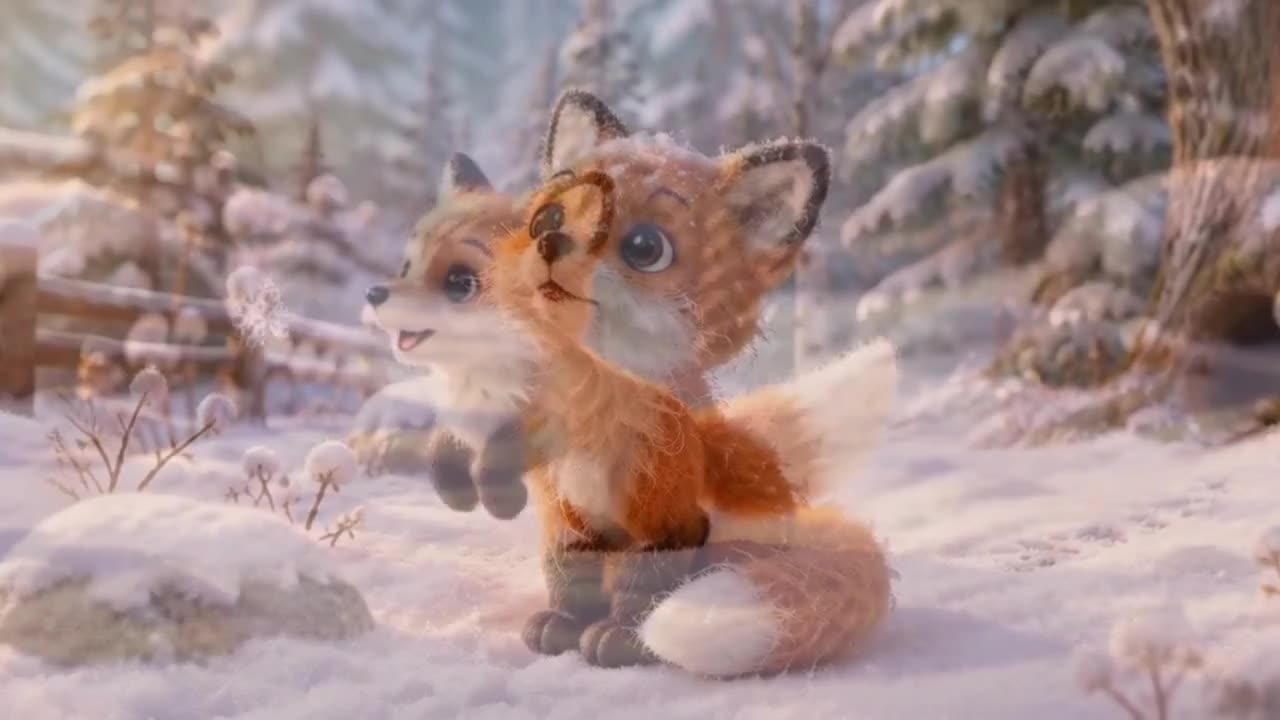
- Small slips happen where clips meet, like the half-second double image in our fox film
Ways to make an AI story video for kids, compared
Use a story video tool when you want a narrated video several minutes long from a script, the blubiu Agent when you want to approve the plan, the look and every shot before paying for video, and the stickman animation maker when a narrated stick-figure story is enough.
| Way | What you get | Cost, as its page states | Compared with blubiu |
|---|---|---|---|
| OpenArt Director mode | Type three story parts and attach a saved character; it plans scenes and makes the video with narration and music, up to 5 minutes; edit by chat or in a Timeline view | Not stated in its kids guide | Better: one 5-minute project with a timeline |
| Fliki | Paste a story, script or one-line idea; it splits it into narrated scenes with captions burned in; up to 5, 15 or 40 minutes by plan | Free plan: 3 minutes a month at 720p with a watermark; watermark removal from $28 a month | Better: much longer videos and a large voice library |
| LongStories.ai | Type a child's name, favorite animal and adventure; pick a style, a length (30 seconds to 5 minutes in its picker) and 16:9 or 9:16 | 200 free credits for characters and scripts; videos need a paid plan from $59 a month | Better: built around the child's own name, and paid plans include a commercial license for monetized YouTube channels |
| Atlabs | Idea, story or script; cast characters once; AI narrators and character voices in 40+ languages, kid-safe royalty-free music, 1080p, up to 10 or 15 minutes by plan | From $19; a free teaser of about 15 to 20 seconds | Better: automatic lip-sync for character voices and Premiere Pro export |
| blubiu Agent | Describe the story in a chat; it stops after the plan, the style, the designs, the storyboard and the clips for your OK; 30.5 s and 59.5 s in our tests | Credits per image, clip, music track, narration line and cut, with an estimate before each paid step; chat billed by usage | Weak spot: no timeline editor, no lip-synced dialogue tested, nothing over 1 minute tested |
| blubiu stickman animation maker | One idea becomes a narrated stick-figure story with captions and music, 20 to 60 seconds, 1080p MP4 | Writing the plan is free; each step shows its price; the Free plan's credits do not cover a whole video | Weak spot: stick figures only, 1 to 3 characters, one narrator |
Start with a three-part story kids can follow
Give the story a beginning, a middle and an end with one clear lesson or feeling: that is what story tools build on and what YouTube's own quality principles for kids content look for.
OpenArt's kids guide puts it as "a problem kids know, a turning point, and an ending the character earns." YouTube's quality principles describe high-quality kids stories as often having a complete narrative, with character development, plot and resolution, and a clear takeaway. Videos with jumbled storylines or no clear beginning, middle and end are on its low-quality list.
- Name one character and the one thing that happens to it: a little fox sees snow for the first time.
- Give it a shape kids know: a problem and its fix, or a feeling that changes from start to finish.
- Add the length, the frame (16:9 for YouTube) and whether you want narration or only music.
- Read the plan before anything is drawn and change any shot that does not move the story.
Result: One sentence was enough for 30 seconds: the Agent wrote the fox's feelings as a line from wary, to testing, to playing, to quietly enjoying, and said that this part was its own addition.
Make a story video from one sentence with the blubiu Agent
Open the Agent, describe the story in one sentence with its length, frame and sound, and approve six steps in turn: plan, style, character and scene design, storyboard, clips and music, final cut.
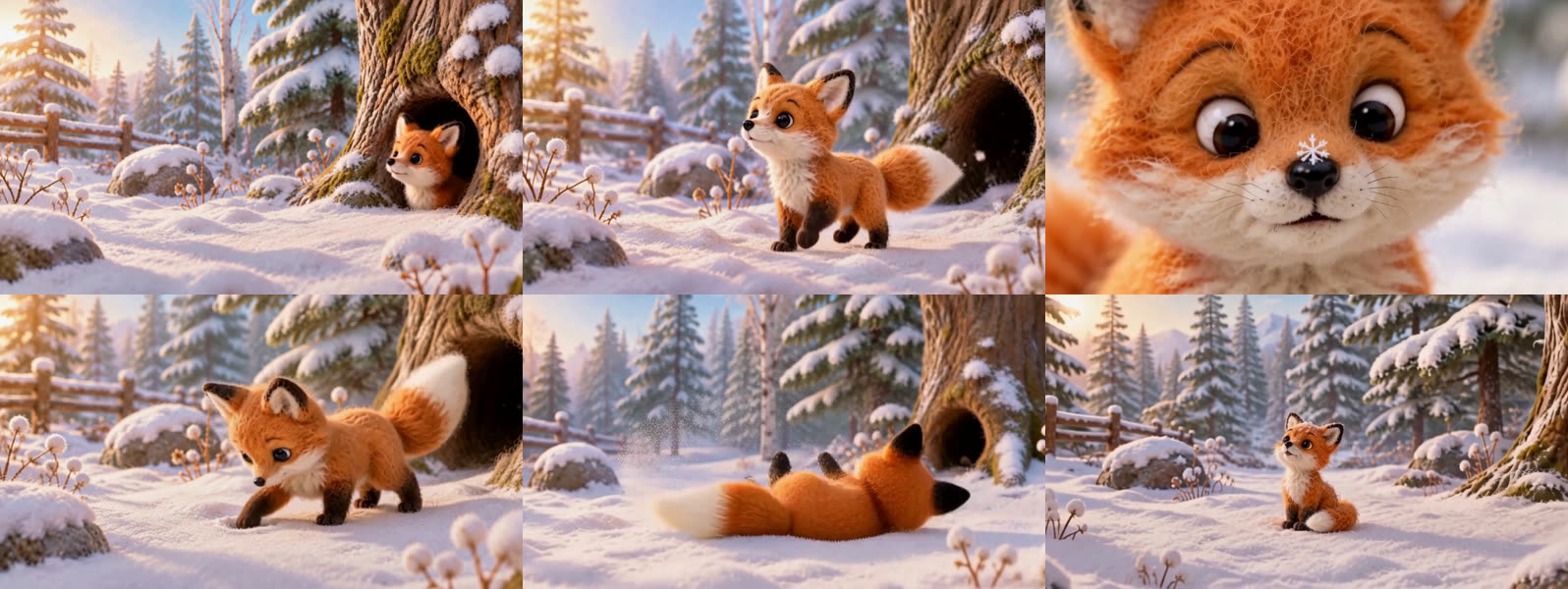
The plan had 6 shots of 5 seconds, each with its framing, the camera position, how it joins the previous shot and which way the fox faces. The design list was two images, one fox and one clearing; changes such as snow on the fox's nose were drawn straight into the storyboard frames instead of extra designs. Images and clips that did not depend on each other were sent off together. Clips were made with MiniMax H3 Lite at 480p to keep the cost down.
- Open the blubiu Agent and describe the story in one sentence, with the length, the frame and the sound.
- Read the plan: the shots, how each joins the last and which designs are needed. Nothing is drawn yet.
- Pick one of the 3 style samples.
- Check the character and scene designs, then the storyboard frame for each shot.
- Approve the clips and the music; the Agent gives an estimate when it asks for a credit budget.
- Watch the cut and ask for any shot to be redone.
Result: 30.5 seconds, 1280×720, six shots: the fox peeks out of a tree hollow, steps out and freezes, a snowflake lands on its nose, it tests the snow, rolls in it and sits in the middle of the clearing. A felt-wool, stop-motion look; light music and no narration, as asked.
Drift and limits: Where the rolling shot hands over to the last shot, about half a second shows two foxes blended into one double image (right). Every other shot change is a clean cut.
Keep the same character in every scene
Design the character and the place once, before any storyboard frame, and make every frame and clip from those designs: in our fox test that kept the same fox and the same clearing in all six shots.
Story tools do the same thing under other names: OpenArt says its Characters feature "saves a character once and reuses the character in every scene", and Atlabs says you cast your protagonist once. If you want to make the design yourself first, a consistent character sheet puts three face angles and front, side and back views in one image.
With three characters the same method held a clockmaker, a girl and a black cat across 10 shots; what held and what slipped is in how to make an AI movie.
Drift and limits: Shot changes are where things slip: the half-second double image in the fox film sits exactly at one. Watch each join before you post.
Consistent character sheet →Add music, narration and captions
Ask for the sound in your first message: our fox film used a light music track and no narration, as asked, and our clock shop film placed 7 narration lines on their shots.
Music was the single most expensive item in the fox film: 57 credits, more than the 48 for all six clips together. The Agent pointed this out before it asked to spend it.
Each narration line has to fit its shot: in the clock shop film each of the 7 lines ran 2.4 to 3.7 seconds inside a 6-second shot. Check the timeline the cut step returns before the final cut; in another test run, lines landed on the wrong shots, as the AI movie guide explains.
Captions: the stickman animation maker burns the narration in as captions. We did not test captions with the Agent.
Drift and limits: This guide reports what the files and the cut timeline show about sound; how the music and voices sound is for you to judge.
AI audio models →The quickest way: a narrated stick-figure story
If stick figures are fine, the stickman animation maker turns one idea into a narrated video with captions and music: its 40-second story about a monster under the bed took 5.6 minutes from plan to finished video.
- Open the stickman animation maker, pick Story and describe the idea in a sentence or two.
- Choose about 20, 30, 40 or 60 seconds and one of 10 ElevenLabs narrator voices.
- Read the plan, which takes about a minute and is free to edit, then draw, narrate, add motion and make the video.
Result: In the stickman page's test, a stickman afraid of the monster under his bed finds a tiny monster even more afraid of him, and they end up sharing the bed: ten narration lines, 40 seconds, a 1080p MP4 with captions and an optional Suno v5 instrumental.
Drift and limits: One narrator tells the whole story; characters do not speak their own lines. 1 to 3 characters, only English narration tested, vertical untested, and the Free plan's monthly credits do not cover a whole video.
Stickman animation maker →Posting AI kids stories on YouTube: made for kids, AI labels and money
Set the video as made for kids yourself, select Yes under AI use if the music is AI-generated or anything looks realistic, and give every episode its own story: those are the three YouTube rules that matter most for AI kids stories.
- Made for kids: YouTube's checklist includes animated characters and stories for children, and a kid in the US is anyone under 13. YouTube says labeling your content correctly is your legal responsibility under COPPA. Set it per video under Audience, or for the whole channel in Settings > Channel > Advanced settings.
- What changes: made-for-kids videos get no personalized ads, no comments and no notification bell, among other features. Contextual ads can still run, and YouTube says the change may lower some creators' revenue.
- AI label: YouTube requires disclosure for AI content that seems realistic. Non-realistic content, such as someone riding a unicorn through a fantastical world, does not need it, but AI-generated music is on its list of examples to disclose. In YouTube Studio that is Attributes, AI use, Yes; YouTube says disclosure alone won't limit the audience or the ability to earn money.
- OpenArt's kids guide tells you to tick the AI box on every video. YouTube's own page is narrower, but since ticking it costs nothing, ticking it when in doubt is the safe choice.
- Money: YouTube does not monetize mass-produced, templated videos, including characters put in the same situation over and over with the same outcome. It lists "using AI to visualize a unique character and narrative you invented" as fine, and a series with the same characters is fine when each video has a distinct storyline.
- Quality: made-for-kids videos are judged by YouTube's quality principles, and a video found to break them may get limited or no ad earnings; hard-to-follow stories with no clear beginning, middle and end are on that list.
How we tested: one sentence, six steps, every credit
We gave the blubiu Agent one sentence on 16 November 2026, approved each step as a user would, and checked every shot from frames extracted from the finished file.
The brief: a little fox sees snow for the first time, about 30 seconds, 16:9, no narration, light music, clips with MiniMax H3 Lite at 480p. The model behind the Agent can change, so a new run of the same sentence will differ. The fox is an original, AI-made character. Credits are what the test account was charged that day; the chat was billed by usage on top and is not in the table. The stickman figures are from the tests reported on the stickman animation maker page, and the clock shop film is covered in the AI movie guide.
| Step | What came back | Credits |
|---|---|---|
| Plan | Text only: 6 shots of 5 seconds, a line of feelings, a 2-image design list | Chat usage only |
| Style, designs, storyboard | 3 style samples, 1 fox, 1 clearing, 6 storyboard frames: 11 images | 88 |
| Clips | 6 clips, MiniMax H3 Lite, 480p | 48 |
| Music | 1 light music track | 57 |
| Final cut | 30.5 s, 1280×720, cut twice | About 3 to 6 |
| Result | Same fox in all 6 shots; one half-second double image between two shots | Just under 200 in all |
When this way is the wrong choice
- You want a 5-minute episode in one go: our longest test was 59.5 seconds; OpenArt's Director mode runs up to 5 minutes and Fliki up to 40 minutes on its top plan.
- Characters must talk with moving mouths: we used music and narration only; Atlabs lists automatic lip-sync.
- You plan dozens of near-identical uploads: YouTube does not monetize templated, mass-produced videos, whichever tool made them.
- You want it free with no account: blubiu needs you to sign in, and a film like our fox costs more than the Free plan's monthly credits.
Next steps
AI Stickman Animation Maker →
Make a narrated stick-figure story from one idea, with captions and music.
How to Make an AI Movie With Consistent Characters →
Read how we kept three characters consistent across a 1-minute film.
Consistent Character Sheet Generator →
Design your story character once, from one line or a photo.
How to Make AI Cartoon Videos: 3 Ways Compared →
Read more on making AI cartoon videos.
FAQ
Can I make AI story videos for kids with free tools?
Partly. Fliki's free plan gives 3 minutes a month at 720p with a watermark, Pictory's trial gives 300 credits for 14 days with a watermark on what you export, and LongStories gives free credits for characters and scripts but needs a paid plan for videos. On blubiu you sign in first; writing a stickman plan is free, but a whole video, or a film like our fox test, costs more than the Free plan's monthly credits.
What prompt should I give an AI story video generator?
One sentence with the character, the one thing that happens, the length, the frame and the sound. Ours was: a little fox sees snow for the first time, about 30 seconds, 16:9, no narration, light music. The blubiu Agent turned it into a six-shot plan we could edit before anything was drawn.
How do I make 3D animated kids story videos with AI?
Ask for a 3D animated look in your first message and pick from the three style samples the Agent makes before anything else; every later image follows the sample you pick. We did not ask for 3D in our tests: the fox came out with a felt-wool, stop-motion look and the clock shop film as a watercolor storybook.
How do I create a kids cartoon video with AI?
Write a short three-part story, design the cartoon character once, make one clip per scene from those designs and join them with music, as in the steps above. More in how to make AI cartoon videos; to make a single drawing your child made move, use animate drawing.
Does YouTube Kids monetize AI content?
It can, if it is not templated or mass-produced: YouTube's policy accepts using AI to visualize a unique character and story you invented. Made-for-kids videos are also judged by YouTube's kids quality principles, and they show only contextual ads, not personalized ones, which YouTube says may lower revenue.
Is AI-generated kids content allowed on YouTube?
Yes, with three conditions from YouTube's own pages: set it as made for kids if it is aimed at children, disclose it under AI use if it has AI-generated music or looks realistic, and make each video its own story rather than a template. A fully animated, non-realistic story does not need an AI disclosure by itself.
Sources and dates
- Questions come from Google autocomplete (English) for AI kids story video searches, checked on 20 November 2026.
- YouTube rules are from YouTube Help (support.google.com/youtube), read on 20 November 2026: Disclosing use of GenAI content, Determining if your content is made for kids, Set your channel or video's audience, How ads work on made-for-kids content, YouTube channel monetization policies, and the quality principles for kids and family content.
- Other tools, as their own pages describe them (read 20 November 2026): OpenArt's "How to Make AI Animated Story Videos for Kids on YouTube" (openart.ai/blog, published 19 November 2026), Fliki's AI story video generator page, LongStories.ai's AI kids video generator page, Atlabs' kids stories page and Pictory's story to AI video page.
- Test results: our own test runs of the blubiu Agent on 16 November 2026; the characters are original and AI-made. The model behind the Agent can change, so a new run will differ. Stickman figures are from the tests on the stickman animation maker page.