
AI Character Reference Sheet Maker
A character reference sheet puts a character's turnaround, expressions, details and palette on one board; blubiu makes one from a line.
What is a character reference sheet?
A character reference sheet is a single board that shows everything about a character at a glance: a turnaround of front, side, back and three-quarter views, a row of expressions, close-ups of the signature details, the color palette with hex codes and a few personality traits. It is also called a character design sheet or a model sheet. blubiu's maker builds one from the character's name, a short description and a style, as a single 16:9 4K image with the labels printed on it.
Checked 2026-11-06
Who it's for
- +You have an IP character or mascot and want one board that shows it off to clients, followers or a licensing partner.
- +You are pitching a character and need the turnaround, expressions and palette in one shareable image.
- +You want a poster-style sheet for social media or a shop listing.
- +You run a brand, shop or café with a mascot and want a one-page character overview to hand to designers and partners.
- +You draw original characters or take commissions and want a ref sheet that shows the turnaround, expressions and colors in one image.
When not to use it
- −You need a production turnaround to keep the character on-model in later scenes and videos — make the turnaround sheet first; it is the reference, this board is the showcase. AI Character Turnaround Sheet Generator →
- −You want to design a mascot by picking options rather than describing it. AI Mascot Generator →
- −You want three design directions, a locked main view, a reference board and an expression sheet as separate files — hand it to the Agent. Go →
How to make a character reference sheet
- 01
Name them and describe them
The name is printed on the sheet, so use letters. Two or three lines on who they are, what they are for and what they are like is enough; the design decisions — body shape, the one memorable feature, the face, the palette — are worked out from it.
- 02
Pick a style
3D animation, plush, flocked, vinyl toy, clay or 2D. An optional banner line (brand, country or series) goes under the title.
- 03
Get the board
One 16:9 4K image: title, intro, hero, turnaround, six expressions, detail callouts, palette with hex codes, traits. Every label is spelled as given. Save the file to your device or keep it in your media.
Tips for better character reference sheet results
Name the one memorable feature and where it sits
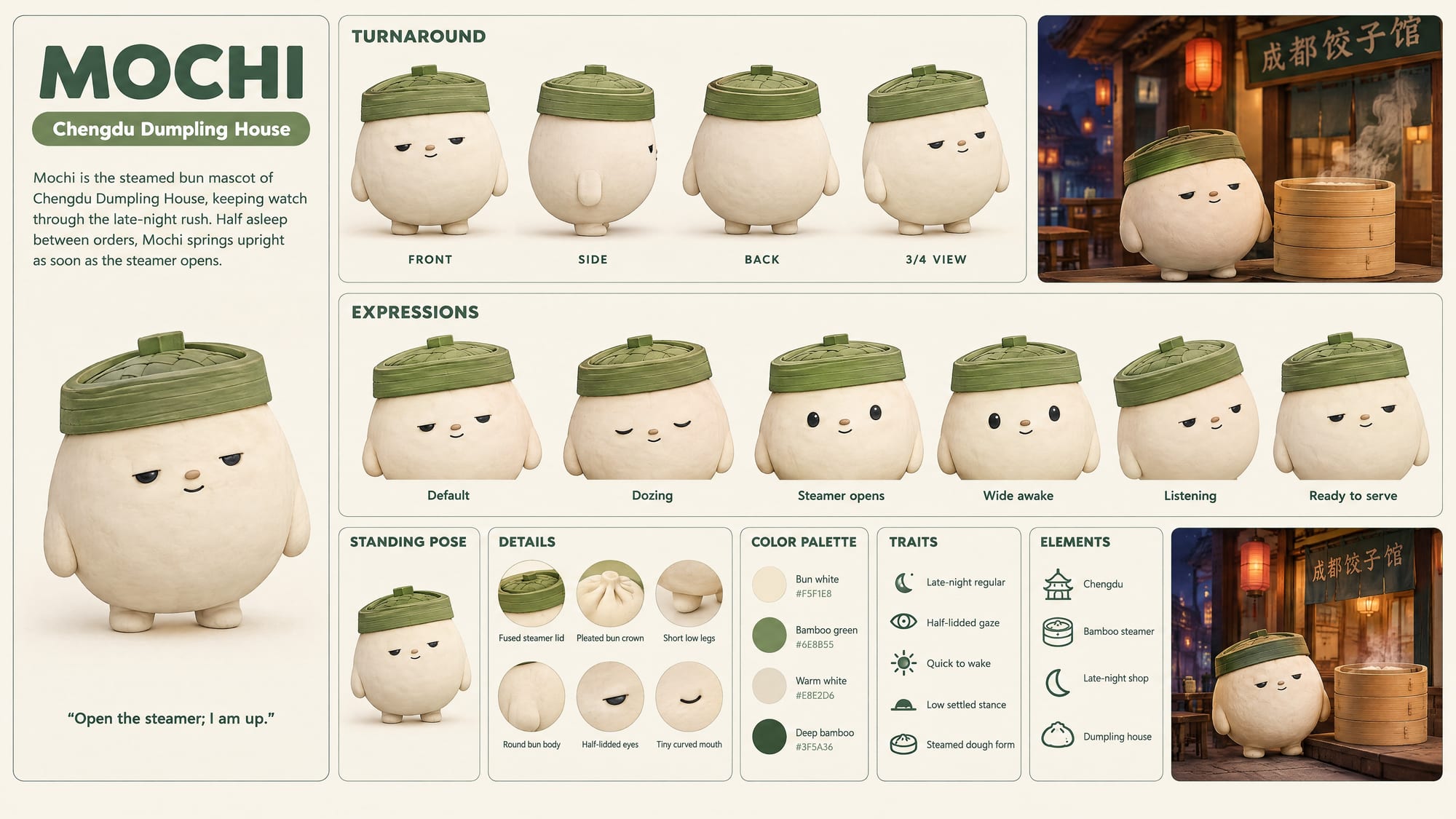
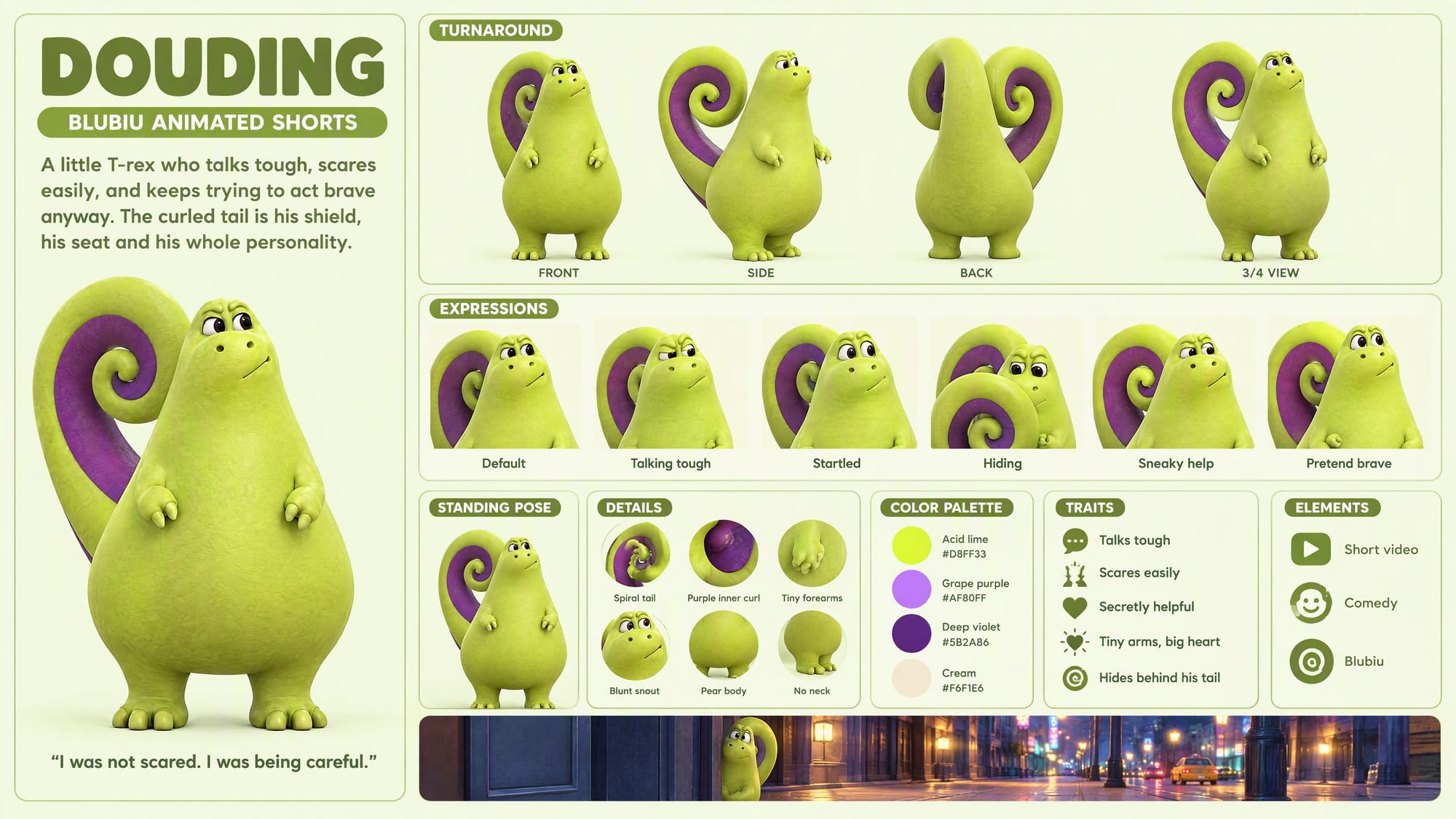
The design is planned around one signature feature that changes the outline, such as a tail that curls into a spiral or a steamer lid worn as a hat. Name it in your description and say where it sits; if you don't, one is chosen for you. Surface extras like blush, a pale belly patch or dot eyes are held to one at most, so they can't be the signature.
Mention the character's world, not only its look
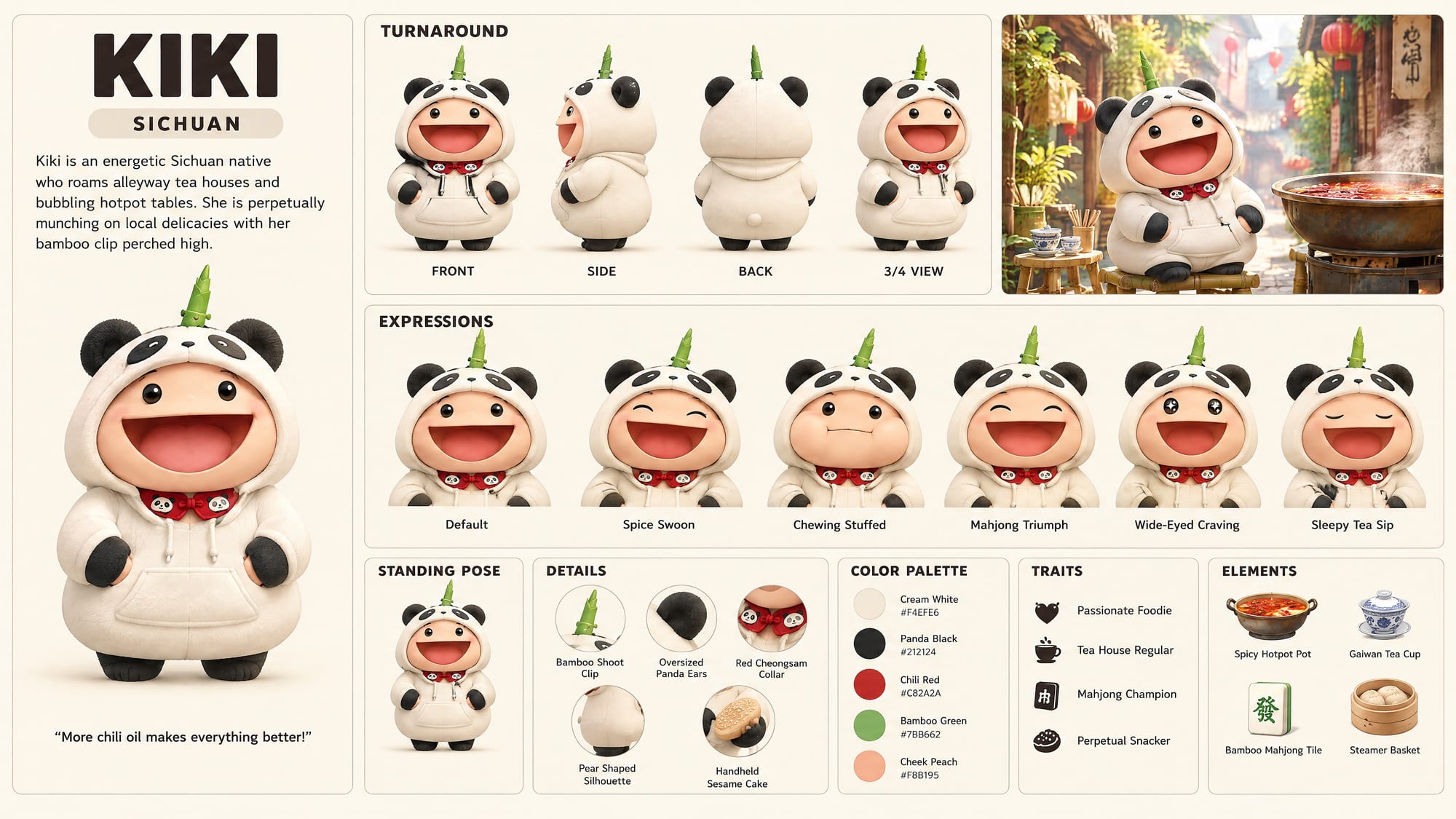
Places, food, a brand or a series named in your description become the ELEMENTS icons and shape the intro text. Kiki's brief names hotpot, tea houses and mahjong; they came back as a hotpot, a gaiwan tea cup and a mahjong tile under ELEMENTS, and as expressions like Mahjong Triumph. Say who the character is for, too: a dumpling-shop mascot and the lead of a comedy short get different traits.
Describe personality as behavior
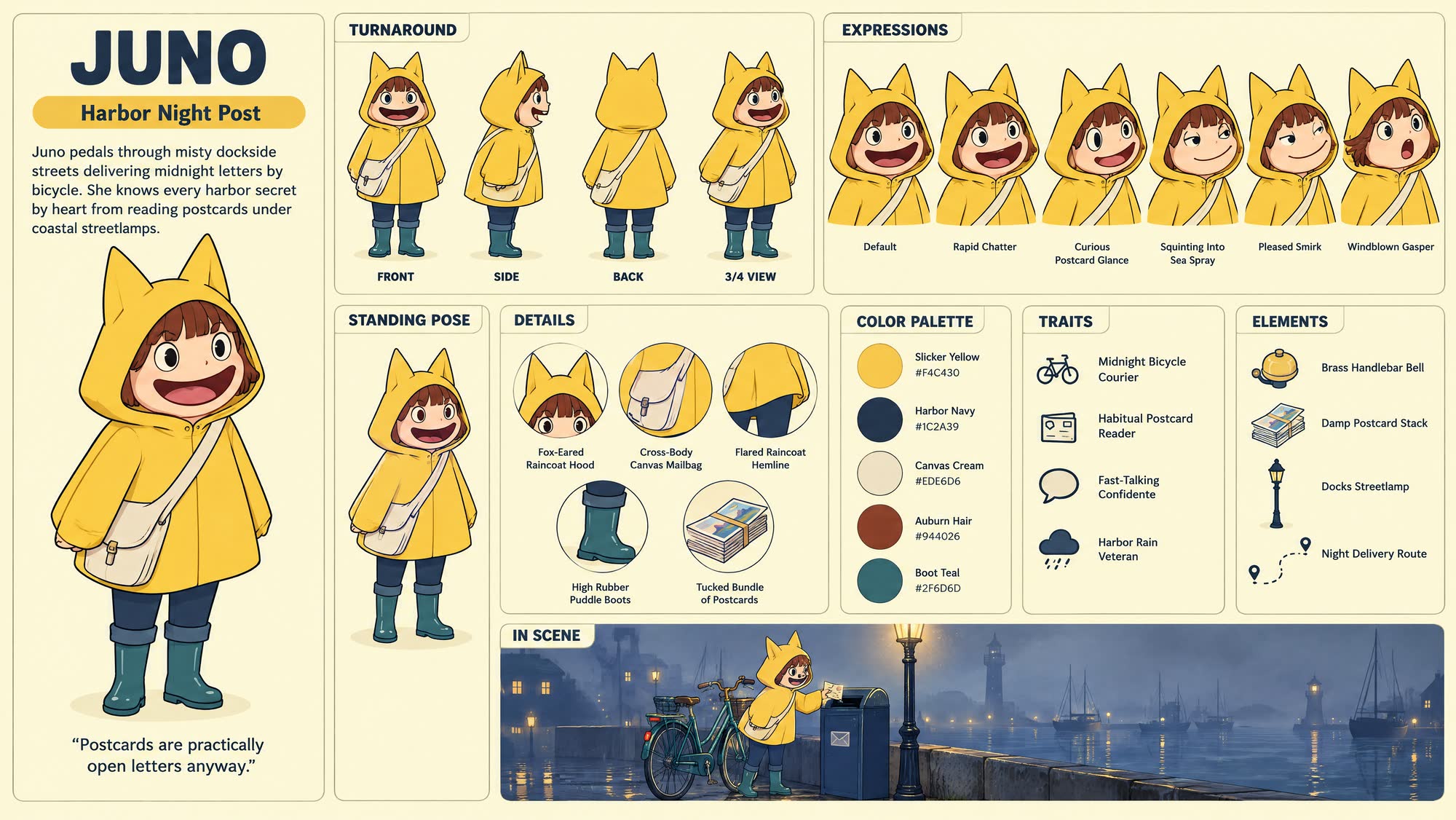
The six expression labels and the traits list are written to fit the personality, starting with Default. "Talks tough, scares easily, keeps trying to act brave" gives the board more to draw than "cute and friendly": on the Douding board it became Startled, Hiding and Pretend brave panels and a trait that reads Hides behind his tail. Juno's "always reads the postcards before she delivers them" came back as a Curious Postcard Glance expression, a Habitual Postcard Reader trait and her motto.
Keep the name and banner in plain English letters
Everything printed on the board is English, and the name is printed in capitals. Use letters or pinyin for the name, because image models still misspell Chinese characters inside pictures. Leave the banner empty and a short tagline is written for you.
Pick one of the six styles; there is no photoreal
The board comes in 3D animation, plush, flocked, vinyl, clay or 2D, the styles that suit IP characters and mascots. There is no photoreal option: for a real-looking person, make a consistent character sheet instead, which also keeps the face from three angles.
Need the character again? Make the turnaround first
The board is drawn from your words, not from an uploaded image, so two runs give two takes on the character. If it has to stay identical across many images and videos, make a character turnaround sheet as the production reference, then use this board to present it.
Character reference sheet examples
All of these were generated on blubiu.
Character reference sheet vs. similar tools
| Tool | You give | You get | Best for |
|---|---|---|---|
| Character reference sheet (this page) | A name, a two-to-three line description, a style and an optional banner | One 16:9 4K board: hero image, four-view turnaround, six expressions, detail callouts, palette with hex codes and traits, all labeled | Presenting a character: client pitches, social posts, shop listings, licensing decks, commissions |
| Character turnaround sheet | A one-line description, a style, up to 2 reference images | Front, side and back views at full size, with no text | The production reference you attach to later images and videos |
| Mascot generator | Picks: animal, use, personality, material and color | A front, side and back turnaround of an animal mascot | Designing a brand mascot without writing a prompt |
| Consistent character sheet | A description of a person or up to 2 face photos | Three face close-ups plus front, side and back full body | Real-looking people you will dress in the AI outfit changer or put in videos |
Models behind the character reference sheet
Character reference sheet FAQ
What is a character reference sheet?
A reference sheet (often shortened to ref sheet) is a single board that documents a character: how it looks from several angles, how it emotes, its signature details and its colors. Artists make them so anyone drawing the character later keeps it consistent; studios and brands use them to present a character.
Is this the same as a turnaround sheet?
A reference sheet is a showcase board, while a turnaround sheet is the production reference: three or four full-size views you feed into later generations. This board includes a small turnaround among many panels, so it is for showing the character, not for driving further images. Make the turnaround first, then this board.
Why is it 4K?
The board has twenty-odd labels and a dozen small panels. At 2K the text gets soft; at 4K every label and swatch stays sharp.
Can the labels be in Chinese?
Not yet. Image models still misspell Chinese characters inside pictures, so the sheet keeps all printed text in English. Your description can be in any language.
What if a panel is off — the wrong expression or a missing detail?
Run it again with the description tightened on that point: name the feature and where it sits. The layout is fixed, so only the character changes between runs.
Is the character reference sheet maker free to try?
Yes. The Free plan includes monthly credits you can spend here, and the Generate button shows the exact cost before you confirm. Failed generations are refunded automatically; plans and credit packs are on the pricing page.
Can I upload my existing character?
No. The maker draws the board from your name, description and style; it has no image upload, so the character is designed fresh on every run. For an existing design, describe its shape, colors and signature feature as exactly as you can, or use the character turnaround sheet generator, which takes up to two reference images.
Can I use the hex codes as brand colors?
Use them as a starting palette. The four or five hex codes are picked to match the colors in the design and printed next to each swatch, but they are not measured from a brand guide, so check them against your exact brand values before they go to print or into a style guide.
Which model makes the board?
GPT Image 2.6 Sunburst at 4K, an image model that can print text; a board took 1 to 4 minutes in our tests. The examples on this page were made earlier with 2.5 Flare. Before that, a text model turns your brief into design decisions and the board's wording, and a checker sends them back for one revision if they break the layout rules. If the brief still can't become a valid design, you get an error before any image is generated.
What can I do with the board next?
Post it, pitch with it, or keep it as the character's one-page guide. For new images and videos, use a full-size turnaround instead of the board: attach it in reference to video or the image generator AI as the reference. The board's labels and small panels are made for people to read, not for a model to copy.
Tools to pair with the character reference sheet
AI Character Turnaround Sheet Generator →
Make the production reference first: full-size front, side and back views you attach to later shots.
AI Mascot Generator →
No character yet? Design a brand mascot by picking options, then describe it here to present it.
Consistent Character Sheet Generator →
For a real-looking person, which this board doesn't draw, pin down the face from three angles plus the full body.
AI Outfit Changer →
Show a person's wardrobe: dress a saved consistent character sheet in new outfits and poses.
Create Video with AI →
Animate the character with its turnaround as the reference; the board's small panels are for presenting, not for driving video.
Other creation tools
Wire script, character, shot and voice nodes into one pipeline and generate it clip by clip, with the same character in every clip.