
AI Outfit Changer
An AI outfit changer puts new clothes on a character: pick your character, a pose and an outfit, and get the same person dressed.
What is an AI outfit changer?
An AI outfit changer is a tool that puts new clothes on a character, and blubiu's takes three pictures (your character, a pose and an outfit) and returns one image of the same person wearing that outfit in that pose. Pick from 175 poses and 90 outfits in our own libraries or upload any pose or clothing image; photoreal, anime, semi-realistic and 3D characters all work.
Checked 2026-11-04
Who it's for
- +You run an AI influencer and need the same person in a new look for every post.
- +You are building a comic, story or game character and want their wardrobe and poses on model.
- +You have an outfit image and want to see it on your own character, not on a stock model.
- +You want a lookbook: one character in a dozen outfits and poses, all clearly the same person.
When not to use it
- −Checking how a real store product fits you before buying: this draws a picture of a character, it does not measure fit or size.
- −Putting revealing clothes on someone without their consent, or making anyone look undressed: this tool is not for that, and the outfit library has no lingerie or see-through clothing.
- −You don't have a character yet: make a consistent character sheet first, then come back. Consistent Character Sheet Generator →
How to use the AI outfit changer
- 01
Pick your character
Choose a character you saved, or upload one image of them. A consistent character sheet with three face angles and a full body gives the most reliable face; a single front photo works, but the side and back are guesses.
- 02
Pick a pose and an outfit
Browse 175 poses (standing, sitting, kneeling, lying, action, upper body) and 90 outfits (seasonal, formal, sport, sleep and lounge, swimwear, traditional, menswear), or upload your own. Uploaded photos only lend their pose or their clothes, never the face.
- 03
Add a scene if you like, then generate
Leave notes for the background, expression or light, such as under cherry blossoms, smiling. The identity, pose and outfit always come from the three images.
Tips for better AI outfit changer results
Start from a character sheet, not a single photo
The character image is the only source of the face. A consistent character sheet shows it from the front, three-quarter and profile plus the full body from three sides, so a turned head or a back view still looks like the same person. From one front photo, the side and back are the model's guess.
Pick the pose for what the outfit needs to show
Upper-body poses are framed from the top of the head to the waist, so shoes, tights and hemlines fall out of frame. When the point of the outfit is the shoes or the length of a skirt, pick a full-body standing or walking pose.
Show the whole outfit in an uploaded clothing image
Only what is visible in the outfit image can carry over. A front view of the complete outfit on a plain background, whether flat lay, mannequin or worn, gives the most detail; a cropped photo leaves the missing pieces to guesswork.
Use notes for the scene, not the clothes
Notes set the background, expression and light, such as on a rooftop at sunset, laughing. The clothes always come from the outfit image, so to change the look, change that image rather than describing a different dress.
Swimwear on photoreal characters: choose a one-piece
In our tests a one-piece swimsuit worked on a photoreal character, while bikinis were refused by the image models on photoreal characters and accepted on anime and 3D ones. A refused run costs nothing; the credits come back automatically.
Pick the model for detail or speed
In our side-by-side test, GPT Image 2.5 Flare kept every outfit detail; Seedream 5.0 Pro also got the details right but took about four minutes; Nano Banana Pro turned white tights skin-colored. Start with Flare, the default.
AI outfit changer examples
All of these were generated on blubiu.
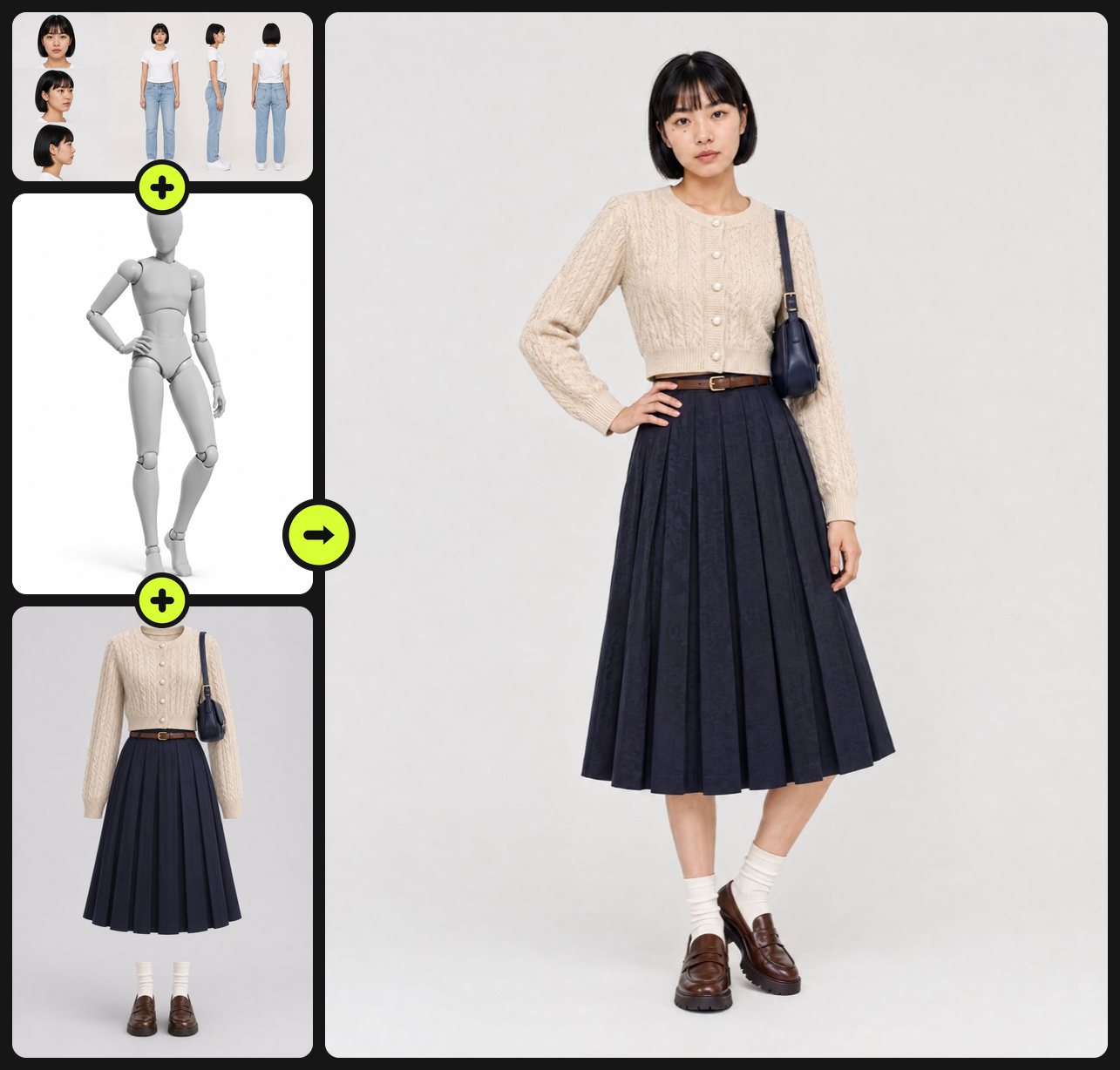
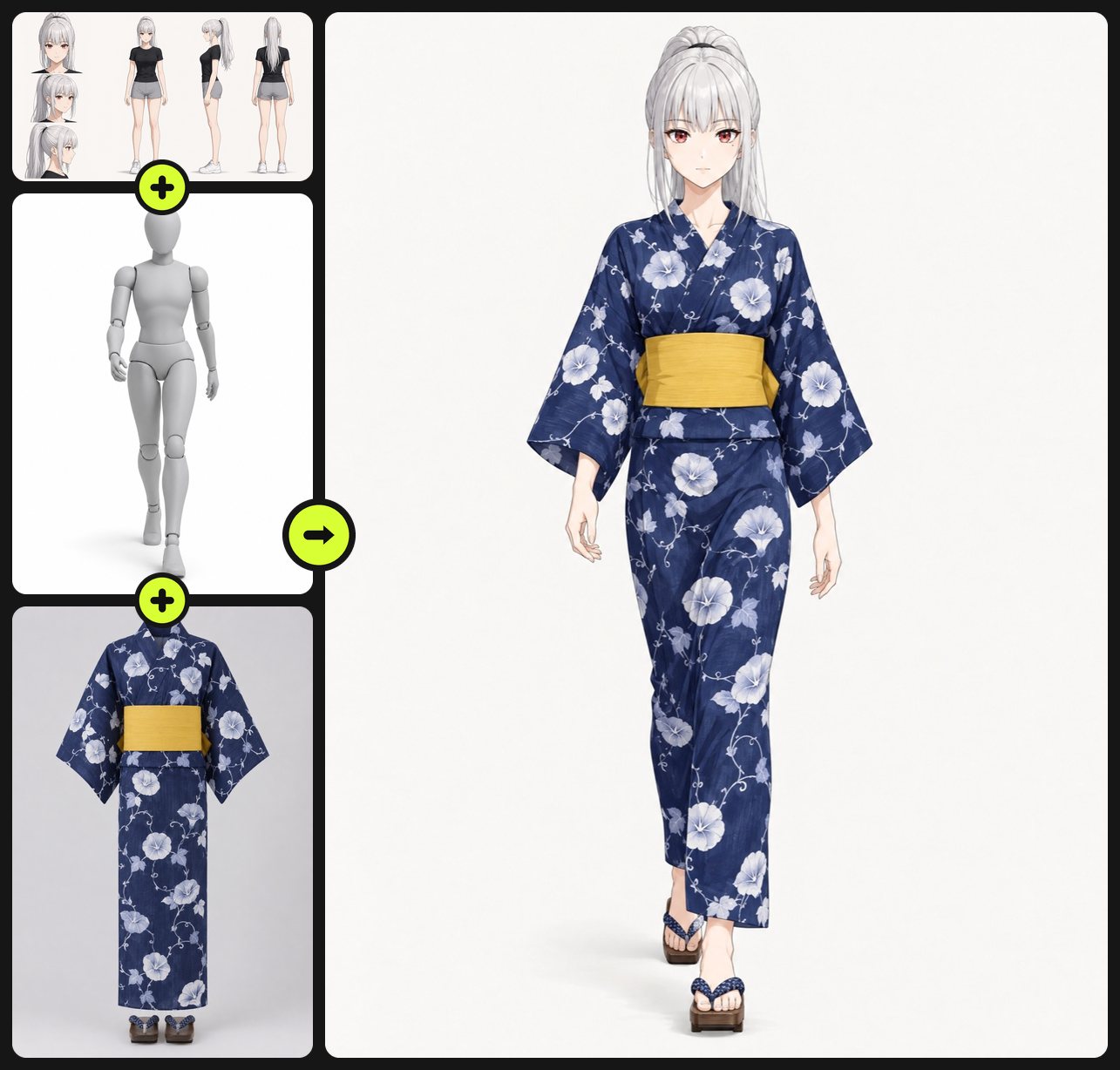
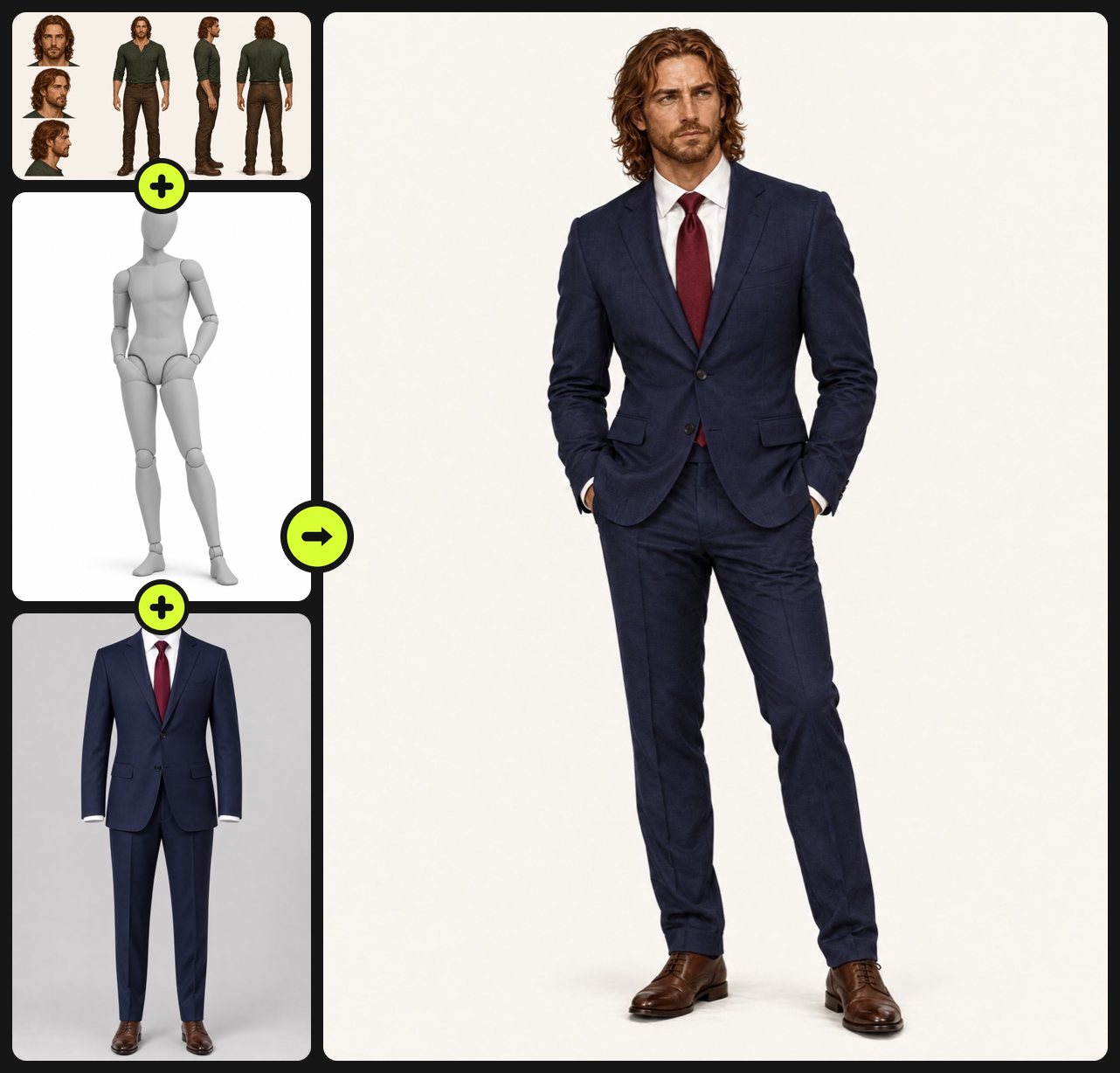
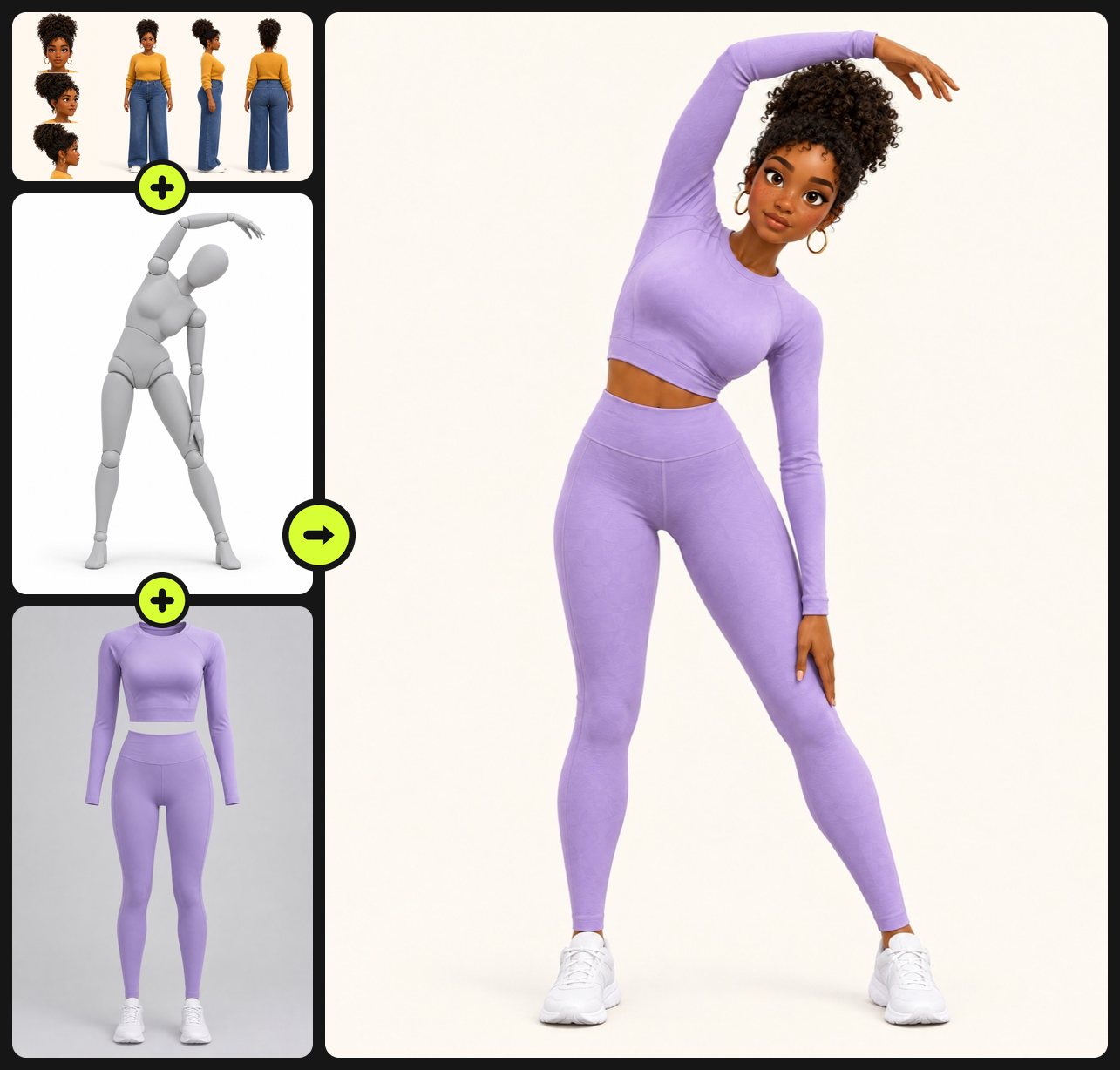
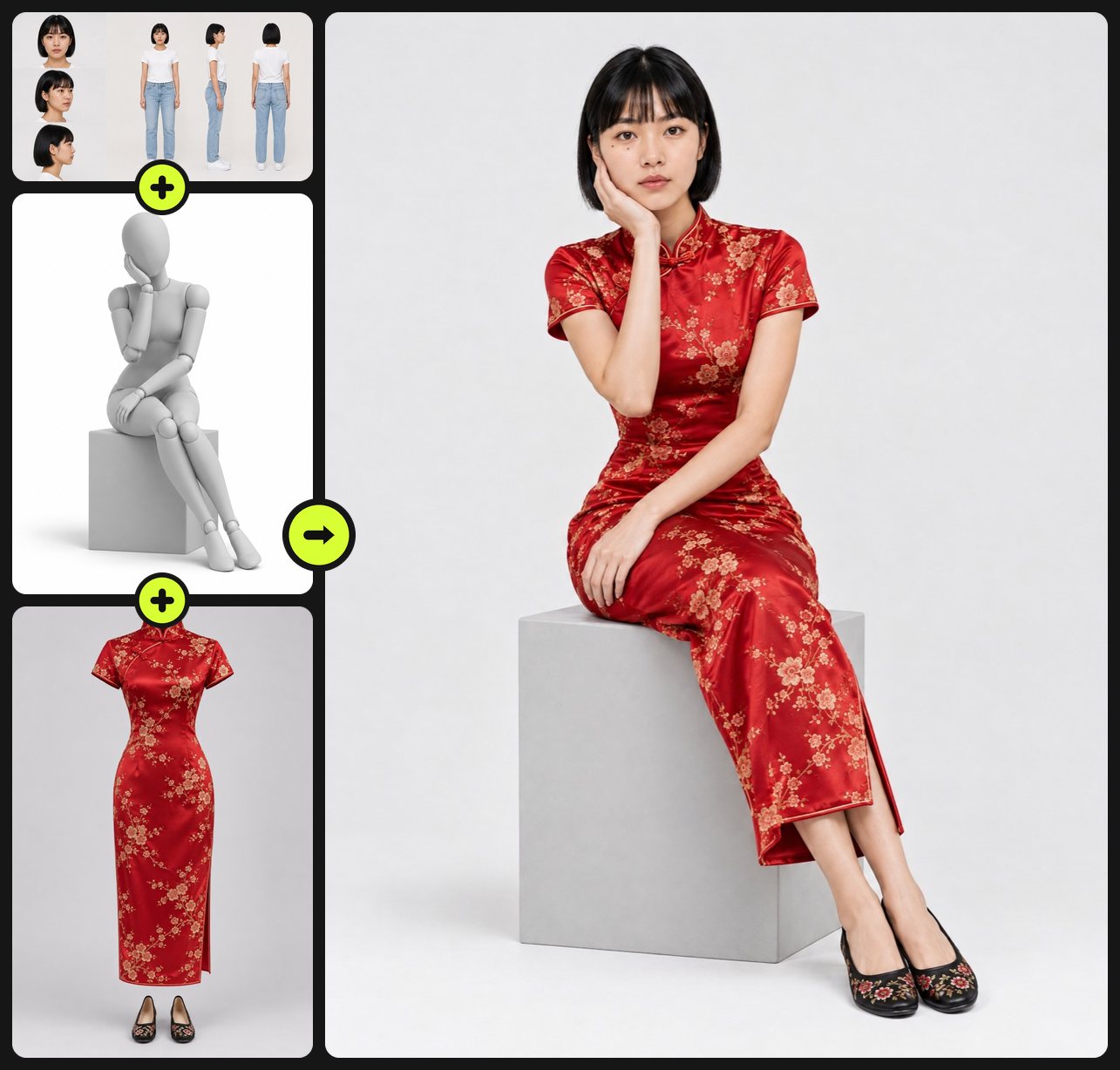
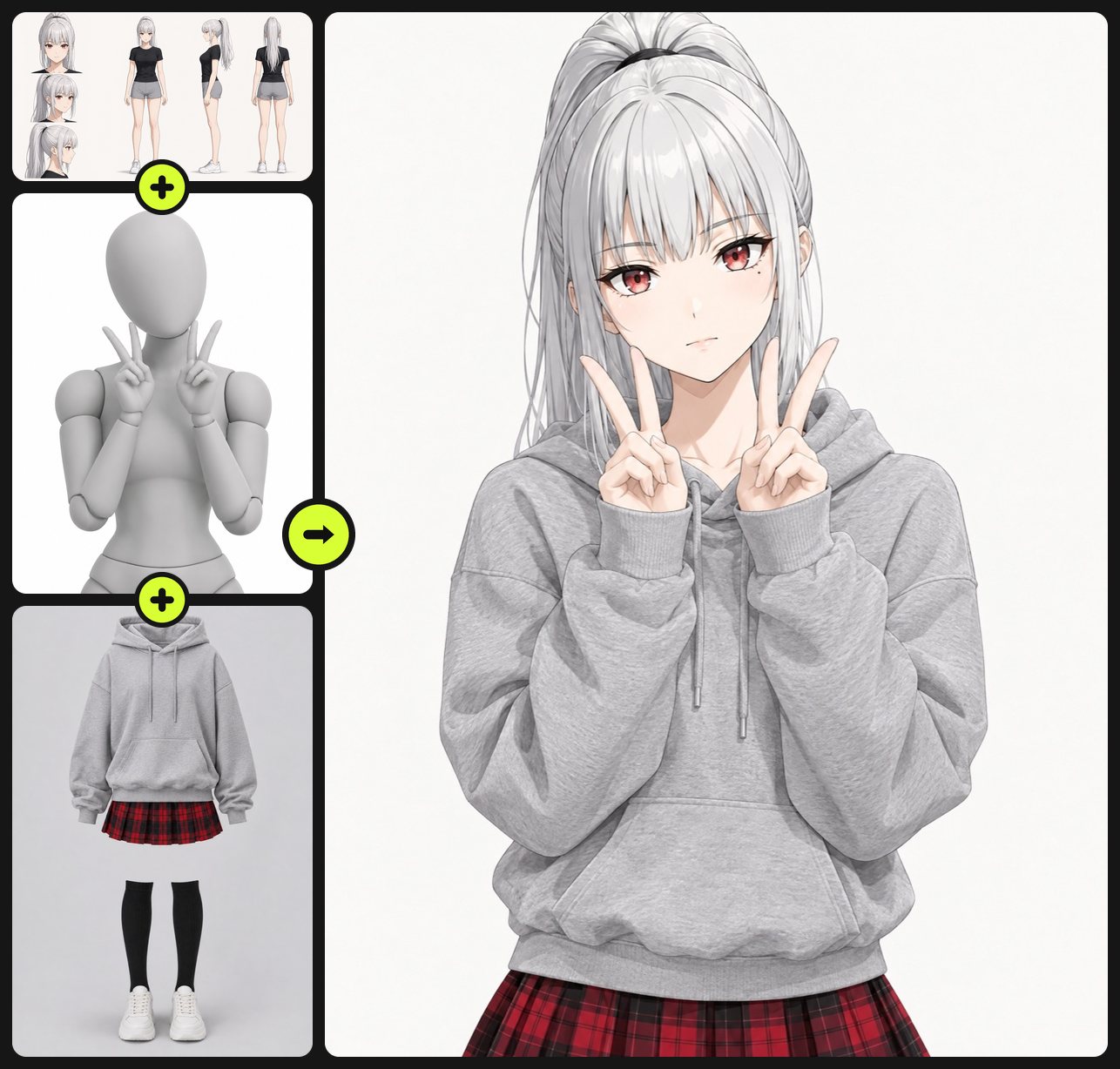
AI outfit changer vs. similar tools
| Tool | You give | You get | Best for |
|---|---|---|---|
| AI outfit changer (this page) | Your character, a pose and an outfit (three images) | One image of the same character in that outfit and pose | New looks for a character you already have: wardrobes, lookbooks, AI influencer posts |
| Consistent character sheet | A short description or a face photo | Three face angles plus front, side and back full body on one sheet | Creating the character before you dress it |
| AI image generator | A prompt and up to 4 reference images | Any image you can describe | Free-form scenes where you describe everything in words |
| Recast video | A source video up to 15 seconds and 1–2 character images | The same clip with your character in it | Moving footage: your dressed character starring in an existing clip |
AI outfit changer FAQ
How does the AI outfit changer keep the same face?
The character image is used only for identity: face, hair, marks, skin tone and build. A consistent character sheet with front, three-quarter and profile faces gives the model a matching face for most poses; with a single front photo, turned heads drift more.
Can I upload my own outfit or pose?
Yes. Any clothing image works (flat lay, mannequin or someone wearing it) and any pose image works (mannequin, sketch or photo). Only the clothes or the pose are taken from them.
Which model does it use?
GPT Image 2.5 Flare by default; you can switch to Nano Banana Pro or Seedream 5.0 Pro. In our side-by-side tests all four models we tried kept the face, and Flare got the most outfit details right, such as tights, jackets and bags.
Does it work for anime and 3D characters?
Yes. The result keeps the art style of your character image: a photo stays a photo, anime stays anime.
Can it do swimwear and sleepwear?
Yes. Pajamas, loungewear and one-piece swimsuits work for every style. Bikinis work on anime, 3D and illustrated characters, but in our tests the image models refused a bikini on a photoreal character; a refused generation costs nothing, the credits come back automatically.
Can I use a photo of a real person?
Only of yourself or of someone who has agreed, and only adults. The outfit library has no lingerie or see-through clothing.
Is the AI outfit changer free to try?
Yes. The Free plan includes monthly credits you can spend here, and the Generate button shows the exact cost before you confirm. Failed or refused generations are refunded automatically; plans and credit packs are on the pricing page.
What size is the result?
One 2K image at 3:4 by default; 9:16 for stories and 1:1 for feeds are also available.
Can I turn the outfit result into a video?
Yes. Use it as the first frame in image to video to animate the still, or recast a video with it so the dressed character performs an existing clip. With a full-body pose, you can also upload the result to motion control AI and have that person copy a dance from any clip.
How is this different from a virtual try-on app?
Virtual try-on is built for shoppers checking a real product on their own photo. This AI outfit changer is built for characters: it keeps one character's face and art style across many outfits and poses, and it does not judge size or fit.
Tools to pair with the AI outfit changer
Consistent Character Sheet Generator →
Make the character first: three face angles and a full turnaround, then click Save as character and pick it here.
Anime to Real Life AI →
Turn an anime character into a real person first, then dress that live-action version here.
AI Image to Video Generator →
Animate an outfit result: use it as the first frame and describe the movement, such as a slow turn to show the back.
Recast Video with AI →
Put the dressed character into a real clip: a dance, an ad or a trending video, with the motion kept as shot.
AI Character Reference Sheet Maker →
Need expressions, a color palette and labeled details too? Build a full character reference sheet for the same character.
Other creation tools
Wire script, character, shot and voice nodes into one pipeline and generate it clip by clip, with the same character in every clip.