
Anime to Real Life AI
Turn an anime character into a real person with a face nobody else has, on a sheet that keeps it the same in every shot.
What is anime to real life AI?
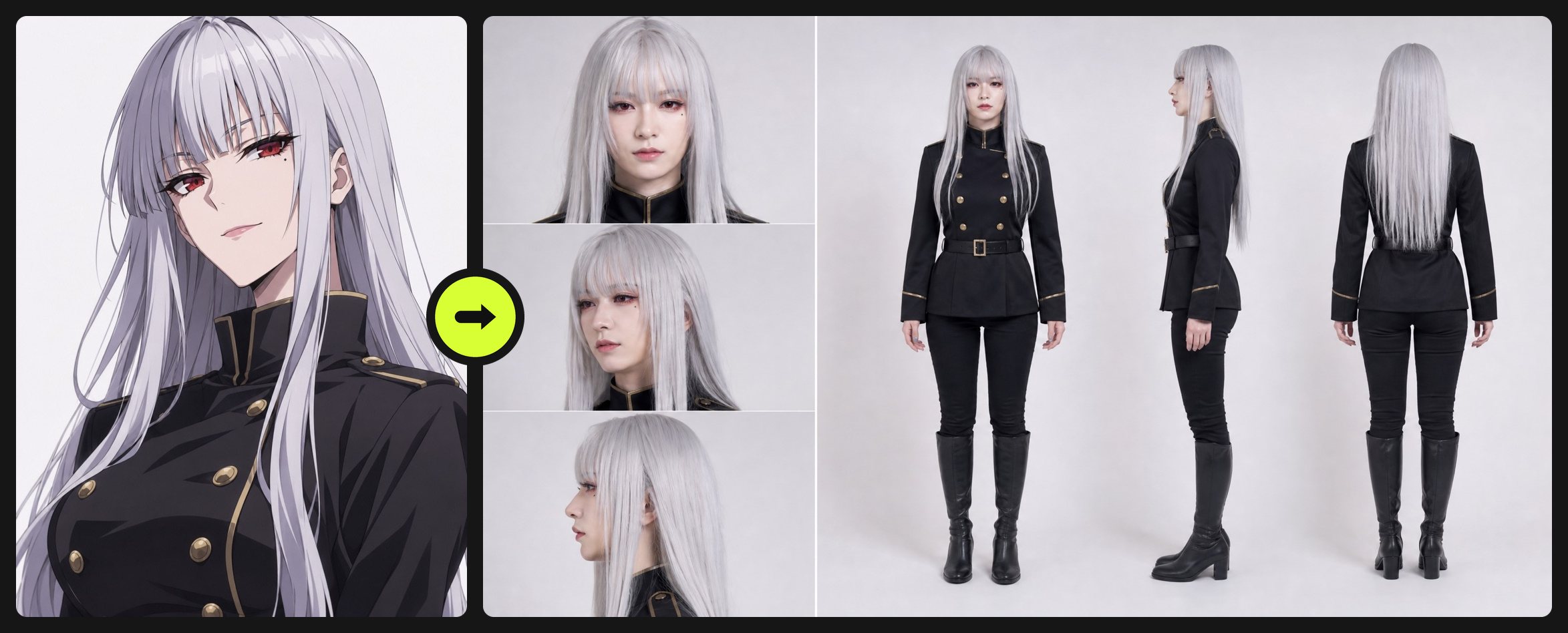
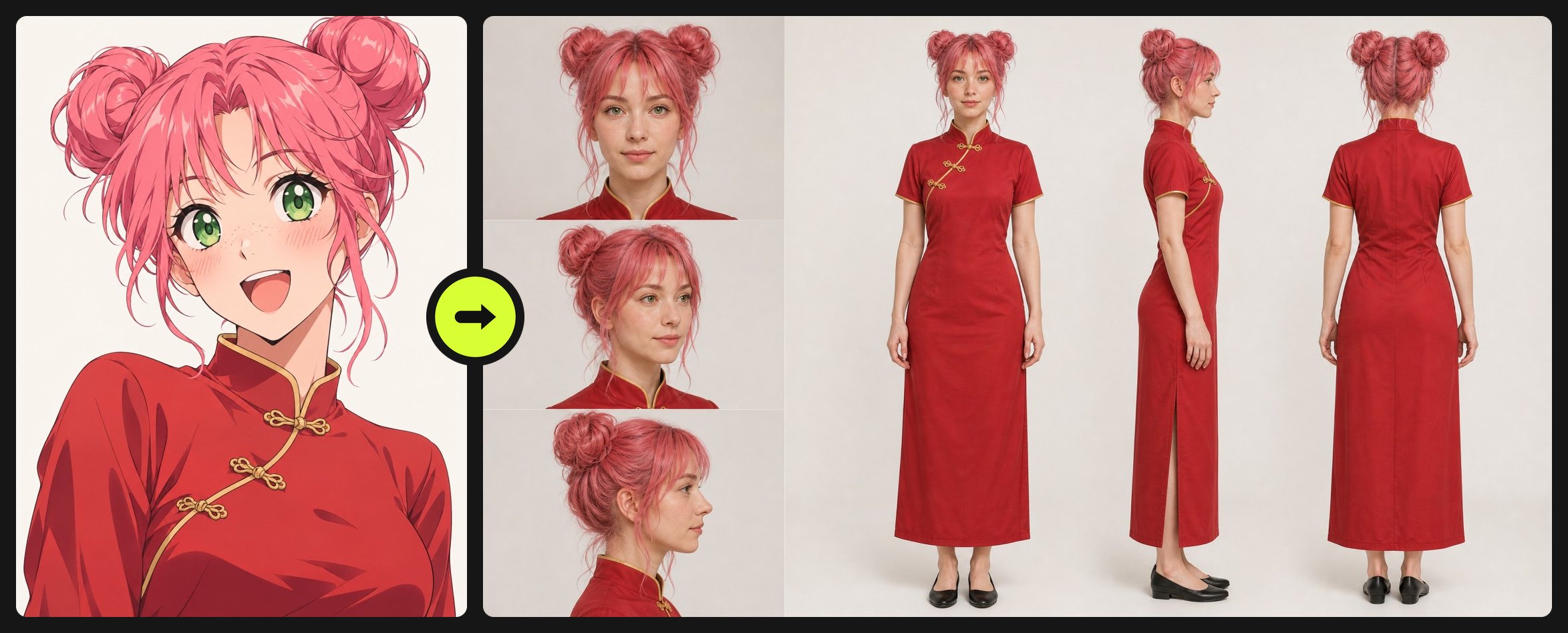
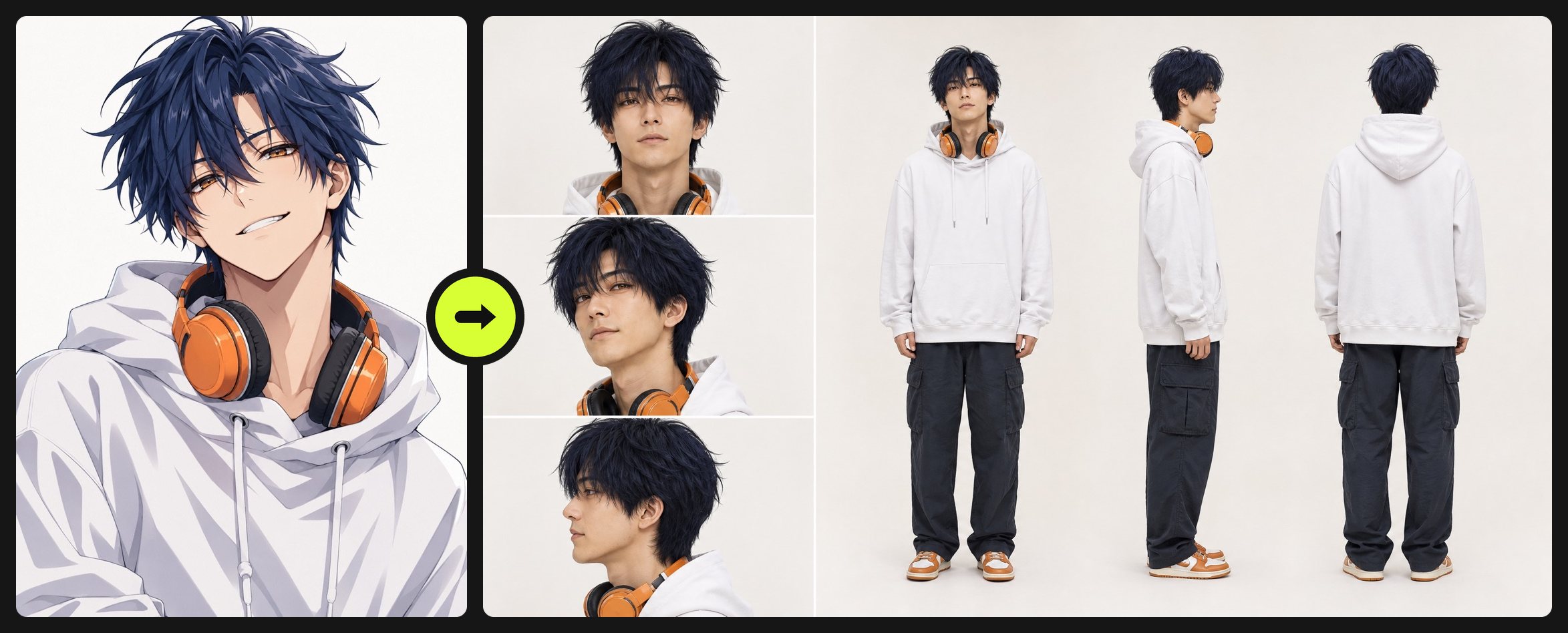
Anime to real life AI turns a drawn anime character into a photo of a real person who keeps the character's face: the eye shape and spacing, brows, jawline, hairstyle, colors and outfit carry over, while skin, hair and fabric become real. On blubiu the default output is a 16:9 character sheet with three face angles and front, side and back full-body views, so the same face holds up in later images and videos.
Checked 2026-11-04
Who it's for
- +AI video creators tired of the same AI influencer face: start from an anime design with distinctive features and get a real face nobody else is using.
- +Your own anime character or IP needs a live-action version for ads, short dramas or an AI influencer account.
- +You are about to make video: the sheet gives three face angles plus a full turnaround, the reference that keeps the face steady when the camera moves.
- +Casting or cosplay planning: see what your original character would look like as a real person before you pick a performer, a wig or a costume.
- +You searched for an anime to realistic AI converter and want more than one flat picture: a usable set of matching angles.
When not to use it
- −You want to keep the character drawn, only in another look such as 3D, clay or pixel art: redesign it with the character turnaround sheet and its style library. AI Character Turnaround Sheet Generator →
- −You want the reverse, a real person drawn as anime: the consistent character sheet takes a photo and draws it in anime style. Consistent Character Sheet Generator →
- −The character belongs to someone else and you plan to use the result commercially. A live-action look of a studio's character is still that studio's character.
How to turn an anime character into a real person
- 01
Add the anime character
Upload a drawing with a clear face, front or three-quarter, one character in the image, or pick a character you saved before.
- 02
Pick the output
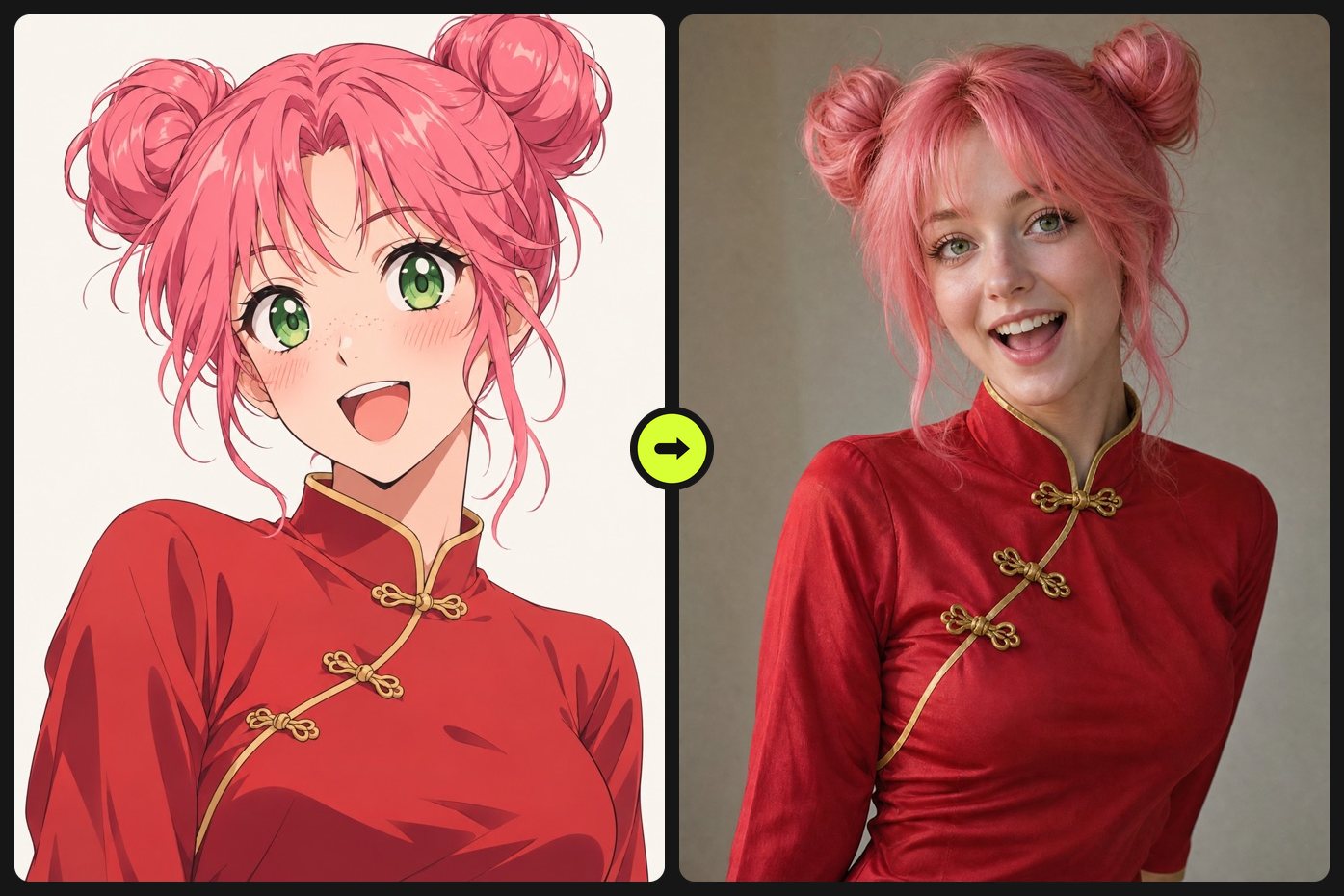
Character sheet (the default) gives three face angles and a full-body turnaround for video work; Single portrait gives one waist-up photo that keeps the drawing's expression. Add notes for age, ethnicity or anything to change.
- 03
Generate and save as character
The Generate button shows the cost before you confirm. Save a sheet you like as a character and reuse it as the reference for later images and videos.
Tips for a better live-action version
Use a drawing with a clear face
The conversion works from what the face shows: eye shape and spacing, brows, nose, mouth and jaw. A front or three-quarter view where the face fills a good part of the image works best; a full-body drawing with a tiny face leaves the model guessing.
Distinctive features are what make the face unique
In our tests, crimson eyes with a beauty mark, green eyes with freckles and hair falling over one eye all carried over into the real faces. Those details are what keep the result from the generic AI influencer face, so pick a design that has them.
Sheets use a calm face; portraits keep the expression
The character sheet uses a calm expression in all three close-ups so it works as a reference. Our cheerful pink-haired character came out with a soft smile on the sheet and a wide open laugh in the single portrait. Make both if you need the attitude too.
Anime colors stay, unless you say otherwise
Silver, pink and navy hair come out as real dyed hair, and crimson or green eyes as real eyes. For a more everyday look, write it in the notes, such as natural black hair or brown eyes.
Fill in what the drawing doesn't show
A waist-up drawing has no legs or shoes, so the full-body views are completed by the model: our waist-up qipao jacket became a full-length qipao with flat shoes. If the trousers, skirt or shoes matter, describe them in the notes.
Anime to real life examples
All of these were generated on blubiu.
Anime to real life vs. similar tools
| Tool | You give | You get | Best for |
|---|---|---|---|
| Anime to real life (this page) | An anime drawing, plus optional notes | A real person with the character's face, as a multi-angle sheet or a single portrait | Live-action versions of anime characters, unique faces for AI video |
| Consistent character sheet | A written description or a photo | The same multi-angle sheet in photoreal, anime, semi-real or 3D | A person designed from words, or a real photo turned into a sheet |
| Character turnaround sheet | A description plus picks from the style and feature library | A front, side and back turnaround in any of 37 styles | Creatures, mascots and stylized characters that stay drawn |
| AI character swap | A video plus your character image | The same video with your character in it | Putting the live-action version into existing footage |
Anime to real life FAQ
Can AI turn an anime character into a real person?
Yes. Anime to real life AI reads the face, hair and outfit from the drawing and renders a real person who keeps them. In our tests with three original characters, eye colors, a beauty mark, freckles and a signature fringe all carried over.
How do I avoid the generic AI influencer face?
Start from a design that already has distinctive features and let the conversion keep them, instead of asking for a beautiful person. The recipe also asks for straight-out-of-camera skin with pores and no beauty filter, which removes the glossy, airbrushed look.
Will the face stay the same in my videos?
The sheet is built for that: three close-ups and three full-body views of one person, which in our tests showed the same face in all six. Add it as a reference image when you create video with AI or swap the character into a clip, and the model has every angle to copy.
Is anime to real life free to try?
Yes. The Free plan includes monthly credits, and the Generate button shows the exact cost before you confirm. Failed or rejected generations are refunded automatically; plans and credit packs are on the pricing page.
Can I use characters from existing anime?
You can upload any image you have the right to use, but a famous character stays its studio's property in live action too. For anything commercial, such as an ad or a monetized account, use your own original characters.
Why is the result always an adult?
Anime characters often look younger than their stated age, and a realistic photo makes that literal. The tool always renders an adult; write a specific adult age in the notes if you want one.
Which model does it use?
GPT Image 2 at 2K. We compared it with Nano Banana Pro on the same three characters: GPT Image 2 kept the six-view layout and the original eye colors, while Nano Banana Pro rearranged the sheet and turned crimson eyes brown.
Can I change the age, ethnicity or hair color?
Yes, write it in the notes, such as mid-20s, East Asian features, natural black hair. Everything you don't mention follows the drawing.
What to do with the live-action version
AI Outfit Changer →
Dress the live-action version in new outfits and poses while the face stays the same.
Talking Photo AI →
Crop the front face from the sheet and make it talk with your script or your own audio.
Create Video with AI →
Add the sheet as a reference image so the same face appears in a brand-new moving shot.
AI Character Swap for Video →
Put the live-action character into an existing clip, such as a dance or an ad.
Other creation tools
Wire script, character, shot and voice nodes into one pipeline and generate it clip by clip, with the same character in every clip.